2610

The Foolish Fellow

Registered user
Joined
Jan 6, 2002
Messages
1,165
Reaction score
0
Location
not far from civility
if you can gafford the new one then get it
the screen redraw is not so bad but the route calculation will drive you to distraction. It is very distressingly slow. + the memory cards on the 2610 are much more commodious for much less money
 
The Foolish Fellow said:
if you can gafford the new one then get it
the screen redraw is not so bad but the route calculation will drive you to distraction. It is very distressingly slow. + the memory cards on the 2610 are much more commodious for much less money

Erm...is it me ???
 
I think he was answering my question on SPIII route calc & re-draw speeds from a different thread.

If so, then I want a 2610, but with battery power backup & water proofing!

Come on Garmin where's the SP IV?

Cheers

Mark
 
From Advrider

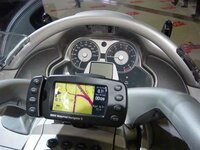
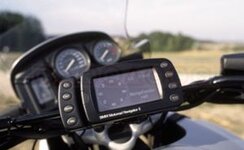
A little caution is required here, having just read a thread on the ADVrider site concerning the 2610. Touch screen don't work with gloves, so bmw commisioned the add on bit with four extra buttons incorporated into the mount. Excellent, however, the add on bit with the buttons and mount is only available for owners of Navigator II and not 2610. Seems bmw own the copyright and will only sell to navII registered owners.
 

Attachments

  • navii.jpg
    navii.jpg
    39.8 KB · Views: 385
2610 Review

Review on the link below,

http://gpsinformation.net/sp26xx/sp2610rev.html

They say no problem with touch screen with gloves wet or dry.

However, as soon as the vehicle starts to move the unit goes into safe mode. Which prevents certain operations.

With the GPS V I always tended to stop if I wanted to reroute, or search etc. So I don't see the touchscreen being a problem.

As I am off the road at the moment I am unable to test the 2610 on 2 wheels.

But route calculation is very quick and it is easier to navigate with the touch screen.


Tip - when using map select, click and drag to select large area in one go. May not work with all software ver.


cheers

Gerry H.
 
The 2610 touchscreen works fine with gloves on - in fact I don't know how Garmin have done it as it always seems to open up whatever icon you are intending to open up- even with big fat gloves on. The user interface is a big improvement on the SP - you can peform an address search and be navigating within 10-15 seconds.

You can also configure the 2610 to run in either safety mode or run with all features available mode.
 
Gazza Wrote: "Touch screen don't work with gloves"
Hello, I am a new user here on this forum, I just registered.

I am sorry, I must contradict Gazza's statement above. I have been using a SP 2650 on my Honda ST1100 since July of 2003 (I began with a pre-production prototype, beta-testing it for Garmin to determine motorcycle suitability).

I rode from the east coast of North America to the west coast and back - about 12,000 km - through all sorts of weather, sun, rain, the works. The touchscreen works just fine with gloves on - heavy gloves, thin gloves, even soaken wet gloves when riding in the rain. The information about use of the SP26xx series on a motorcycle in Joe Mehaffy's article referenced above by Gerry H. also came from me.

So, motorcycle users should have no concerns whatsoever about using either the SP 2610 or SP 2650 on a motorcycle.

For additional information, including pictures of the SP 2650 on my bike, see this link:

http://www.my-mc.com/messages/16/22921.html

If you have any additional questions about the SP26xx on a motorcycle, post them here and I will try to answer them. I don't work for Garmin, nor do I speak for them, but I am pretty familiar with the SP III and SP 26xx on motorcycles - I own both models, in both North American and European basemap configurations.

Respecting BMW's new motorcycle navigator, I think BMW simply wanted to distinguish their "BMW branded product" from the regular production Garmin SP 2610 with a Garmin brand motorcycle mount, so they commissioned Garmin to make the special mount with the additional buttons. The BMW Motorcycle Navigator version of the SP 2610 also offers some additional visual features, such as a compass pointer display, that the regular production model of SP 2650 does not offer. I can see that having the additional buttons on the BMW mount would be helpful - you could do more operations (e.g. zoom) just by "feel", as you can on the SP III. On the SP 26xx, you need to look at the screen to see where to put your finger. But, adapting to this is not a big problem once you get used to the layout of the screen touch-points - it takes about 2,000 km of riding to get used to the SP 26xx, if you are transitioning from a SP III.

PanEuropean
 
Mount

Found this on the ADV site looks like a usefull bit of kit. Mount Back to the gloves issue, just quoting ADVrider users observations, they complain of not being able to access certain functions using the touchscreen because of them being located in top right and left of the screen. It would appear that with thick gloves on you can't get your finger tip into these areas. They are having to tape a stylus to the finger to operate the gps correctly. Just reflecting their views, unfortunately don't have one myself but would like one. New bike forces me to stick with trusty NavI
 
2610 Tracklog

Pan,

interesting to read your comments on here and your web site.

Having used a GPS V for the last 2 years and just bought 2610 can you advise on track use and management on 2610. It would appear that it is not possible to save or retrace a track with the 2610?


cheers

Gerry H.
 
Hi Gerry:

Well, you can't exactly backtrack on a route or track you have followed on a SP 26xx (or any other Garmin automotive GPSR for that matter), because if you tried to do it, you would probably die in a head-on collision within the first few minutes.

The SP 26xx offers two possible ways to backtrack. The choice of which method to use depends on how much "help" you want from the GPSR.

1) If you are 50 miles along a route you have created, and you suddenly realize you left your wallet at home, just press the "Return to Start" button on the "Route" menu, and the GPSR will take you back to the starting point, using the most appropriate route according to your preferences (fastest, no toll roads, no unpaved roads, whatever). This will likely not be exactly the same as the route you followed on the outbound leg.

2) If you want to EXACTLY retrace your steps backwards, go to the "Map Setup" page, under the tab entitled "Line", select "Track Log" and choose a scale view that is larger than the largest scale view that you plan to set the screen to, and now the track you have followed on the outbound leg will be visible as a breadcrumb trail. You can then follow it back, though you have to do this manually, the GPSR will not auto-route you back on the breadcrumb trail.

If you think about it, it makes a lot of sense that an automotive GPSR does not offer the option of choosing to "reverse track" on the breadcrumb trail. YOU might be intelligent enough not to drive the wrong way up the motorway ramp, and drive the wrong way down one-way streets, but what about the rest of the motorists out there? Not sure what life is like in the UK, but in Canada, well, we have a certain species of elderly lady that usually drives a Mercedes S500, all the while talking on her cell phone (probably arranging a MahJong game) and pays no attention to road signs, traffic lights, other vehicles, etc... just runs over everything in her path, like Rommel's tanks in North Africa - you get the idea, I think.

PanEuropean

A PS to Gazza: Any pair of gloves that give you sufficient precision to push the buttons on a GPS V or to push the "Zoom" buttons on a SP III will allow you to do everything you want to do on a SP 26xx. Believe me, I rode coast to coast and back again with one last summer, and this was one of the primary concerns I had. If your gloves are suitable for a North Pole expedition in December, well, you might have problems - like you would with just about anything else you tried to operate, your horn and starter buttons included.

Although the "buttons" that are drawn on the screen on the SP 26xx look pretty small, the actual "activation area" is a bit larger than the visual depiction of the button. The Garmin software engineers paid a lot of attention to the needs of moto riders when they built the software for the SP 26xx, and I personaly tried out several different beta software versions (with different button activation models) until we found one that worked really well.
 
PanEuropean

Does your 'inside track' with Garmin indicate whether the extra button module fitted to the BMW Navigator II will be available as a stand-alone extra for the 2610?

Greg
 
Tracklog

Pan,

thanks for your comments, the GPS V allowed saving of tracks but it looks like the only track available on the 2610 is the current one.
Is this correct.

The compass screen on the BMW version looks usefull especially if using a goto. I assume the arrow follows a bearing as in the GPS V.

Would this extra feature be possible as a future software update from Garmin for the standard 2610, perhaps you could suggest it with your insider connections?


cheers

Gerry H.
 

Attachments

  • bmw_navigator_29_12_03.jpg
    bmw_navigator_29_12_03.jpg
    10.3 KB · Views: 269
Gerry:

I'm not really that familiar with the GPS V capabilities, I never used one.

The SP 26xx will save the track you have generated as you travel along, it eventually over-writes itself but not for quite a while. I think the SP 26xx has a lot more memory for track log purposes than the GPS V or SP III, but I am not 100% sure on this.

If you have a special desire to save a certain track, you can go to the "Track" setup page in the "Options" menu, clear the track memory, then do your riding, and when you have finished tracking the area of interest to you, you can turn off the track recording feature. This will ensure that the track you are interested in is not overwritten.

The RMI (Radio Magnetic Indicator) like device on the BMW Motorcycle Navigator II is a special software feature that is only provided on the BMW Motorcycle Navigator. As we all know :o the BMW Motorcycle Navigator is not simply a re-labelled SP 2610 being sold for a higher price, it is a "unique BMW product". Now, if the software dudes were to allow the normal SP 26xx to have that feature, my previous sentence would be an untruth, right? (cough, cough). So, no hope we will get it on the "Garmin" brand SP 26xx products. I think there might be a few more tricks coming down the line within the BMW product, but that's about as much as I can say.

FYI, the bearing pointer on the BMW motorcycle navigator points to the direction of your next turn, not to the direction of your destination. So, in theory, all you have to do is just follow that arrow, and you will get to where you want to go. The screen is nicely split so that the RMI shows up on the left side, and the text prompts for turns, etc. show up on the right. When no turn is due for a while, the right side is filled with other info such as speed, time to destination, etc. It works quite nicely. You access it through the "Page" button - the normal SP 26xx has 3 pages, the BMW Motorcycle Navigator II has 4 pages, the 4th one being the RMI. The letters for the compass points (N, NE, E, SE, etc.) always remain upright (right side up) as the compass card swings around. This is a very nice feature, but disconcerting to riders who have an aviation background and are used to seeing the reciprocal heading 'upside down' at the bottom. The card turns very smoothly and is well dampened. You can really see the difference in processing power (screen redraw speed) between the SP 26xx series and the SP III when viewing this particular page.

PanEuropean

 
PanEuropean said:


Well, you can't exactly backtrack on a route or track you have followed on a SP 26xx (or any other Garmin automotive GPSR for that matter), because if you tried to do it, you would probably die in a head-on collision within the first few minutes.


:D :D :D :D Great reply, I can tell by your name you do have a great sense of humour;)

Tim:)


Back
Top Bottom