Bad routing proposal on Quest 2 (as well as MapSource).

  • Thread starter Thread starter BeatO
  • Start date Start date

BeatO

Guest
Hi M8s.

I just registered myself to this forum as a member of of the PocketGpsWorld forum, which I quess is also a member of this one ;) , suggested to post my message in here as my problem is of a type also discussed in here. Esp. a user named Pan European he noted could be of help here.

Ah, and yes, from time to time I drive a motor bike as well. :cool:

As I (most of the time) take a good advice, here's my post. The experiences have been using a car and it all took place in the first half of April.

Cheers to all!
---
Hello M8s.

Just returned from a marvelous 12day vacation in Cornwall, equiped with my new Quest 2 (that time with 2.50 as FW on it). We got there by plane to Bristol Int'l Airport. We had no problems finding our destination (a farm B&B, for which I created a POI at home).

As you might expect, we did a lot of local driving and there I'd had a bit of a disappointing routing. The settings used are for Car, Best Route and Shortest Time to destination.

To me it looks like Quest 2 routing algo (as well as MapSource 6.10.2 which I tried after returning home) are not very elaborate OR the mapping data for that region in Cornwall is inaccurate.

I'll give you an example:
Waypoint 1: Bude = N50.82838 W4.54448
Waypoint 2: Lower Tresmorn = N50.74945 W4.60995

Create a route with the above points. This takes you down the costal road. On a OS papermap (1:250'000, Road 7, SW-England) the first section is marked as a yellow one (road generally more than 4m wide) and the second part as a white one (road generally less than 4m wide), both of them have not even a Bxxxx-Number. You can imagine, that esp. the second part basically is a single-track road with a lot of bends and sometimes quite steep. If you can drive with an average of 30mph on that one you are already very fast compared to the conditions.

As an alternate way you can drive up to the A39, which is a "green" ( on an OS map) primary route where you drive with 60mph without problems.

The calculation are as follow: The first costal route is 7.9m (12min 11sec), the A39 one is 11.1mi (15min 15sec).

The time calculated for the second option (for which I had to block the costal route) is somewhere near reasonable. But the 12 minutes calculated for the first route are a direct trip to hell. I've driven that one as well and it took me close to 30 minutes.

For me this looks like Quest/Mapsource (or Garmin) don't take the road type into account at all, making small single-lane tracks equal to primary roads. Can that be fixed/adjusted somehow? I've played with my Quest 2 and Mapsource more than an hour but could not get to any result that makes sense.

BTW: Just as an example, even the free service at Map24 gives a much more reasonable result. Enter Bude as starting point and EX23 0NU as destination.

Any Hints? Does Garmin have to make improvements to the software or is the Navtec-Data in CN8 not accurate?

BeatO
 
give it time!

From experience over the last 2 years using Quest for all my bike and car trips I have found that the accuracy of the ETA's has improved with use.
I believe the unit learns your driving and average speeds and the ETA's my unit gives me on long (300 mile) and short (5 mile) trips is consistantly accurate.
It's a fantastic tool but you have to remember that it is only a machine.

Did you read about the idiots who are going through a river because the sat nav tels them to and the moaning when the car floods out !!!!

I ask you!!

Sherpa ;)
 
Hi Sherpa

sherpa said:
I believe the unit learns your driving and average speeds and the ETA's my unit gives me on long (300 mile) and short (5 mile) trips is consistantly accurate.
It's a fantastic tool but you have to remember that it is only a machine.

That sounds interessting... But in that case I thinks it could be very difficult for the Quest to get the difference of these two routes correct if it doesn't consider the type of road correctly. And there I've got my doubts. :reynolds

BeatO
 
sherpa said:
I believe the unit learns your driving and average speeds ....

I don't think it is that smart !

The ETA is based upon pre-defined average speeds for a Car/Truck/Motorcyle/Pedestrian based upon the type of roads selected (not that pedestrians get quicker on a Motorway - or maybe they would :rolleyes: )

If you get stuck in traffic for 5 mins, your ETA increases by 5 mins. It is not based upon your average speed, it is based upon the assumption there will be no more delays and you will travel at a 'normal' speed again.

I have found the ETA to be pretty accurate (assuming there are no traffic jams).
 
BeatO......the roads you describe in that area are a lot slower than the same class of road in other areas, as you rightly say.

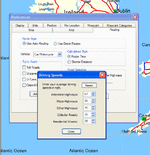
Mapsource works on the average speeds on each class of road based on data YOU control.....you can't change the saved data for a particular road, but you can for the class of road.

That means if you're planning a route in Cornwall, you can change the settings to make the software give you more accurate ETA's etc.....but once you're back on the same class of road elsewhere, the time will be overestimated.

Nothing much you can do about it I don't think, but here's how to change it for a particular class of road;
 

Attachments

  • garmin.gif
    garmin.gif
    55.5 KB · Views: 274
nick said:
I don't think it is that smart !

It is!

from a Garmin FAQ on an American site....

The trip computer works similarly to other late model car navigators. With Quest, you will notice that when you come to a stop, the estimated times do not go to infinity, but hold a realistic value. The GPS calculates estimated times based upon road classes in your Route and modifies the estimation by your actual speeds on the various road classes. It also computes the actual road distance between turns (waypoints) instead of using straight line distances. The results give fairly accurate estimated time to various points, even when using different road classes, like traveling on the freeway, and then exiting later on some local roads. Your estimates will not only be based upon your current highway speed, but by the combination of speeds you are using, or will be using on the various road classes. We note that the Quest was within 10 minutes on one 400 mile highway drive we made after it "learned" our driving speed habits. Usually it slightly underestimates the time principally as a result of unexpected traffic congestion which randomly occurs.

:thumb
 
I always thought it would be helpful if MapSource described the different types of roads in terms us Britons could understand. For example "A roads" "B roads" etc. Last time I checked we don't have "Interstate Highways" over here :)
 
Mouse said:
I always thought it would be helpful if MapSource described the different types of roads in terms us Britons could understand. For example "A roads" "B roads" etc. Last time I checked we don't have "Interstate Highways" over here :)

That might happen if a UK company took Garmin over, until then the Merkins can call the shots. :eek:
 
Bad routing proposal

Just because the GPS suggests a route it does not remove the need for a little common sense to be applied - as has been stated earlier in the thread about the numpties and the ford, and also on this forum about the track near a cliff :eek:

Clearly a computer works on the old adage - garbage in, garbage out. I'm not suggesting that Mapsource is garbage (far from it) but there are limits to what the unit can do based on speed of calculation and the cost you are willing to pay.

I'm sure that these issues could be dealt with but by the purchase of a Quest rather than a 2720 you have indicated that other factors are important to you as well as the navigation ability. I bought a Quest 1 because I wanted portability, battery power, waterproofing and small size / weight. I am therefor willing to accept the odd glitch, especially if I go to a part of the country where the 'normal' traffic speeds and road types don't apply.

GPS - it's not a replacement for common sense :soapbox: :hide
 
Mouse said:
I always thought it would be helpful if MapSource described the different types of roads in terms us Britons could understand.
What are your limitations? Would you understand the difference between "big road" and "small road"? :o

May I also remind you that the people living on the "the western islands" is a small minority seen in an international perspective. :eek
 
This is not a Garmin or MapSource issue

This is a mapping issue. The class of road appears to be wrong.
NavTeq supplies the mapping.
You can feedback errors to either Garmin or NavTeq.

If you do not feed them back but simply complain about them then the same error with be in the next version of the maps.
 
BurnieM

I agree with your assumption, as I also think that the road classe known, at least to OS, did not make it into Mapsource/Quest 2. As I said, on an OS map you clearly see the differences about road class. On the Quest/Mapsource you don't.

Fanum

I've tried your suggestion and lowered/changed them quite a bit. But I didn't manage to get MapSource to calculate it more reasonable (meaning to take the A-road and not the costal route). That's why I quess that the road types are eigther not there or are not taken into account correctly. Somehow I quess the second, as there are some differences visible between the A-Road and the costal one. But ...
BTW: This feature is nice if you've your computer at hand, but not very useful if it's around 1500 miles away. ;)


The thing about learning your driving speeds on different road types, that's great as long as those types are on file correctly.

Does anybody know a way to get the Quest/Mapsource to give the parameters about the roads to us users? I mean, I can catch up with garmin on that, but if I don't have a way to verify my feeling, that might be quite useless ...

BeatO
 
BeatO:

It looks like the other forum participants have done a pretty good job of answering your questions... there's not really much I can add.

My guess is that your difficulties have been caused by one of three things, in this order of probability:

1) The classifications of roads in the area you were travelling may not be entirely correct. This is a cartography (Navteq) issue, not a Garmin issue.

2) You may have the preferences and parameters for routing on either your GPSR or your laptop set up in such a way that they are unduly influencing your route. In particular, I suggest you check the advanced preferences for major, medium, and minor roads on your GPSR.

3) You may have an avoidance set up for toll roads, unpaved roads, etc. that is influencing your route, or a preference for shortest route that is influencing your route, or an inappropriate vehicle type entered.

All Garmin automotive GPSRs share the same basic software (source code) for generating routes. This software is pretty mature now, because the engineers at Garmin have been working on it for the last 8 years. I occasionally encounter a 'flaky' route - not very often, but occasionally - and when I do, it is inevitably caused by an error or omission in the cartography. I was in Cornwall in December, and did not notice any problems with navigation in the Lands End - Newquay area.

By the way, I am living in Zürich at this time (Balsberg, actually) - I will be in Zürich until next weekend, then I will be going to Africa for a month. If you would like to get together for a coffee, we can look at your GPSR together and see if anything can be done to solve your problem. Beenden Sie mich bitte ein SMS - ich habe ein handy Swisscom, die letzten 7 Zahlen bin 7982653.

Michael
 
I haven't read all the thread, so forgive me if someone's mentioned this;

I've had problems with Mapsource not connecting roads, and choosing weird long-winded roads - for no apparent reason. That is, until I discovered that it was treating some sharp turns (ie, going up/down a steep hill) as u-turns - which, of course, I have always selected as Avoid. De-selecting the Avoid U-turns solved the 'problem.'

rgds
 
chasr said:
I've had problems with Mapsource not connecting roads, and choosing weird long-winded roads - for no apparent reason. That is, until I discovered that it was treating some sharp turns (ie, going up/down a steep hill) as u-turns - which, of course, I have always selected as Avoid. De-selecting the Avoid U-turns solved the 'problem.'

Chasr:

Most interesting. It should not do that. If you could give me a couple of specific examples of where the GPSR is doing this (lat/long co-ordinates), I will forward this information to the software engineering team for their review.

Michael
 
PanEuropean said:
It should not do that. If you could give me a couple of specific examples of where the GPSR is doing this (lat/long co-ordinates), I will forward this information to the software engineering team for their review.
No need. I think they've fixed it. I've been planning a 1-week tour, originally using CN5. The u-turn re-routes don't occur using CS6 & CN8. For reference, try selecting a route on the D425 between N4823.535 E718.134 & N4822.415 E717.180 using CN5 (if you still have it), with avoid U-turns selected & de-selected.

Weird.
 
Hi Chasr:

Thanks a lot for posting that follow-up note (above) and closing this issue out. I think I know what you are talking about, because I remember encountering similar problems in Canada using CN North America version 5.

I'm not 100% sure of how the problems got in there, but I think the story goes like this: There were a HUGE number of new roads added between CN 4 and CN 5 (old-timers will remember when the cartographic databases sometimes had 'here be dragons' written over 1,000 square mile blocks), and in order to get all these new roads in, the task of digitizing them from paper maps was split up between a large number of data entry people. When each person finished work on their assigned 'square', the roads were then stitched together where the squares met. But... as you can guess, there were a few spots where they missed a stitch. One was on Highway 401 between Toronto and Montreal (North America's busiest roadway) - there was what amounted to a one foot long gap between two sections of this road, and any route created between Toronto and Montreal yielded the screwiest possible route to work around what was, effectively, a 'Berlin Wall' in the middle of the highway.

Now that all of Canada, the USA, and the EC (the Ireland's excepted) have 100% coverage, it is unlikely we will see any more clangers like this one again.

Michael
 
PanEuropean said:
.............Now that all of Canada, the USA, and the EC (the Ireland's excepted) have 100% coverage, it is unlikely we will see any more clangers like this one again.

Michael

Could you have a look at routing from northern Poland into Germany along the Baltic coast? I'm abroad at the moment so can't look up the name of the town, but instead of taking the vehicle ferry just inside the Polsh border then coming off the basemap into Germany on the island uf Usedom Mapsource insists on routing south through Stettin (can't remember modern spelling) and then back up north
 
Hi Kritou:

It seems that the ferry routes to and from Europe are not 100% bulletproof on version 8 of CN. This issue came up before in a question regarding routing to the UK from Morocco.

I don't really know what the full story is - it could be that the cartography only contains ferry routes for services that operate 365 days of the year, or, it could be that users (possibly yourself) have the new 'avoid ferries' option checked on either the GPSR or on MapSource, and for that reason, the ferries are not being considered.

Until we (end users) become more familiar with how ferries are handled, it might be best to calculate routes that involve ferries the 'old fashioned way' - in other words, let the GPSR or MapSource do the land based calculations, and we do the ferry planning ourselves.

Both the GPSR and MapSource seem to do a good job of handling well established ferry routes (e.g. English Channel, or short little cross-river ferries in Germany and Switzerland) - but the more complex ferry services (e.g. France to Ireland, Europe to Africa) might be beyond the capability of the cartography or the GPSR at this point in time.

Michael


Back
Top Bottom