Error message???

Banger

Well-known member
UKGSer Subscriber
Joined
Jul 7, 2004
Messages
1,374
Reaction score
9
Location
Yorkshire Dales
Anyone know what or why this message keeps coming up. It drives me nuts you can either press yes or no at the end so i just press yes to get rid of it but it takes about 5 clicks of yes before it goes. Bloody enoying- Happens on most websites.

It says:

AN ERROR HAS OCCURED IN THE SCRIPT OF THIS PAGE

LINE 5

CHAR 1

ERROR- INVALID CHARACTER

CODE 0

URL.....................(what site you are on)

DO YOU WANT TO CONTINUE

YES NO


It pops up in a grey box and takes up half the screen?

Any ideas wizzkids?
 
Symptom:

When opening a page within Internet Explorer (version 4) a dialog box is displayed titled ‘Internet Explorer Script Error’ displaying the message:

Line: 1
Char: 1
Error: Invalid character
Code: 0

Do you want to continue running scripts on this page?

The line, character end error message might vary slightly.
What the error means:

Internet Explorer is displaying this message because it has encountered this error when trying to run some JavaScript on the page.
Probable Cause and Remedy:

* The most likely cause of this error is that you are using a relatively old version of Internet Explorer (i.e. Internet Explorer 4) and it cannot deal with something on the page. Consider upgrading to a more recent version of Internet Explorer. Otherwise select 'No' and see if you can continue with the page being viewed.

* See also Internet Explorer: A Runtime Error has occurred, which covers the same error but for later versions of Internet Explorer.
 
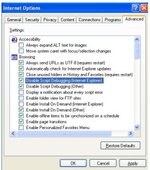
Banger Try,

Select 'Tools' / 'Internet Options'
Select Advanced tab,

Make sure the 'Disable Script Debugging Internet Explorer' is checked

Also 'Disable Script Debugging Other' is also checked.

Click 'Apply' OK

As below,
 

Attachments

  • script debugging.jpg
    script debugging.jpg
    37.3 KB · Views: 56


Back
Top Bottom