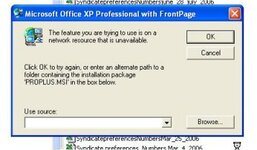
Excel is asking to load FrontPAge??

AndyT

Well-known member
UKGSer Subscriber
Joined
Jun 26, 2002
Messages
8,331
Reaction score
10
Location
Stuck in SE Asia.....Thank you Covid 19
I have just tried to open up MS Excel and get a small windown that opens up saying (or I interpret it as saying), that I am trying to use Excel with Front Page. I have never had this come up before and never use FrontPage.

Can anyone advise what to do as I don't have excel at the moment andf its my most used package!!!!! :eek:

MAny thanks in advance

AndyT
 
Excel has been corrupted...or an update (office SPIII came out this week IIRC) has made your excel install require the original installation cd's........it's a dodgy sneaky typical Microsucks trick to foil pirated versions of office I think.

:nenau
 
Is it worth doing a system restore as I'm knackered without Excel for my Shares club...... :confused:


Oh dear, maybe should have left Norton on..........Nah, it was strangling the PC :(

Any more for any more :nenau

Andy
 
Just click cancel and it should go away. It is not looking for frontpage. Just XP Disc with FP. Probably you tried to use a feature in Excel that was not installed and that is why it asks for the disc.
 
richie said:
Just click cancel and it should go away. It is not looking for frontpage. Just XP Disc with FP. Probably you tried to use a feature in Excel that was not installed and that is why it asks for the disc.
Hi Richie,
I tried that and it stops Excel Loading. :( This has just happened out of the blue. I havn't changed any settings in Excel. The only thing I can think of is removing Norton last week but can't see how that would affect it :nenau

AndyT
 
Norton affects all sorts of shit :(

It's quite possible it has its grubby litle fingers looking at macros in excel....

I presume you don't have the disc?????
 
Fanum said:
Norton affects all sorts of shit :(

It's quite possible it has its grubby litle fingers looking at macros in excel....

I presume you don't have the disc?????
I will have the disk somewhere (can't remember which one though!!). Not sure if the serial numbers need to match up....I'll try it tonight when I get home. I wanted to make sure it wasn't a virus or some other nasty. I've just bought an external hard drive to back up 5 years of photos and knowing my luck I'll loose them before its hooked up....

I actually think that most people will loose all there photos now we are all going digital but thats another thread for another day ;)
 
madmikey said:
Reset your pc to the day before it started to happen, worked for me
Bingo. Just got round to doing a system restore and its fine again. I recon its to do with removing Norton from my PC last week. My Bro advises me to get AVG as an antivirus, Zone Alarm as a firewall and SpyBot or Spyblaster for additional protection. Off to take the dog for a walk before I start all that.

I've actually just opened my shiney new 300GB external drive rom Amazon (£60 :) ) and plan to copy all my photos and files on to this and wipe this Motha clean and start over.

Thanks for your help guys.

AndyT :beerjug:


Back
Top Bottom