got new work p.c / how best to remove + 'store' files off old one?

Ogmios

Well-known member
UKGSer Subscriber
Joined
Nov 18, 2003
Messages
16,633
Reaction score
430
Location
Dublin, Ireland
yes - easy solution - just buy a 1 terrabyte external hard drive. :rolleyes:

but i've no money. :P
It's all personal documents and photos - oh, music too.
i have an 80gb thing - but it's not enough.
So,
is there an easy way to take all this cra ... important docs and 'priceless memories' from the P.C. and store it elsewhere?
Apart from many many memory sticks and 'The Cloud' / photostorage online - of which i know feck all about and trust even less.
There's lots of duplicated files - if i could find an easy way to find and delete copies, i might fit it on the 80gb yoke.

Thanks in advance. :thumb2
~~~
The w.i.m.p.
(Windows. Icons. Mouse and Prompt :D)
 
The simplest way is going to be to physically remove the old drive and slot it into the new PC (In ADDITION to the drive that's in there, not INSTEAD of :) )......it will show up as a drive and all your files will still be there.
 
The simplest way is going to be to physically remove the old drive and slot it into the new PC (In ADDITION to the drive that's in there, not INSTEAD of :) )......it will show up as a drive and all your files will still be there.
i actually understood that! :eek: Ta Bill. :thumb2
Ahem.

However
i dont think the techies here owe me enough favours to go against company policy and do that. :(
 
i actually understood that! :eek: Ta Bill. :thumb2
Ahem.

However
i dont think the techies here owe me enough favours to go against company policy and do that. :(

Ok, the other cost-effective way to do it is to remove your old HD and pop it into a caddy :

$_12.JPG


LINKY

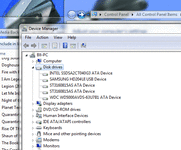
Just to make sure it's the right caddy though, we'll need to know exactly what the HD is.......you'll find that in control panel:device manager, then expand the 'disk drives' option....you'll see the make and model of your HD in there :)


That will give you an external USB drive which is in fact your old HD......plug it into the USB port on the new machine and then copy/paste stuff you want across.

Once you're certain you've got everything off the old drive, you can reformat it with a couple of clicks and voila, you now have a removable, transportable hard drive :beerjug:
 

Attachments

  • marc.gif
    marc.gif
    46.2 KB · Views: 94
Is it not possible to connect the 2 machines together with a Lan cable and copy from one to the other or if the systems are networked use the migration assistant or whatever it is called
 
Is it not possible to connect the 2 machines together with a Lan cable and copy from one to the other or if the systems are networked use the migration assistant or whatever it is called

Yes, but he'd need a CROSSOVER LAN cable, not a standard one.
Plus, there could easily be issues if one PC is on Vista or W95 and the new one on W8......and he'd have to delve into file sharing options and networking settings etc.

I'd stick with the caddy method myself......almost totally idiot proof (sorry Marc :D) and he'll end up with a very handy USB drive afterwards :)
 
Is it not possible to connect the 2 machines together with a Lan cable and copy from one to the other or if the systems are networked use the migration assistant or whatever it is called

Possibly. But there is a need in work to cull the amount of non work related crap we all have on our P.C's.
I wont argue - Seems fair enough really.
:)

EDIT:
almost totally idiot proof
I'll have you know, i'm no ordinary idiot! ... i'm speshul i am :pullface:
~~
:D
 
Sounds like the time to sort out what you want to keep, and what you can get rid of.
 
Sounds like the time to sort out what you want to keep, and what you can get rid of.
That's deep man, deep and meaningful. :cool:

... also absolutely true! ;) :D
Half the problem is that in my neurosis to ensure i lost nothing - every time the 'save' option came up - i did. :blast
So i've ended up with multiple copies of files with the same name, within different folders and also duplicated as single items not in a folder.
Stuff that was on a netbook in a different place / but also copied over already (see above :rolleyes: ) and stuff that was on memory sticks and lots of different named pics that are actually the same pics...
.... ArrGghhhh! :banghead:
Totally my own fault and i swear i will never let p.c. housekeeping get out of hand again! :(

Fluffmeister,
Ta for that link - i'll take a look. :thumb2


Back
Top Bottom