bought new Samsung SSD for the trusty Thinkpad (preferable to use Windows for work).
Connected SSD, fired up Samsung data migration tool, eventually stuck at 99% and never completed. Installed new SSD anyway and it did not work, so stuck original Hard disk back in and all works perfectly.
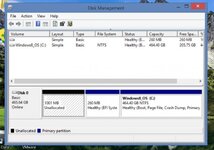
Googled why and reviewed the partition setup (lenovo factory setup on windows 8.1), five partitions , 3 recovery, 1 efi, 1 primary windows.
Lots of suggestions about deleting recovery partitions, so I backup everything and delete the three recovery partitions. Merge main partition with two of the deleted recover partitions and all good, but the first recovery partition is at the start of the hard disk - un-mergeable. Laptop still works.
Try data migration again, this does not work at all now.
So my next idea is to delete the EFI Partition (but I suspect that this is not a good idea - as I think this is used by Windows to update firmware etc, but I could be wrong) and then merge the primary Windows 8.1 partition across the whole hard disk, leaving me with just one partition, which should be clone-able ?
Laptop is a relatively new S540 and all working fine (still) and I've done quite a few of these SSD clone and installs and they have all worked easily. But not when I'm doing my own it seems...
Any techy gurus here have any ideas on this ?
Am stumped as to how to resolve it, without fubaring my laptop.
Partition image should be below...
Connected SSD, fired up Samsung data migration tool, eventually stuck at 99% and never completed. Installed new SSD anyway and it did not work, so stuck original Hard disk back in and all works perfectly.
Googled why and reviewed the partition setup (lenovo factory setup on windows 8.1), five partitions
, 3 recovery, 1 efi, 1 primary windows.Lots of suggestions about deleting recovery partitions, so I backup everything
and delete the three recovery partitions. Merge main partition with two of the deleted recover partitions and all good, but the first recovery partition is at the start of the hard disk - un-mergeable. Laptop still works.Try data migration again, this does not work at all now.
So my next idea is to delete the EFI Partition (but I suspect that this is not a good idea - as I think this is used by Windows to update firmware etc, but I could be wrong) and then merge the primary Windows 8.1 partition across the whole hard disk, leaving me with just one partition, which should be clone-able ?
Laptop is a relatively new S540 and all working fine (still) and I've done quite a few of these SSD clone and installs and they have all worked easily. But not when I'm doing my own it seems...
Any techy gurus here have any ideas on this ?
Am stumped as to how to resolve it, without fubaring my laptop.
Partition image should be below...