Hidden Google Earth Win7

(RIP) willstatt

Lost
UKGSer Subscriber
Joined
Jun 28, 2002
Messages
2,444
Reaction score
1
Location
derbys
Just downloaded Google earth. Got message saying "thank you for installing Google Earth"

Trouble is.... it aint here! No icon on desktop, and no listing in 'all programs' search files and folders and it aint there!

Downloaded again, and same result. Tried a restart, still no good!

Where is the foooker

I'm on Win7

any ideas?

Will
 
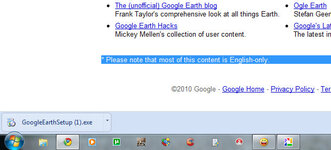
Download it again, and when the progress icon appears at the bottom of the browser screen, click on the down arrow to the right of it and select "show in folder".
Works on win 7 fine for me.

Rob
 
Hi Franco, Thanks for the response. I downloaded it again, but there's no 'down arrow' giving me the option you talk about. Could you be more specific please?
Will
 
Hi Franco, Thanks for the response. I downloaded it again, but there's no 'down arrow' giving me the option you talk about. Could you be more specific please?
Will

I dont have Win7 so this could well be just a load of billox, but does Franco mean the arrow down key on the keyborad, over there on the right :nenau
It may mean hitting that arrow down key as its installing, just a guess mind :augie :D
 
On my Win 7 machine it's in c:\program files (x86)\google\google earth

If that folder is not visible, check in control panel->programs->uninstall programs to see if you could uninstall it. If it appears not it did not install properly in the first place.
 
No no

I meant on the status bar at the bottom of yer browser window as seen in the attached image.
 

Attachments

  • google_earth.jpg
    google_earth.jpg
    45.6 KB · Views: 101
Just downloaded Google earth. Got message saying "thank you for installing Google Earth"

Trouble is.... it aint here! No icon on desktop, and no listing in 'all programs' search files and folders and it aint there!

Downloaded again, and same result. Tried a restart, still no good!

Where is the foooker

I'm on Win7

any ideas?

Will

search C: drive for *earth*.exe
 
Sorted it. Uninstalled it, and re-installed it, and it appeared at last. Franco, thanks for your help: My Win7 task bar doesn't look like that, and I've never seen a download icon with arrow like the one in your picture! Very strange!

Thanks to everyone for the suggestions (apart from the first few!!!)

Will


Back
Top Bottom