
How do I find out what programs run when I start up my `puter?

Big Lee

Registered user
Joined
Jun 21, 2004
Messages
2,831
Reaction score
5
Location
Cumberland
I`m running Windows XP home edition & a guy at work told me that I could check what programs my computer runs through when I first start it up, I`m interested in doing this as it seems to take an age to get started??
Can anyone tell me how to find these?

Cheers

Lee
 
Lee,
I have the same problem but i think it is only that i have 128ram and cant upgrade, so a new PC is on its way.

Mind you would like to know myself how to check for the future.

Anyone?
 
go to start>run>type msconfig>OK>startup tab

they're all listed there, well most of them.
 
\\\\\How to check what you are running at start-up

Place your mouse over "start" then right click your mouse button. Then click "explore".

Under the "start menu" you will see a program folder. Within that folder are all the programs that start-up when you start your PC.

Mind you if you don't have a good antivirus program you are more than likely being attacked about 3 to 4 times a night without you even knowing.
 
not all are in the start up folder. not all are listed under msconfig either i think.

they are all in task manager though. control-alt-delete.
 
I have quite a few in mine, i would say about 30 items.

Now i know the Firewall and Anti-Virus should run and my internet server but what after that?

what apart from that do you need?
 
i have 29 running processes on my recently built pc & 37 on the old one. i stopped worrying about the large number a while back.

try a search for "start up programs" or similar. there are several sites that can advise.

alternatively, i've used security task manager before & that will allow you to view & edit everything.
 
The only certain way to do this is to remove them one by one, restart, and see what happens. If something you usually need doesn't work, then reboot again and the startup program tickbox window should pop up when the system starts. You can then re-tick the last one you unticked and then keep going.

My preferred way (as the above is far too boring) is to look at the directory the .exe that starts is residing in. This is shown in the pathname for the item on the tick list. Usually, "proper" programs will be in a directory like programs\mcafee\virus or suchlike, so you can be fairly happy that they are OK. Start by removing ones that you dont recognise.
 
This is what i was told to do by an AOL engineer but wanted to run it by you guys first:


Hold down the ctrl and the Alt keys together.Now while holding these press once (only once) the delete Key.You will now see a screen windows Task manager. Click on Applications. Here you will have a list of every application running on your P.C. Click on the Aplication to highlight it and then click End task.
Task Manager will stay open so you dont need to keep pressing ctrl+Alt+Delete. Once the applications list is Blank close the windows Task manager by clicking the X in the corner.

Before i do this, does this mean i am deleting everything?
I know anti virus Firewall etc have to be kept but there are a few that i am affraid to delete as i dont know if they are needed. Does the above application need to be done online?
And it sounds like EVERYTHING is deleted!! It sounds odd.

Anyone comment on this

Regards:beerjug:
 
AOL get something right shock!

don't worry you won't delete anything, just turn it off. when you re-boot it all loads again.

windows usually trys to stop you turning anything critical off anyway.
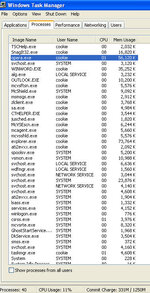
here's a screen of mine. 40 processes running :nono :rolleyes: but it's all running fine. are you sure you need to bother?

 

Attachments

  • cont2.jpg
    cont2.jpg
    84.4 KB · Views: 83
cookie said:
AOL get something right shock!

don't worry you won't delete anything, just turn it off. when you re-boot it all loads again.

windows usually trys to stop you turning anything critical off anyway.
here's a screen of mine. 40 processes running :nono :rolleyes: but it's all running fine. are you sure you need to bother?


I have 51 process and 244100K/3116 usage.

Is that reasonable?

The mystery is why it takes so so so long to load windows XP.

Now i have only 128 ram but have only used half my disc space and yet from switch on to windows loaded on an account is 20 minutes!!!!!
Its a 1.7 packard bell and is totally virus free as i am very strict about this , it has a firewall and i de-fragmentate every week.
So it runs fine but when you can make a cup of tea and put a frozen Pizza in the oven and have it cooked quicker its getting very painfull

I know the Ram is not brilliant but 20minutes???????????
 
Banger said:
I have 51 process and 244100K/3116 usage.


51 IS a lot. 128MB RAM is absolute minimum. not sure what the othe rfigures you quote are.

how long has this install of windows been going? if it's more than about 2 years a reinstall would perk it up no end.
 
Have you ran any spybot or adaware programs recently? The first time I ran these there was well over a 150 "things" on my computer my virus check hadn`t seen.
 
Yes regulary, Every week.

I think most of it is down to the Ram . But a new PC is arriving in a month with 1028ram so i can hold on.

I cant wait for it, it will be like jumping from a bicycle to a GS


Back
Top Bottom