How to check a route that you`ve pre planned today, for possible road closures when you come to use it in the future?

Big Lee

Registered user
Joined
Jun 21, 2004
Messages
2,831
Reaction score
5
Location
Cumberland
After spending much time over winter planning my euro jolly I was wondering how to check the route closer to my depature date to see if theres any road closures. Currently if theres a closed road now it doesn't allow you to route down it, seasonal closures ignored, but come summer when the roads are getting dug up my route doesn`t know as I`ve planned it in January. A few times I`ve came across a closed road and used google maps to navigate me back onto or close to my chosen route. I don`t know how to check my current routes before I set off for any problems without seemingly re doing them all.
Any ideas on this?

Thanks for the help (y):DD

======

I have edited your title, to hopefully make it easier for someone with the same question, to find in the future.

Richard
 
Last edited by a moderator:
Try changing it from fastest to shortest and back again.
 
After spending much time over winter planning my euro jolly I was wondering how to check the route closer to my depature date to see if theres any road closures. Currently if theres a closed road now it doesn't allow you to route down it, seasonal closures ignored, but come summer when the roads are getting dug up my route doesn`t know as I`ve planned it in January. A few times I`ve came across a closed road and used google maps to navigate me back onto or close to my chosen route. I don`t know how to check my current routes before I set off for any problems without seemingly re doing them all.
Any ideas on this?

Thanks for the help (y):DD
I think if you have planned routes with seasonal closures turned off, the if you turn them back on and a route is blocked for whatever reason then this will be shown in your routes. So do this before you go and you should be fine. One comment is that road closures on Here maps can be a bit out of date. Checking your routes via Google maps is always a good idea.
 
Try this method.

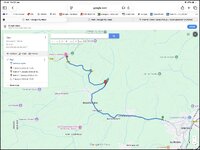
Create a route in MyRoute Routeplanner

Export it to Google My Maps

IMG_0215.jpg

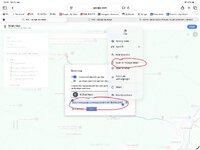
Select ‘Share’ and copy the webpage address, for example:


Paste the webpage address into Google

Or select ‘Open in Google Maps’

IMG_0217.jpeg

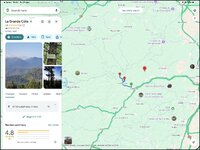
The My Maps route should then open in Google Map

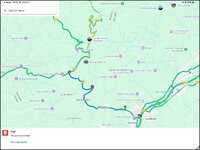
Select the Traffic layer

IMG_0212.jpg

Zoom in and out:

IMG_0214.jpg
 
Try changing it from fastest to shortest and back again.
I suspect if I did that the pre planned route wouldn`t be the same as it`s not the fastest or shortest originally as I`m not just going from A to B
 
Try this method.

Create a route in MyRoute Routeplanner

Export it to Google My Maps

View attachment 474847

Select ‘Share’ and copy the webpage address, for example:


Paste the webpage address into Google

Or select ‘Open in Google Maps’

View attachment 474851

The My Maps route should then open in Google Map

Select the Traffic layer

View attachment 474846

Zoom in and out:

View attachment 474852
Excellent reply! I`ll give that a go, had too many occasions being stuck on the wrong side of a closed road in the Black Forest :ROFLMAO:
 
I think double checking in Google maps is the only way.

Other mapping systems are unreliable, for example, in regards to seasonal road closures. This is a bit of a know pain around the Alps/Dolomites area sometimes.
 
The German highway authorities seem to be particularly adept at just installing total road closures requiring long detours, rather than installing temporary traffic lights to control one way traffic through the working area
 
Excellent reply! I`ll give that a go, had too many occasions being stuck on the wrong side of a closed road in the Black Forest :ROFLMAO:

Thank you.

It’s a bit cumbersome but it should work. As you say, do give it a go, not least as you can’t break it. It’s a pity Google My Maps does not allow the use of the ‘Traffic’ layer. If it did, it would remove the need to display the route in Google maps.

To possibly get around any Google limitation on the number of ‘waypoints’ you might have in a route (I think the maximum number Google allows is something like ten) try importing the MyRoute route into Google My Maps as a track.
 
Last edited:
Yep, when I travel across Europe by car I always use Waze, but I have the habit of always checking Google maps for Tunnel closures just in case (even if they are the same company at the end :D ).
Habit.


Back
Top Bottom