I am already a technogeek but I'm stuck. Any idea's?

Gas'd Off

Registered user
Joined
Apr 29, 2004
Messages
3,456
Reaction score
2
Location
here
I have a set of bluetooth headphones that I can't get to work with windows media player. The PC is definitely aware of the headphones, I have connected them and they appear in bluetooth devices but I have no option to select them as the media player output device.
Any idea's folks?
TIA :thumb2
 
Have you set them in ControlPanel Sounds and Audio Devices as your default device for playback? - or even visible in there?
 
Have you set them in ControlPanel Sounds and Audio Devices as your default device for playback? - or even visible in there?
Not visible? Shows as a connected device under bluetooth devices but doesn't appear in 'sounds & audio' devices? :confused:
Hmmmmmmmmmmmmm? :nenau
 
Something fishy in the bluetooth side then most likely as it's not in the class of speaker devices, there's a particular standard/profile for high quality stereo BT.

Might be the computer end doesn't support it. Any joy from the manufacturer website on requirements?
 
Your pc needs to support A2DP profile for stereo BT.
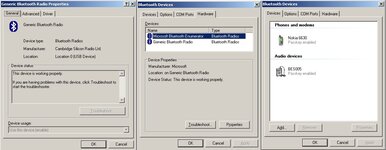
What bluetooth stack are you using?
Now you're getting proper technical :thumb2
I know about haystacks? Not sure about BT stacks!
Does this help?
 

Attachments

  • BT.jpg
    BT.jpg
    106.9 KB · Views: 56


Back
Top Bottom