IMac migration

Dazzle

Registered user
Joined
Jan 15, 2009
Messages
1,095
Reaction score
0
Location
Surrey
Finally got my new iMac used migration assistant to transfer pics and music
It asked my to change user name as you can't have two users on same Mac
So did so migrated it over now I cant open files coz it said I don't have autherisation to view these files :nenau
What have I done wrong
 
change over

What type of files will it not let you open?
 
Is it files in your home dir?

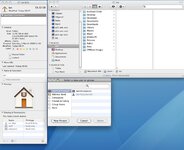
Select it in the sidebar do cmd-i to get the info pane up, and see what the permissions are (see below).

You can add your new user to the access control list (with read & write), and then click the cog to 'apply to enclosed items' to propagate the acl down to all the files in your dir.

Does your old user show up? The group 'Everyone' should have read access to all the user dirs, do you get issues trying to modify/save files?

You may need to do the same to other folders on the system where you need permission as you find them.
 

Attachments

  • perm.jpg
    perm.jpg
    103.8 KB · Views: 69
Just so I'm sure I understand the problem:

You have two users created on the Mac, the files belong to one user (userA), but the other user (userB) can't view the files. Is that correct?

Why don't you log in as userA? I'm not clear why you created the userB.

My first suggestion is to use userA as your main account on the iMac.

Get back to me and we'll sort this out
 
I thought migration assistant would be easier but I have dragged and dropped my iphoto library across :thumb
but it doesn't seem to want to copy my itunes library :confused:

when I migrated my user profile over thats when the access issues arose
everything transfered but a pop up bar came up and said that user already exsisted do I want to changed names so I changed the macbook name
it transfered over but I got a pop up to say I didn't have permission to view folders

I think Ian had what I meant as thats what the guy in the apple shop said to do give permission to the user to read and write but I have deleted the user files and started again dragging and dropping the files across

like I said it worked on my pictures, garmin maps, but not itunes library, itunes doesn't show my songs purchased in store or anything

I was very new to macs when I got my macbook 5 years ago so didn't want to migrate everything as theres a lot of junk on it that I don't know what to get rid of that may stop it working properly.
so the plan is to just put files on the imac that I know I want, I'm cocking it up already :blast

sorry if this sounds numpty but cut and paste is about my limit :augie


Back
Top Bottom