Laptop / 2 in 1 For insta 360 editing

Guru Gora

If it glows......It goes.
UKGSer Subscriber
Joined
Feb 26, 2023
Messages
1,924
Reaction score
1,693
Location
UK
Hi All,

My cheap tablet won’t run insta 360 footage smoothly.

I’m after either a laptop, or a 2 in 1 type thing preferably, that I can take on trips to do normal Netflix etc but will also allow me to video edit insta 360 footage when back at home.

Any help or recommendations appreciated.
 
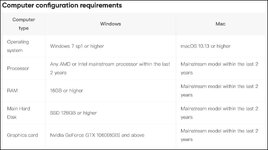
What hardware spec recommendation does the Insta software say to use?
 
It’s a bit wooly, or to my non IT eyes it is :0

Anyone using insta at moment ?
 
This is the specs from their website, so this will guide you as to what machine hardware you need to use the software.

Screenshot 2025-05-26 at 18.25.25.jpg
 
Rather than starting a new thread, I thought I would jump on the this thread.

I am looking for a new laptop to edit video, BaseCamp, emails, surf the net no gaming and able to take traveling.

I currently use a ASUS VivoBook, 8GB installed RAM and a processor 11th Gen Intel(R) Core(TM) i3-1115G4 @ 3.00GHz 3.00 GHz. Which is just not hacking, it's causing me to get frustrated with editing.

I'm not after a laptop with ton's of additional software I will never use.

Thanks in advance for the advice.
 
Rather than starting a new thread, I thought I would jump on the this thread.

I am looking for a new laptop to edit video, BaseCamp, emails, surf the net no gaming and able to take traveling.

I currently use a ASUS VivoBook, 8GB installed RAM and a processor 11th Gen Intel(R) Core(TM) i3-1115G4 @ 3.00GHz 3.00 GHz. Which is just not hacking, it's causing me to get frustrated with editing.

I'm not after a laptop with ton's of additional software I will never use.

Thanks in advance for the advice.
I have one for sale on the forum

Its perfect for travelling, super light and priced very well for the forum people

 
For video editing smoothly you need 3 things

SSD hard drive
16 GB RAM
i7 CPU

The trouble with laptops is that video editing is really helped by the Graphics card, which laptops don't generally have, unless your prepared to spend £2k+
My laptop costs £2800 which is more than most expect to pay but it will be a little future proof due to having SSD, 32GB RAM and an i9 CPU

Sadly video editing can be testing for computers
especially if your using professional editors such as Davinci Resolve and Adobe Premier Pro, to edit several camera angles and adding text effects etc.
as it all piles up in layers of 4k it can become unstable if your PC isn't up to the task.

For a single camera footage the minimum above will work.
just make sure you transfer the footage to the SSD first, don't try and edit from the SD card (sounds obvious I know, but I know people who have)
 
For video editing smoothly you need 3 things

SSD hard drive
16 GB RAM
i7 CPU

The trouble with laptops is that video editing is really helped by the Graphics card, which laptops don't generally have, unless your prepared to spend £2k+
My laptop costs £2800 which is more than most expect to pay but it will be a little future proof due to having SSD, 32GB RAM and an i9 CPU

Sadly video editing can be testing for computers
especially if your using professional editors such as Davinci Resolve and Adobe Premier Pro, to edit several camera angles and adding text effects etc.
as it all piles up in layers of 4k it can become unstable if your PC isn't up to the task.

For a single camera footage the minimum above will work.
just make sure you transfer the footage to the SSD first, don't try and edit from the SD card (sounds obvious I know, but I know people who have)
thats why I went the snapdragon elite chip route, works very well with adobe premiere and davinci resolve. As well as being mega power efficent.
 
Some video editing applications will allow you to perform edits on a low res version of the original files, and once you have all your editing done it goes to work on the original while you head to off for a cup of tea.


Back
Top Bottom