

You are using an out of date browser. It may not display this or other websites correctly.
You should upgrade or use an alternative browser.
You should upgrade or use an alternative browser.
Macbook startup disc
- Thread starter Dazzle
- Start date


garfield
Registered user
Just got a message come up on my mac startup disc full
clicked on it and this seems to be the hard drive, not being great with computers, do I need a larger memory fitted or is it time to buy a new mac
have a look here.....

http://macosx.com/forums/mac-os-x-system-mac-software/312703-startup-disk-full.html
Thanks I have checked 250mb left 
I have an external hard drive but not sure what I can take off without messing up laptop.
I have office, gimp, photoshop, page, keynote can these be taken off and used through the ex HD ? Help !!!!!
I have an external hard drive but not sure what I can take off without messing up laptop.
I have office, gimp, photoshop, page, keynote can these be taken off and used through the ex HD ? Help !!!!!

dump the porn. often frees up half the disc 

- Joined
- Jan 9, 2004
- Messages
- 26,927
- Reaction score
- 6,152
leave the program files well alone.
Take off pictures / videos / mp3 etc files.
Oh, and while you are at it make a copy of them as a backup
Take off pictures / videos / mp3 etc files.
Oh, and while you are at it make a copy of them as a backup

I highly recommend a neat little program called whatsize which you run on your drive and it shows you in order where your largest folders are and what they contain.
Run that and see where you're stacking up the space.
Be aware that if you move the itunes library, which is probably one of the bigger folders, that itunes won't know where it is now. You can run itunes from an external drive, I do, but you need to change the settings so that it knows where you've moved it to.
You ideally want to keep about 10% of your system drive free, as the computer uses that for virtual memory, storing data temporarily when the ram memory is full. Filling the drive will slow the computer down dramatically until it can't keep working properly.
An external hard drive is a cheap option and useful for backing things up. YOu can buy a Terabyte drive now for about £60, which will give you loads of backup space if all you have is the macbook's internal drive at the moment.
Run that and see where you're stacking up the space.
Be aware that if you move the itunes library, which is probably one of the bigger folders, that itunes won't know where it is now. You can run itunes from an external drive, I do, but you need to change the settings so that it knows where you've moved it to.
You ideally want to keep about 10% of your system drive free, as the computer uses that for virtual memory, storing data temporarily when the ram memory is full. Filling the drive will slow the computer down dramatically until it can't keep working properly.
An external hard drive is a cheap option and useful for backing things up. YOu can buy a Terabyte drive now for about £60, which will give you loads of backup space if all you have is the macbook's internal drive at the moment.
Cheers for help I have a 1 TB external drive, just didn't know what to take off,
I presume If I copy pictures to the ex hd can I then delete them in pictures and iphoto not got too much in itunes aabout 600 files,
thanks for help guys
I presume If I copy pictures to the ex hd can I then delete them in pictures and iphoto not got too much in itunes aabout 600 files,
thanks for help guys
Cheers for help I have a 1 TB external drive, just didn't know what to take off,
I presume If I copy pictures to the ex hd can I then delete them in pictures and iphoto not got too much in itunes aabout 600 files,
thanks for help guys
Iphoto puts everything in it's own repository, don't under any circumstances, mess with it or you could lose them all. Usually it's in your home/pictures folder. Like with itunes you can move it but generally you won't want to.
Use whatsize to find out where your main size hogs are before you just start moving things randomly. You might find that what you need to move or delete isn't what you thought.
Be a bit more analytical first before you do anything else.
as way of seeing exactly what is taking up room on your mac, you could try daisy disk, it's the easiest and best i've used.
there's a free trial
there's a free trial

or omnidisksweeper from www.omnigroup.com - ancient mac sw house.

Iphoto puts everything in it's own repository, don't under any circumstances, mess with it or you could lose them all. Usually it's in your home/pictures folder. Like with itunes you can move it but generally you won't want to.
.
You can safely put iphoto libraries on external drives and run them from there. I have numerous iphoto libraries which I use for different projects. To create a new iphoto library hold the ALT key while opening iPhoto. A window will then pop up allowing you to create a new iphoto library or open any iphoto library you have on your internal hard drive or any external hard drives.
If you do copy your iphoto library to an external hard drive then hold down the ALt key and choose it and it will load and become your default library and any photos added will be saved to your external drive. Once you are happy that its loading and working fine then you can delete the original iphoto library from your internal hard drive.
Hi again
Skynet I have tried to copy them over not sure I am doing it right as can't open them in the Ex HD
idiots guide to the procedue would help please
thanks
First of all make sure external Hard drive is connected and visible in Finder window and quit iPhoto.
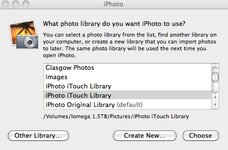
Then hold down the ALT key and then click on the iPhoto icon in the Dock to start iPhoto.
A pop up window will then appear listing any iPhoto libraries iPhoto can locate on your Mac drives, including the external one. It ask you "what photo library do you want to use?" When you click on a library it will indicate where that library is located.
In the example screenshot below I have selected an iPhoto library named "iPhoto iTouch Library" which is located on an external hard drive named "Iomega 1.5TB"
I also have another library named "iPhoto iTouch Library" and this is located in my local hard drive.
Select the library you want to work on and then click the "Choose" button. The selected iPhoto library will then load up. This iPhoto library will then become your default library.
The above dialog box is also a way to create new iPhoto libraries. Instead of choosing an exsiting library just select the "Create New" button. You can then choose a name and location for your new library.
Hope that all makes sense and works Ok

Attachments
Cheers for reply I got that bit ok just not sure how to copy the library file to HD
Saying that, been messing about with the HD plugged in and things I am doing on mac HD is being duplicated in the Ex HD
I back up HD every month with Superduper so not sure if that is linking the systems
I just want to remove iphoto libary and docs to HD so I can delete them on the macbook pls
just not sure how to copy the library file to HD Saying that, been messing about with the HD plugged in and things I am doing on mac HD is being duplicated in the Ex HD
I back up HD every month with Superduper so not sure if that is linking the systems
I just want to remove iphoto libary and docs to HD so I can delete them on the macbook pls
Cheers for reply I got that bit ok
Saying that, been messing about with the HD plugged in and things I am doing on mac HD is being duplicated in the Ex HD
I back up HD every month with Superduper so not sure if that is linking the systems
I just want to remove iphoto libary and docs to HD so I can delete them on the macbook pls
Not quite sure what Superduper does though it seems to clone your internal drive to an external hard drive. I guess that if it copies a file from your internal hard drive to the external one then if you later delete it on the internal drive it will still be on the external drive.
Easy to test out by creating a file on your internal drive, run superduper, check it makes a copy on your external drive, delete the file on your internal drive and then run superduper again and check if the file is still on your external drive. If all works fine then you should just be able to delete your iPhoto libraries and documents on your internal drive to free up space and then just run them from the external drive. Does that make sense

Its been a while since my last post on this
but I have filled Hard drive up again, I have copied over my iphoto library nbut I expected it to run on the external hard drive just like on my macbook.
But all it has done is transfered the files in file form,
I sort iof expected it to transfer over in an iphoto format.
how do I work on the files when they are like this ???
numpty or what
but I have filled Hard drive up again, I have copied over my iphoto library nbut I expected it to run on the external hard drive just like on my macbook.
But all it has done is transfered the files in file form,
I sort iof expected it to transfer over in an iphoto format.
how do I work on the files when they are like this ???
numpty or what

Similar threads


- Locked
- Replies
- 15
- Views
- 490
- Locked
- Replies
- 33
- Views
- 1,450

- Replies
- 13
- Views
- 1,291

- Replies
- 1
- Views
- 326