Mapsource map detail problem.

bowser

Well-known member
UKGSer Subscriber
Joined
Nov 7, 2007
Messages
4,703
Reaction score
152
Location
Gloucester
Sorry if this has been addressed in previous threads.

I have a 2610 which came with a 256mb card with maps of uk, I think they are from navigator version 7, the maps go right down to local road level and every thing is fine, although the maps are a bit old.

I have a copy of V9 which I loaded into mapsourse, it is all registered and works fine the detail at local level is just as good. Now I have copied the whole of the map set to a 2gb sd card with a card reader.

When I put the card in the 2610 it sees the card and appears to access the maps, because when I remove the card it says its is now unable to access the map data.
My problem is that with the 2gb card in the machine using what should be the latest map set I have no detail on the maps. Where I live for instance my home waypoint just appears in a blank space on the map, the main roads are marked and the mapping works fine it just dosent show the local streets, I have made sure that map detail is set to most, but is still wont show details.

Any help would be greatfully received.
 
Card

What make card are you useing there where some problems with some makes also have you got all the updates from Garmin for V9 where some of the problems were sorted. Hope this helps.

Mitch
 
If you zoom in on somewhere where there are no detail maps loaded you see the basemap which has a lot less detail. It sounds like that is what is happening. The GPS can read the fact that you have the detailed mapset but can't read the contents it so shows the basemap. I seem to remember somewhere that the 2610 is fussy about the cards used and it may be that it can't read a 2 GB card.

This is not a problem that just affects the 2610. A lot of kit that was designed before large capacity cards were developed cannot read them or will only read a part of them. My laptop, for example reads up to 1 GB OK but when I put a 2GB in, it knows it's there and reads it's name but will not open the contents. My digital camera and tower PC read it OK though.
 
2GB

2GB card is ok but like l said some makes did not work some updates took care of some problems. I'm shaw a search would tell you the makes some had a problem with. Just found it Kingston were a problem had the same problem myself.

Mitch
 
I dont think that there is anything wrong with the cards, if I take the img file from the 256 card an put it in the garmin directory then the card and the maps are seen fine.

I took the europe maps and the topo maps gb and put them on the 2 gb card, got the message saying that the maps were not routable but loaded them, but when I look its just the topo maps.

I put the v9 europe maps on the 2gb card and re named the map set to be sure that I was looking at the right ones and when I put the card in the slot is comes up with reading maps and it had the right map name.
If I try and load maps from mapsource into 2610 I get an error messge saying the device can you v9 maps.

It really seems to be problem with navigator 9, I am really running out of ideas.
 
You say in your 1st post that the maps are loaded onto your PC and registered, by this do you mean that you've unlocked them with an unlock code? If so does the unlock code pertain to the 2610 or another Garmin unit? If it's unlocked to another unit then you should be able to write maps to a card but the 2610 won't be able to use them... You'll need an additional unlock code, the one for the v7 mapping won't work with v9,

That's how I understand it anyway.
 
I am assuming that I have done it right, the unlock code is the 25 digit one generated for this particular 2610
 
I am assuming that I have done it right, the unlock code is the 25 digit one generated for this particular 2610
Is the unlock for City Navigator v9 or City Navigator/City Select v7?

If the 2610 came with the disks is the v9 an upgrade disk, it'll say Update DVD at top right of the cover. If it's an update it requires payment to Garmin for an unlock although the unit will need to be registered to you, not the previous owner, and the cut-off date for v9 updates has passed anyway as City Nav 2008 is now out (in NT form anyway).

When you say your unlock code is 'generated' can you explain what you mean by that?

If you can get the previous owner to email Garmin stating that ownership has been transfered to you you should then be able to set-up a myGarmin account that will show all unlock codes and enable you to obtain an update to City Nav 2008 (the sucessor to City Nav v9). You could try emailing Garmin yourself giving as much detail as you can but I think that they need the previous owner to confirm the sale.

The presence of the v9 disk probably means this won't be the case but you could try setting up a myGarmin account now just in case the previous owner never registered the unit. The Quest I purchased from eBay was like this, the previous owner had never installed Mapsource (one of the install disks was damaged anyway), in Garmin's eyes I was 1st owner and as a result qualified for a free upgrade from City Select v6 to City Nav v8 (the then current mapping). That was a real result!
 
Ah dont I feel like a bit of a plonker, I have a feeling that I am trying to use V9 NT not 9 and that the 2610 dont support maps from the NT version. I am loading maps on the memory card now and will post how I get on.
 
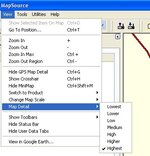
I cannot seem to get details of small roads and lanes on mapsource on my computer despite zooming into highest detail?

Any advice ??:)
 
I cannot seem to get details of small roads and lanes on mapsource on my computer despite zooming into highest detail?

Any advice ??:)

View > Map Detail > Highest :thumb2
 

Attachments

  • detail.jpg
    detail.jpg
    34.8 KB · Views: 97


Back
Top Bottom