MP3 files

peejay

Registered user
Joined
Aug 19, 2006
Messages
670
Reaction score
0
Location
South Gloucestershire
I know, I'm being a total thicky, but can anyone enlighten me on how I can convert my itunes aac/m4a files to an mp3 format that i can download to my zumo660/micro SD card.

Simple instructions with illustrations will bring forth much gratitude and maybe a couple of beer tokens:beerjug:

My teenage son who knows all aint gotta clue :type
 
tunebite

Someone will be along in moment with something better but I use tunebite. You will need a soundcard in the PC
 
You can create MP3's from M4a's in Itunes.

Open Itunes go to edit > preferences open this up go to import settings chose MP3 and your quality........ 128k is more than enough for a zumo.

In itunes library click on the tunes you are interested in and right click select show in windows explorer.

Go to file and Add folder or file to library. Navigate to the folders or files you want and add them to your library. Itunes will re-import the m4a's as MP3's and you will have an mp3 duplicate of an m4a. You can see these mp3 extensions by selecting KIND as a library header by left clicking on the library headers right clicking and selecting KIND as a header title then sort the library by m4a or mp3. If you want to import cd's etc as m4a's go back to edit prefs and select import settings and return it from mp3 to m4a.

down load your mp3's to your Zumo

Takes longer to explain than do.M.
:D
 
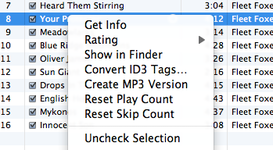
You can convert individual songs by right clicking and selecting 'create mP3 version'

might be simpler ?
 

Attachments

  • Screen shot 2010-03-24 at 23.55.23.png
    Screen shot 2010-03-24 at 23.55.23.png
    50.6 KB · Views: 57
There you go I didn't realise they had done that to the software! You still need to edit your import preferences tho':D


Back
Top Bottom