MS WORD QUERY

Taff

Well-known member
UKGSer Subscriber
Joined
Feb 21, 2004
Messages
7,351
Reaction score
6
Location
South West Wales
I'm sure there's a way of doing this, but I'm buggered if I can find it. :(

I have a large Word doument, and want to cut and paste a large block of text from a different Word document. So far - so good. :D

The problem is that all the text I want to cut and paste has been typed in capital letters JUST LIKE THIS, WHICH CAN BE IRRITATING WHEN THE ORIGINAL DOCUMENT WAS TYPED NORMALLY. :blast

Is there a way of highliting the selected text and changing it to normal format, rather than over-typing the lot, which could take me hours. :eek
 
Look ...

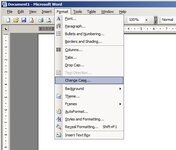
... under Format (in header bar) and select Change Case Highlight your text and select tOGGLE cASE:thumb2

i'M SURE THERE'S A WAY OF DOING THIS, BUT i'M BUGGERED IF i CAN FIND IT.

i HAVE A LARGE wORD DOUMENT, AND WANT TO CUT AND PASTE A LARGE BLOCK OF TEXT FROM A DIFFERENT wORD DOCUMENT. sO FAR - SO GOOD.

tHE PROBLEM IS THAT ALL THE TEXT i WANT TO CUT AND PASTE HAS BEEN TYPED IN CAPITAL LETTERS just like this, which can be irritating when the original document was typed normally.

iS THERE A WAY OF HIGHLITING THE SELECTED TEXT AND CHANGING IT TO NORMAL FORMAT, RATHER THAN OVER-TYPING THE LOT, WHICH COULD TAKE ME HOURS.
 
I'm sure there's a way of doing this, but I'm buggered if I can find it. :(

I have a large Word doument, and want to cut and paste a large block of text from a different Word document. So far - so good. :D

The problem is that all the text I want to cut and paste has been typed in capital letters JUST LIKE THIS, WHICH CAN BE IRRITATING WHEN THE ORIGINAL DOCUMENT WAS TYPED NORMALLY. :blast

Is there a way of highliting the selected text and changing it to normal format, rather than over-typing the lot, which could take me hours. :eek

Shift + F3 cycles throught, all upper, proper, and lower case :thumb
 
Go here.........
 

Attachments

  • ScreenShot163.jpg
    ScreenShot163.jpg
    99.3 KB · Views: 70


Back
Top Bottom