Nav V won't delete old routes and waypoints?

G&T

Well-known member
UKGSer Subscriber
Joined
Jan 18, 2016
Messages
4,408
Reaction score
2,307
Location
Shropshire
I thought I'd start with a clean slate with NAV V.

I have deleted all my waypoints and routes in Basecamp and gone into 'My Garmin' folder on the PC and deleted all current and temp gpx files and finally gone to the device itself and deleted all routes, history etc in there. However when I plug the Nav V back in, a list of my old waypoints and routes are showing when I expand the device folder.

Any help appreciated.

Ta
Glenn
 
I think you have to do the delete on the nav 5 itself. Also in the my data section

Sent from my SM-G920F using Tapatalk
 
I think you have to do the delete on the nav 5 itself. Also in the my data section

Sent from my SM-G920F using Tapatalk

I have deleted tracks, active and archive, history, routes etc on the Nav5 as well as all in Basecamp including temporary gpx files, So I don't know where it keeps picking these up from?
 
Hi Richard, I'm afraid that didn't work. The instructions are not proven so no luck.

I have trawled Nav v device and deleted routes in where to, history, favourites whilst operating device.

I have deleted all the current, position and gpx files in Nav v internal memory folder when connected to PC.

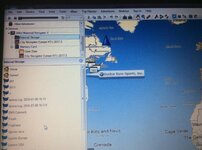
Lo and behold when I connect to basecamp and I click on Nav V and expand they show up on the left. Pic attached.

Any ideas or contact Garmin support?
 

Attachments

  • image.jpg
    image.jpg
    56.7 KB · Views: 2,007
Garmin support chat function doesn't work, so have sent an email. If you use there support on line you won't find BMW Navigator V in the drop down list. You have to type your serial no. in. Let's see.

Will update everyone on this as I believe this is a subject of interest for most: 'How to delete routes and waypoints from Nav V so they don't show up in basecamp.'
 
when you have added your routes to your nav 5 do you get the prompt to import route or found new data. are you using a mac or pc.
 
Hi Lee, thanks for your help.
I'm using a PC. I think when I added the new routes a while ago and exported to Nav v it prompted me to import routes. But as I say I just want to delete everything off.
 
Garmin support chat function doesn't work, so have sent an email. If you use there support on line you won't find BMW Navigator V in the drop down list. You have to type your serial no. in. Let's see.

Will update everyone on this as I believe this is a subject of interest for most: 'How to delete routes and waypoints from Nav V so they don't show up in basecamp.'

If you can't delete the items shown in your picture by right clicking & deleting then carry out a master reset to return the device to factory settings. Garmin will probably suggest this.
Press power button & lower right hand corner of screen together & follow the prompts.
If there're anything on the SD card then reformat this as well.
It also appears you have the same map on device & SD card so you may have to reinstall the maps using GE if you wipe the card.
 
I am half guessing that the routes are on the device's SD card, not being deleted and then being reimported.
 
I have just connected the Nav v up to basecamp. Originally having deleted everything from Base camp 'my collection' folder (because you can delete routes waypoints etc) I checked it again and all of the routes are there. So I deleted them again.

Then I expanded the menu on internal storage from the device and interestingly no routes showing. At this point I have an empty list in my collection folder on basecamp and on my device folder. I unplugged the Nav v and replugged into PC. Hey presto nothing is still showing in the lists.

My only problem now is to replicate how I managed to get rid as I'm still none the wiser. I do wonder if when you have manually deleted everything off the Nav v you do need to hard switch the unit off? This may be the culprit as I didn't, just left it in sleep mode, which maybe caching something. Dunno - just a guess
 
In BaseCamp you can remove a list or list folder and still keep all the list items in My Collection
 
Hi Lee, thanks for your help.
I'm using a PC. I think when I added the new routes a while ago and exported to Nav v it prompted me to import routes. But as I say I just want to delete everything off

i understood that all you wanted to do was delete all, the only reason i asked if they had been imported was, they may be stored elsewhere on the nav 5 before import, and not the gpx folder, such as Wapping suggested the sd card, it was just a thought,


Back
Top Bottom