centaur said:
You might try downloading and running a prog called 'HiJackThis' from here....
http://www.tomcoyote.org/hjt/
It's very good and it's free. If you post the resulting logfile here after running it, I could do an analysis for you ?
Here you go Centaur. Thanks in advance. Adam

Logfile of HijackThis v1.99.1
Scan saved at 17:11:03, on 08/03/2006
Platform: Windows XP SP2 (WinNT 5.01.2600)
MSIE: Internet Explorer v6.00 SP2 (6.00.2900.2180)
Running processes:
C:\WINDOWS\System32\smss.exe
C:\WINDOWS\system32\winlogon.exe
C:\WINDOWS\system32\services.exe
C:\WINDOWS\system32\lsass.exe
C:\WINDOWS\system32\svchost.exe
C:\Program Files\Windows Defender\MsMpEng.exe
C:\WINDOWS\System32\svchost.exe
C:\WINDOWS\system32\spoolsv.exe
C:\Program Files\Common Files\Acronis\Schedule2\schedul2.exe
C:\Program Files\Depositit\Automated Backup\srvany.exe
C:\Program Files\Depositit\Automated Backup\JRE\bin\javaw.exe
C:\Program Files\Symantec\LiveUpdate\ALUSchedulerSvc.exe
C:\Program Files\Common Files\Symantec Shared\ccProxy.exe
C:\Program Files\Common Files\Symantec Shared\ccSetMgr.exe
C:\Program Files\Common Files\Microsoft Shared\VS7Debug\mdm.exe
C:\Program Files\Norton AntiVirus\navapsvc.exe
C:\Program Files\Norton AntiVirus\AdvTools\NPROTECT.EXE
C:\WINDOWS\System32\nvsvc32.exe
C:\Program Files\Dantz\Retrospect\retrorun.exe
C:\Program Files\Common Files\Symantec Shared\SNDSrvc.exe
C:\Program Files\Webroot\Spy Sweeper\WRSSSDK.exe
C:\Program Files\Common Files\Symantec Shared\CCPD-LC\symlcsvc.exe
C:\WINDOWS\system32\wwSecure.exe
C:\Program Files\Bonjour\mDNSResponder.exe
C:\Program Files\Common Files\Symantec Shared\ccEvtMgr.exe
C:\Program Files\Common Files\Symantec Shared\ccApp.exe
C:\Program Files\Common Files\Symantec Shared\Security Center\SymWSC.exe
C:\WINDOWS\BCMSMMSG.exe
C:\PROGRA~1\Maxtor\OneTouch\Utils\OneTouch.exe
C:\WINDOWS\MXOALDR.EXE
C:\Program Files\Roxio\Easy CD Creator 5\DirectCD\DirectCD.exe
C:\Program Files\Microsoft IntelliPoint\point32.exe
C:\Program Files\Nokia\Nokia PC Suite 6\Launch Application 2.exe
C:\Program Files\Acronis\TrueImage\TrueImageMonitor.exe
C:\Program Files\Common Files\Acronis\Schedule2\schedhlp.exe
C:\Program Files\iTunes\iTunesHelper.exe
C:\Program Files\Windows Defender\MSASCui.exe
C:\Program Files\Maxtor\Maxtor Quick Start\msssort.exe
C:\Program Files\Webroot\Spy Sweeper\SpySweeper.exe
C:\WINDOWS\system32\ctfmon.exe
C:\PROGRA~1\COMMON~1\PCSuite\Services\SERVIC~1.EXE
C:\Program Files\Common Files\Intuit\QuickBooks\QBUpdate\qbupdate.exe
C:\PROGRA~1\COMMON~1\PCSuite\DATALA~1\DATALA~1.EXE
C:\Program Files\iPod\bin\iPodService.exe
C:\Program Files\Norton AntiVirus\SAVScan.exe
C:\WINDOWS\explorer.exe
C:\Program Files\Norton AntiVirus\OPScan.exe
C:\Program Files\Messenger\msmsgs.exe
C:\Documents and Settings\Adam\My Documents\Downloaded Files\Temp\HJT\HijackThis.exe
R0 - HKCU\Software\Microsoft\Internet Explorer\Main,Start Page =
http://www.ntlworld.com/
R0 - HKLM\Software\Microsoft\Internet Explorer\Main,Start Page =
http://www.ntlworld.com/
R1 - HKCU\Software\Microsoft\Internet Connection Wizard,ShellNext =
http://windowsupdate.microsoft.com/
R1 - HKCU\Software\Microsoft\Windows\CurrentVersion\Internet Settings,ProxyServer = 80.1.224.4:8080
R1 - HKCU\Software\Microsoft\Windows\CurrentVersion\Internet Settings,ProxyOverride = local.,
O2 - BHO: AcroIEHlprObj Class - {06849E9F-C8D7-4D59-B87D-784B7D6BE0B3} - C:\Program Files\Adobe\Acrobat 7.0\ActiveX\AcroIEHelper.dll
O2 - BHO: (no name) - {53707962-6F74-2D53-2644-206D7942484F} - C:\PROGRA~1\SPYBOT~1\SDHelper.dll
O2 - BHO: CNisExtBho Class - {9ECB9560-04F9-4bbc-943D-298DDF1699E1} - C:\Program Files\Common Files\Symantec Shared\AdBlocking\NISShExt.dll
O2 - BHO: CNavExtBho Class - {BDF3E430-B101-42AD-A544-FADC6B084872} - C:\Program Files\Norton AntiVirus\NavShExt.dll
O3 - Toolbar: Web assistant - {0B53EAC3-8D69-4b9e-9B19-A37C9A5676A7} - C:\Program Files\Common Files\Symantec Shared\AdBlocking\NISShExt.dll
O3 - Toolbar: Norton AntiVirus - {42CDD1BF-3FFB-4238-8AD1-7859DF00B1D6} - C:\Program Files\Norton AntiVirus\NavShExt.dll
O3 - Toolbar: Yahoo! Toolbar - {EF99BD32-C1FB-11D2-892F-0090271D4F88} - C:\Program Files\Yahoo!\Companion\Installs\cpn\yt.dll
O4 - HKLM\..\Run: [ccApp] "C:\Program Files\Common Files\Symantec Shared\ccApp.exe"
O4 - HKLM\..\Run: [Advanced Tools Check] C:\PROGRA~1\NORTON~2\AdvTools\ADVCHK.EXE
O4 - HKLM\..\Run: [Symantec NetDriver Monitor] C:\PROGRA~1\SYMNET~1\SNDMon.exe /Consumer
O4 - HKLM\..\Run: [BCMSMMSG] BCMSMMSG.exe
O4 - HKLM\..\Run: [NvCplDaemon] RUNDLL32.EXE C:\WINDOWS\System32\NvCpl.dll,NvStartup
O4 - HKLM\..\Run: [nwiz] nwiz.exe /install
O4 - HKLM\..\Run: [NvMediaCenter] RUNDLL32.EXE C:\WINDOWS\System32\NvMcTray.dll,NvTaskbarInit
O4 - HKLM\..\Run: [MaxtorOneTouch] C:\PROGRA~1\Maxtor\OneTouch\Utils\OneTouch.exe
O4 - HKLM\..\Run: [MXO Auto Loader] C:\WINDOWS\MXOALDR.EXE
O4 - HKLM\..\Run: [AdaptecDirectCD] "C:\Program Files\Roxio\Easy CD Creator 5\DirectCD\DirectCD.exe"
O4 - HKLM\..\Run: [IntelliPoint] "C:\Program Files\Microsoft IntelliPoint\point32.exe"
O4 - HKLM\..\Run: [PCSuiteTrayApplication] C:\Program Files\Nokia\Nokia PC Suite 6\Launch Application 2.exe -onlytray
O4 - HKLM\..\Run: [DataLayer] C:\PROGRA~1\COMMON~1\PCSuite\DATALA~1\DATALA~1.EXE
O4 - HKLM\..\Run: [Acronis

True
Image Monitor] "C:\Program Files\Acronis\TrueImage\TrueImageMonitor.exe"
O4 - HKLM\..\Run: [Acronis Scheduler2 Service] "C:\Program Files\Common Files\Acronis\Schedule2\schedhlp.exe"
O4 - HKLM\..\Run: [iTunesHelper] "C:\Program Files\iTunes\iTunesHelper.exe"
O4 - HKLM\..\Run: [QuickTime Task] "C:\Program Files\QuickTime\qttask.exe" -atboottime
O4 - HKLM\..\Run: [TkBellExe] "C:\Program Files\Common Files\Real\Update_OB\realsched.exe" -osboot
O4 - HKLM\..\Run: [Windows Defender] "C:\Program Files\Windows Defender\MSASCui.exe" -hide
O4 - HKLM\..\Run: [mssSort] C:\Program Files\Maxtor\Maxtor Quick Start\msssort.exe
O4 - HKLM\..\Run: [SpySweeper] "C:\Program Files\Webroot\Spy Sweeper\SpySweeper.exe" /startintray
O4 - HKCU\..\Run: [ctfmon.exe] C:\WINDOWS\system32\ctfmon.exe
O4 - Global Startup: AutoCAD LT Startup Accelerator.lnk = C:\Program Files\Common Files\Autodesk Shared\acstart16.exe
O4 - Global Startup: Microsoft Office.lnk = C:\Program Files\Microsoft Office\Office10\OSA.EXE
O4 - Global Startup: QuickBooks Update Agent.lnk = C:\Program Files\Common Files\Intuit\QuickBooks\QBUpdate\qbupdate.exe
O4 - Global Startup: Quicken Scheduled Updates.lnk = ?
O8 - Extra context menu item: E&xport to Microsoft Excel - res://C:\PROGRA~1\MICROS~3\Office10\EXCEL.EXE/3000
O9 - Extra button: Messenger - {FB5F1910-F110-11d2-BB9E-00C04F795683} - C:\Program Files\Messenger\msmsgs.exe
O9 - Extra 'Tools' menuitem: Windows Messenger - {FB5F1910-F110-11d2-BB9E-00C04F795683} - C:\Program Files\Messenger\msmsgs.exe
O10 - Unknown file in Winsock LSP: c:\program files\bonjour\mdnsnsp.dll
O16 - DPF: {17492023-C23A-453E-A040-C7C580BBF700} (Windows Genuine Advantage Validation Tool) -
http://go.microsoft.com/fwlink/?linkid=48835
O16 - DPF: {56393399-041A-4650-94C7-13DFCB1F4665} (PSFormX Control) -
http://www.pestpatrol.com/pestscan/pestscan.cab
O16 - DPF: {6414512B-B978-451D-A0D8-FCFDF33E833C} (WUWebControl Class) -
http://update.microsoft.com/windowsupdate/v6/V5Controls/en/x86/client/wuweb_site.cab?1126887904765
O16 - DPF: {B38870E4-7ECB-40DA-8C6A-595F0A5519FF} (MsnMessengerSetupDownloadControl Class) -
http://messenger.msn.com/download/MsnMessengerSetupDownloader.cab
O18 - Protocol: intu-res - {9CE7D474-16F9-4889-9BB9-53E2008EAE8A} - C:\Program Files\Common Files\Intuit\intu-res.dll
O18 - Protocol: msnim - {828030A1-22C1-4009-854F-8E305202313F} - "C:\PROGRA~1\MSNMES~1\msgrapp.dll" (file missing)
O20 - Winlogon Notify: WRNotifier - C:\WINDOWS\SYSTEM32\WRLogonNTF.dll
O23 - Service: Acronis Scheduler2 Service (AcrSch2Svc) - Acronis - C:\Program Files\Common Files\Acronis\Schedule2\schedul2.exe
O23 - Service: Autodesk Licensing Service - Autodesk - C:\Program Files\Common Files\Autodesk Shared\Service\AdskScSrv.exe
O23 - Service: Automated Backup Daemon (AutomatedBackupDaemon) - Unknown owner - C:\Program Files\Depositit\Automated Backup\srvany.exe
O23 - Service: Automatic LiveUpdate Scheduler - Symantec Corporation - C:\Program Files\Symantec\LiveUpdate\ALUSchedulerSvc.exe
O23 - Service: Bonjour Service - Apple Computer, Inc. - C:\Program Files\Bonjour\mDNSResponder.exe
O23 - Service: Symantec Event Manager (ccEvtMgr) - Symantec Corporation - C:\Program Files\Common Files\Symantec Shared\ccEvtMgr.exe
O23 - Service: Symantec Network Proxy (ccProxy) - Symantec Corporation - C:\Program Files\Common Files\Symantec Shared\ccProxy.exe
O23 - Service: Symantec Password Validation (ccPwdSvc) - Symantec Corporation - C:\Program Files\Common Files\Symantec Shared\ccPwdSvc.exe
O23 - Service: Symantec Settings Manager (ccSetMgr) - Symantec Corporation - C:\Program Files\Common Files\Symantec Shared\ccSetMgr.exe
O23 - Service: InstallDriver Table Manager (IDriverT) - Macrovision Corporation - C:\Program Files\Common Files\InstallShield\Driver\11\Intel 32\IDriverT.exe
O23 - Service: iPodService - Apple Computer, Inc. - C:\Program Files\iPod\bin\iPodService.exe
O23 - Service: LiveUpdate - Symantec Corporation - C:\PROGRA~1\Symantec\LIVEUP~1\LUCOMS~1.EXE
O23 - Service: Norton AntiVirus Auto Protect Service (navapsvc) - Symantec Corporation - C:\Program Files\Norton AntiVirus\navapsvc.exe
O23 - Service: Norton Unerase Protection (NProtectService) - Symantec Corporation - C:\Program Files\Norton AntiVirus\AdvTools\NPROTECT.EXE
O23 - Service: NVIDIA Display Driver Service (NVSvc) - NVIDIA Corporation - C:\WINDOWS\System32\nvsvc32.exe
O23 - Service: Retrospect Launcher (RetroLauncher) - Dantz Development Corporation - C:\Program Files\Dantz\Retrospect\retrorun.exe
O23 - Service: SAVScan - Symantec Corporation - C:\Program Files\Norton AntiVirus\SAVScan.exe
O23 - Service: ScriptBlocking Service (SBService) - Symantec Corporation - C:\PROGRA~1\COMMON~1\SYMANT~1\SCRIPT~1\SBServ.exe
O23 - Service: Symantec Network Drivers Service (SNDSrvc) - Symantec Corporation - C:\Program Files\Common Files\Symantec Shared\SNDSrvc.exe
O23 - Service: Webroot Spy Sweeper Engine (svcWRSSSDK) - Webroot Software, Inc. - C:\Program Files\Webroot\Spy Sweeper\WRSSSDK.exe
O23 - Service: Symantec Core LC - Symantec Corporation - C:\Program Files\Common Files\Symantec Shared\CCPD-LC\symlcsvc.exe
O23 - Service: SymWMI Service (SymWSC) - Symantec Corporation - C:\Program Files\Common Files\Symantec Shared\Security Center\SymWSC.exe
O23 - Service: Washer Security Access (wwSecSvc) - Webroot Software, Inc. - C:\WINDOWS\system32\wwSecure.exe



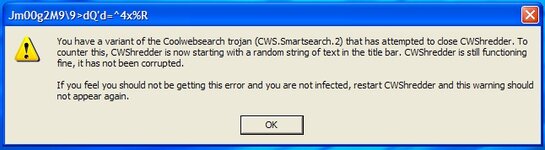
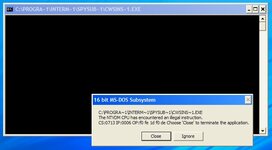
 ) ...forget it, no information of any worth (used to be


 ]
]