PC running slow and clunky.

(RIP) Miff

Well-known member
UKGSer Subscriber
Joined
Apr 18, 2009
Messages
7,978
Reaction score
1
Location
The Highest Hill In Norfolk.
My Dell Desktop PC has been running slow and clunky for a few weeks now. I really want to try to speed it up/get it back to how it was.

Now I'm no geek, but I'm no technophobe either. But I have been left behind in the technology stakes.

I am running Windows Vista. Emsisoft and Malware bites malware with AVAST anti virus.

My photo's and videos are kept on an external hard drive (1TB).

It's especially slow on the internet, but my ADSL speed is fine (6.5mb).

Any help would be greatly appreciated, before I have to call a man in.

Cheers.

PC Details
 
I did a defrag and disc clean up recently... I thought it was being done automatically but this was not the case..... On my Windows 7 it's in Control Panel -System and Security - Administrative tools - etc etc
 
Ccleaner mate. Brilliant program. Google for the download link.
You could do with some more ram too to be honest. 2GB just isn't enough now.
 
CTRL ALT and DEL at the same time.....
That brings up the task manager (you may have to click an option first, I'm not sure on Vista, never used it)

You can see what Applications you have running....check that there's nothing running that you don't recognise and close it if necessary.

Next tab (should be, again not 100% sure on Vista) "Processes"........that lists all of the.....er....processes :blast that are running.
A lot you may not recognise by name, but if you look in the description column, there shouldn't be anything really odd in there....GOOGLE the name of the .exe if you don't recognise the programme to see what it does before you end the process, but you may find something that's hogging your resources that is not required and can close it, then adjust the prog's settings so that it doesn't automatically start with Windoes next time around.

The performance tab may give you a clue as well.......see if there are any graphs off the scale EG Ram usage....some progs 'leak' memory which means they take up increasing amounts of ram and that slows a system down to a crawl.

NEXT.......this is a way of starting up with ONLY Microsoft progs enabled......then you can enable the others one by one to see if one of them is causing your constipation.

UNPLUG your internet or just turn off your router first, as doing this will obviously knock out Avast etc.

Unashamed cut'n'paste, as I can't be arsed to type it myself (and I'm not familiar with Vista, for which the following steps are specifically for)


Open System Configuration by clicking the Start button Picture of the Start button, clicking Control Panel, clicking System and Maintenance, clicking Administrative Tools, and then double-clicking System Configuration.* Administrator permission required If you are prompted for an administrator password or confirmation, type the password or provide confirmation.

Click the General tab, click Selective startup, and then clear the Load system services and the Load startup items check boxes.

Select the Load system services check box, click OK, and then click Restart.

If the problem occurs after restarting, do one or both (if necessary) of the following tasks:
Identify the system service that is causing the problem

Click the Services tab, click Disable all, select the check box for the first service that is listed, and then restart the computer. If the problem does not occur, then you can eliminate the first service as the cause of the problem.

With the first service selected, select the second service check box, and then restart the computer.

Repeat this process until you reproduce the problem. If you cannot reproduce the problem, then you can eliminate system services as the cause of the problem. Perform the following task:
Identify the startup item that is causing the problem

Click the General tab, and then select the Load startup items check box.

Click the Startup tab, click Disable all, select the check box for the first startup item that is listed, and then restart the computer. If the problem does not occur, then you can eliminate the first startup item as the cause of the problem.

With the first startup item selected, select the second startup item check box, and then restart the computer. Repeat this process until you reproduce the problem.

After that lot, if you're still constipated, there are a few more things to try so post back :)
 
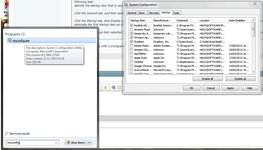
Try this:
Untitled.jpg

this little application is great for streamlining windows, just run the essentials e.g. anti-virus.
Also pull the casing off and vacuum inside dust on the chips make them run hot slowing then computer down.
 
Hopefully there is room for more RAM. Up grade that the RAM. Many PC'c with low RAM as standard can take at least double what they come with.

Avast and Avast auto updates could be an issue. Check that you haven't downloaded any Browser search progs.

Personally over many years I've found that Windows own anti virus/malware Defender prog has never let anything untoward go down on numerous computers I look after. I've found Avast, Mcafee, Norton all slow down PC's and if you don't use removal tools for the likes of Norton, Mcafee and Avast PC's will run slow. Use MS Defender and the PC will work far faster.
 
Reseat the RAM

This is an old machine if it's running Vista.
Power down the PC, take out the main lead and leave for about 30 mins.
Open up the PC and remove all the dust and fluff.
Then take out the RAM - 1 piece at a time - and then put it back in again.
We've found that this cleans the contacts
Alternatively replace the RAM - RAM ages like us all.
Vista was a bit clunky, you might think of installing XP after a backup.
 
I've stopped a couple of programmes from working. ITunes and media player. That helped a little. I then took the cover off and hoovered out lots of dust and fluff. Couldn't identify the RAM. I could id the hard drive. I removed a couple of bits to hoover them. Put it back together and now it doesn't work at all. It turns onbut all I can hear is the fan running. Think I need to get a man in.
 
I have never put a hoover near a computer to clean it. Use compressed air, cans cans of compressed air are available in PC World or similar shops, to blow dust off the internals... don't allow a hoover anywhere near it.

When you get your puter working again, go to http://eu.crucial.com/eur/en YOu can scan your pc and identify your ram capacity.Crucial site will tell you if it can be upgraded and will show you the correct ram to buy.

put as much ram as you can in your machine and check if you can upgrade to W7. Check here to see if your machine can be upgraded:

http://www.microsoft.com/en-us/download/details.aspx?id=20
 
Miff, seriously you need to install Ccleaner. It really will clean your machine up. It's easy to use too.
 
Ccleaner mate. Brilliant program. Google for the download link.
You could do with some more ram too to be honest. 2GB just isn't enough now.

+1 for more RAM. I increased mine from 2gb to 2.5gb (about £25 I think) and it made a big difference- even though the underlying problem was a knackered hard drive and disc drive...


Back
Top Bottom