Promptware Attacks

zoltan

Well-known member
UKGSer Subscriber
Joined
May 3, 2006
Messages
17,264
Reaction score
3,902
Location
England
Interesting how fast criminals discovered how to use AI to infect your phone. I used SIRI to read/answer me text when driving. Now disabled.


First discovered 2 years ago "how to"...
 
Last edited:
For those of us who sell software to protect against this sort of stuff, AI has been a real boon :D

For years people have thought I was being 'tin foil hat' about this stuff and now they're starting to realise just how big the problem is (and they haven't yet realised how big it's about to be...)

I should put it in my signature to avoid typing it so often, but AI is going to continue to increase both the frequency and sophistication of attacks at an exponential rate.

The time to protect yourself against it was three to five years ago but if you haven't then you should do right now.

Ditching Windows wouldn't be a bad place to start...
 
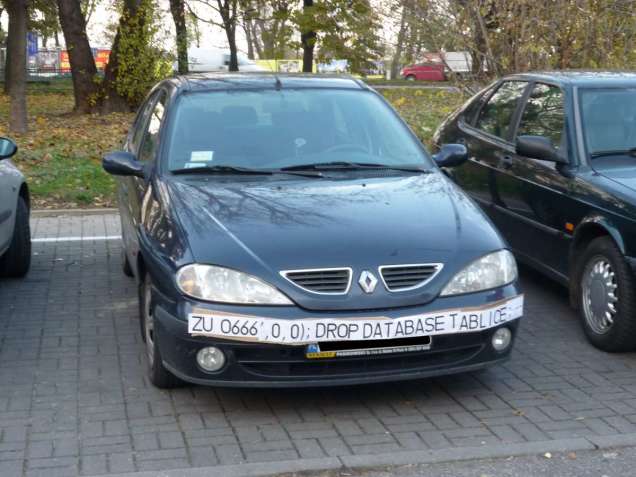
18mpenleoksq8jpg.jpg


Same concept, different carrier :D
 
For those of us who sell software to protect against this sort of stuff, AI has been a real boon :D

For years people have thought I was being 'tin foil hat' about this stuff and now they're starting to realise just how big the problem is (and they haven't yet realised how big it's about to be...)

I should put it in my signature to avoid typing it so often, but AI is going to continue to increase both the frequency and sophistication of attacks at an exponential rate.

The time to protect yourself against it was three to five years ago but if you haven't then you should do right now.

Ditching Windows wouldn't be a bad place to start...
Could you pad this out a bit please Sparky? I, like many others I suspect, know little to nothing about things like this. I buy a device and I use it, but I don’t really know what the risks are, or what to do about them. Any chance you could expand with some decent advice ?
 
Sure.

It's really hard to know where to start sometimes as every person / company / customer is slightly different but as basics go here's a few pointers.

1. Passwords.
Always use good passwords. Never reuse the same password. How to remember them all? Use a password manager like Keeper (I think they still have a free version but it doesn't cost a lot - I'm on the paid plan). What's a good password? Something long (8+ characters) that also contains upper and lower case as well as 'special' characters (e.g. punctuation)

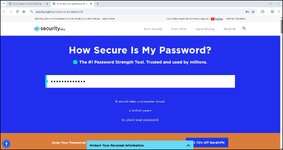
Want to test how good your password is? Try it here

Oh, and never save your passwords in your browser (unless maybe you're using 2FA - see point #7)

2. Cookies.
Never, ever accept them unless you really have to. Same with 'legitimate interest'. Any website that doesn't have a way of rejecting all within a few seconds and demands you scroll down a list of 40 of these turning each one off manually should just be avoided. They're making it hard for a reason.

3. Phishing (this should maybe be Nº1)
There's plenty of free resources online on how to recognise this, but Phishing is the single biggest way in which bad actors infiltrate systems. Common examples include emails that tell you you need to reset your Facebook / PayPal / other password because yours has been hacked. Or 'insufficient postage' texts or mails. Any text that's been sent to a group of people that you don't know.... emails with receipts for large value purchases from Amazon (or other sites). There are a lot of these, too many to cover quickly but take a bit of time to learn how to spot these.

4. Identity based login
You know the sort of thing. Log in to this site with your Facebook, Google or whatever account. While this isn't the very worst possible thing, it's best avoided generally. Partly goes back to using unique passwords, partly goes towards your 'online identity'.
Sounds 'tin foil' a bit, but they're already using this sort of data in the USA for things like your health insurance. Spend lots of time looking at fitness equipment and your premium is lower than if you're on fags and booze websites and have a home delivery account with Domino's...

5. Why my Windows comment?
AI. Be very mindful of AI. Again, this can work for or against you, but don't just assume it's 'all OK because it's Microsoft' Have a read up on it, but lots of people are quite concerned about Copilot being forced on you now (used to be an option) and its 'feature' where it can decide to take screenshots and snapshots of you machine if it so feels like it... The jury is still out, but I would personally be quite concerned especially as Microsoft is a US company and data in the US isn't protected the way it is in other countries. If some agency wants access, they can get it.

6. VPN
Never, ever use 'public WiFi' without connecting to a VPN. Especially 'free' WiFi that doesn't require a password. You can set up a free VPN at home with a RaspberryPi (so not free in the sense that you need a Pi, but it's a one off cost and not a big one) - there are lots of other ways of doing this such as with Wireguard or Tailscale. These all take some level of IT tinkering, but lots of online guides on how to do this (e.g. YouTube)

Alternatively hotspot off your phone if you have to.

7. 2FA / MFA
Two Factor Authentication (or Multi Factor Authentication). Use it always on everything that will let you. This will either need an authenticator app on your phone or it will send a code to your email or by SMS.
This way even if your password is compromised then they've only got half the key as they'd need access to your phone too.
Some browsers will prompt you to 'trust this device' so you don't have to keep putting the code in. Not a great idea because if they've got into your device then....

8. Updates.
Do them. Sometimes it's worth waiting a couple of days to make sure no one else is having issues with the update. However, updating your phone, your laptop, your software - it's essential. Often these updates fix vulnerabilities. Those of you on Windows 7, watch out because all the exploits are well known and well documented.

9. Backups.
Got important data? Back it up. Then back it up again. Then make a copy of it and store it off-site. :D

The 3-2-1 rule... Three copies of your data on two different types of media (e.g hard disk and cloud) and keeping one copy offsite.

Mine's backed up automatically (because we all mean to getting round to backing up but...) onto a NAS (have a look for Qnap or Synology or similiar) This spreads the data over several discs using something called RAID (so if one disc fails then you haven't lost any data). This also gets backed up onto a separate USB drive and then the whole lot is also replicated to another NAS I have which is not only not in the same house, but not in the same country.

OK, that last bit is a bit 'tin foil' but I can, so I have :D

If your laptop got hacked, lost, stolen, soaked in beer in your bike pannier (yes, it happened to me) then what happens to all your data?

Have a "Disaster Recovery" plan.

Sheesh.. I keep thinking of more stuff and I keep editing this post.


There's lots (and lots) more - but that's not a bad starting point.

I personally keep all my work and all my personal stuff completely separate (down to having separation in the internet connection).

(and another edit)

10. Cloud.
Think of cloud as "someone else's computer". Going to use a cloud service? Where's your data? Is it in the USA where it's not covered by GDPR and other legislation? Well, if it's Google or Microsoft or Facebook or Instagram or....

There's something to be said for going with a 'big name' because they've got massive infrastructure in Tier 4 Datacentres with redundant power and data replication and backups and...

But when it all goes wrong you're not going to be calling Bezos or Gates to get it fixed and they're not going to give two hoots about you.

Smaller 'cloud' providers might have your data on a server they've got tucked away under the stairs. It might not be backed up, it probably won't do well in the event of a power cut, but it will be cheaper and you will have a phone number you can ring.

There's a middle ground with people like the company I work for who take rack space in proper datacentres but are still contactable. Our data is in the EU (you can go and visit the racks if you want) so you have all the GDPR compliance and data sovereignty etc.

So - 'cloud' can mean very different things. There's also 'private cloud' which is what I've got where I've got data backing up from one server I own and manage to another server I own and manage abroad. 100% in my control, but also 100% my responsibility and without the added protections of a datacentre.

I think I'm straying into 'advanced' territory now so I'll leave it there....

 
Last edited:
Plus one here. Good of you. (y) Very much appreciated.
No, thank you for the question.

Yes, I earn my keep selling software and cloud services, but my advice is always free and helping to keep people 'safe out there' is something I feel strongly about.

I'm always happy to help if I can.
 
Sure.

It's really hard to know where to start sometimes as every person / company / customer is slightly different but as basics go here's a few pointers.

1. Passwords.
Always use good passwords. Never reuse the same password. How to remember them all? Use a password manager like Keeper (I think they still have a free version but it doesn't cost a lot - I'm on the paid plan). What's a good password? Something long (8+ characters) that also contains upper and lower case as well as 'special' characters (e.g. punctuation)

Want to test how good your password is? Try it here

Oh, and never save your passwords in your browser (unless maybe you're using 2FA - see point #7)

2. Cookies.
Never, ever accept them unless you really have to. Same with 'legitimate interest'. Any website that doesn't have a way of rejecting all within a few seconds and demands you scroll down a list of 40 of these turning each one off manually should just be avoided. They're making it hard for a reason.

3. Phishing (this should maybe be Nº1)
There's plenty of free resources online on how to recognise this, but Phishing is the single biggest way in which bad actors infiltrate systems. Common examples include emails that tell you you need to reset your Facebook / PayPal / other password because yours has been hacked. Or 'insufficient postage' texts or mails. Any text that's been sent to a group of people that you don't know.... emails with receipts for large value purchases from Amazon (or other sites). There are a lot of these, too many to cover quickly but take a bit of time to learn how to spot these.

4. Identity based login
You know the sort of thing. Log in to this site with your Facebook, Google or whatever account. While this isn't the very worst possible thing, it's best avoided generally. Partly goes back to using unique passwords, partly goes towards your 'online identity'.
Sounds 'tin foil' a bit, but they're already using this sort of data in the USA for things like your health insurance. Spend lots of time looking at fitness equipment and your premium is lower than if you're on fags and booze websites and have a home delivery account with Domino's...

5. Why my Windows comment?
AI. Be very mindful of AI. Again, this can work for or against you, but don't just assume it's 'all OK because it's Microsoft' Have a read up on it, but lots of people are quite concerned about Copilot being forced on you now (used to be an option) and its 'feature' where it can decide to take screenshots and snapshots of you machine if it so feels like it... The jury is still out, but I would personally be quite concerned especially as Microsoft is a US company and data in the US isn't protected the way it is in other countries. If some agency wants access, they can get it.

6. VPN
Never, ever use 'public WiFi' without connecting to a VPN. Especially 'free' WiFi that doesn't require a password. You can set up a free VPN at home with a RaspberryPi (so not free in the sense that you need a Pi, but it's a one off cost and not a big one) - there are lots of other ways of doing this such as with Wireguard or Tailscale. These all take some level of IT tinkering, but lots of online guides on how to do this (e.g. YouTube)

Alternatively hotspot off your phone if you have to.

7. 2FA / MFA
Two Factor Authentication (or Multi Factor Authentication). Use it always on everything that will let you. This will either need an authenticator app on your phone or it will send a code to your email or by SMS.
This way even if your password is compromised then they've only got half the key as they'd need access to your phone too.
Some browsers will prompt you to 'trust this device' so you don't have to keep putting the code in. Not a great idea because if they've got into your device then....

8. Updates.
Do them. Sometimes it's worth waiting a couple of days to make sure no one else is having issues with the update. However, updating your phone, your laptop, your software - it's essential. Often these updates fix vulnerabilities. Those of you on Windows 7, watch out because all the exploits are well known and well documented.

9. Backups.
Got important data? Back it up. Then back it up again. Then make a copy of it and store it off-site. :D

The 3-2-1 rule... Three copies of your data on two different types of media (e.g hard disk and cloud) and keeping one copy offsite.

Mine's backed up automatically (because we all mean to getting round to backing up but...) onto a NAS (have a look for Qnap or Synology or similiar) This spreads the data over several discs using something called RAID (so if one disc fails then you haven't lost any data). This also gets backed up onto a separate USB drive and then the whole lot is also replicated to another NAS I have which is not only not in the same house, but not in the same country.

OK, that last bit is a bit 'tin foil' but I can, so I have :D

If your laptop got hacked, lost, stolen, soaked in beer in your bike pannier (yes, it happened to me) then what happens to all your data?

Have a "Disaster Recovery" plan.

Sheesh.. I keep thinking of more stuff and I keep editing this post.


There's lots (and lots) more - but that's not a bad starting point.

I personally keep all my work and all my personal stuff completely separate (down to having separation in the internet connection).

(and another edit)

10. Cloud.
Think of cloud as "someone else's computer". Going to use a cloud service? Where's your data? Is it in the USA where it's not covered by GDPR and other legislation? Well, if it's Google or Microsoft or Facebook or Instagram or....

There's something to be said for going with a 'big name' because they've got massive infrastructure in Tier 4 Datacentres with redundant power and data replication and backups and...

But when it all goes wrong you're not going to be calling Bezos or Gates to get it fixed and they're not going to give two hoots about you.

Smaller 'cloud' providers might have your data on a server they've got tucked away under the stairs. It might not be backed up, it probably won't do well in the event of a power cut, but it will be cheaper and you will have a phone number you can ring.

There's a middle ground with people like the company I work for who take rack space in proper datacentres but are still contactable. Our data is in the EU (you can go and visit the racks if you want) so you have all the GDPR compliance and data sovereignty etc.

So - 'cloud' can mean very different things. There's also 'private cloud' which is what I've got where I've got data backing up from one server I own and manage to another server I own and manage abroad. 100% in my control, but also 100% my responsibility and without the added protections of a datacentre.

I think I'm straying into 'advanced' territory now so I'll leave it there....

@sparkplug
Excellent post, and probably one of the most useful on here.
Thanks Fil. 🙏

@zoltan
Great thread Zolty👍
Bloomin scary too
 
Thanks - good result on my password from the link you provided.

Decent result, thanks for posting it because it reminded me of a couple of other things....

Nice strong password. Difficult to hack. Well done, you've won a cuddly toy.

However, what happens when Yahoo have a data breach (3 billion accounts in 2013), or LinkedIn (700 million users in 2021), or....[insert company name here]?

Or maybe you fell for a phishing email and typed your password into their system.

When these data breaches are discovered the lists of passwords go up for sale on the dark web so that bad actors can use them to ..um.. act badly.

How would you even know?

Well, thanks to Troy Hunt you can check here:

Just because your password has been compromised, it doesn't mean that it's been used - but it does mean you should change it.

You should probably change them all once a year anyway just to be sure. I do this during the Christmas holidays and it's another reason why having a password manager is really helpful - because it lists all of the passwords you have so you don't end up forgetting one.

Now, this also brings me on to the master password for your password manager. The only one you need to remember.

Well, how do you remember it?

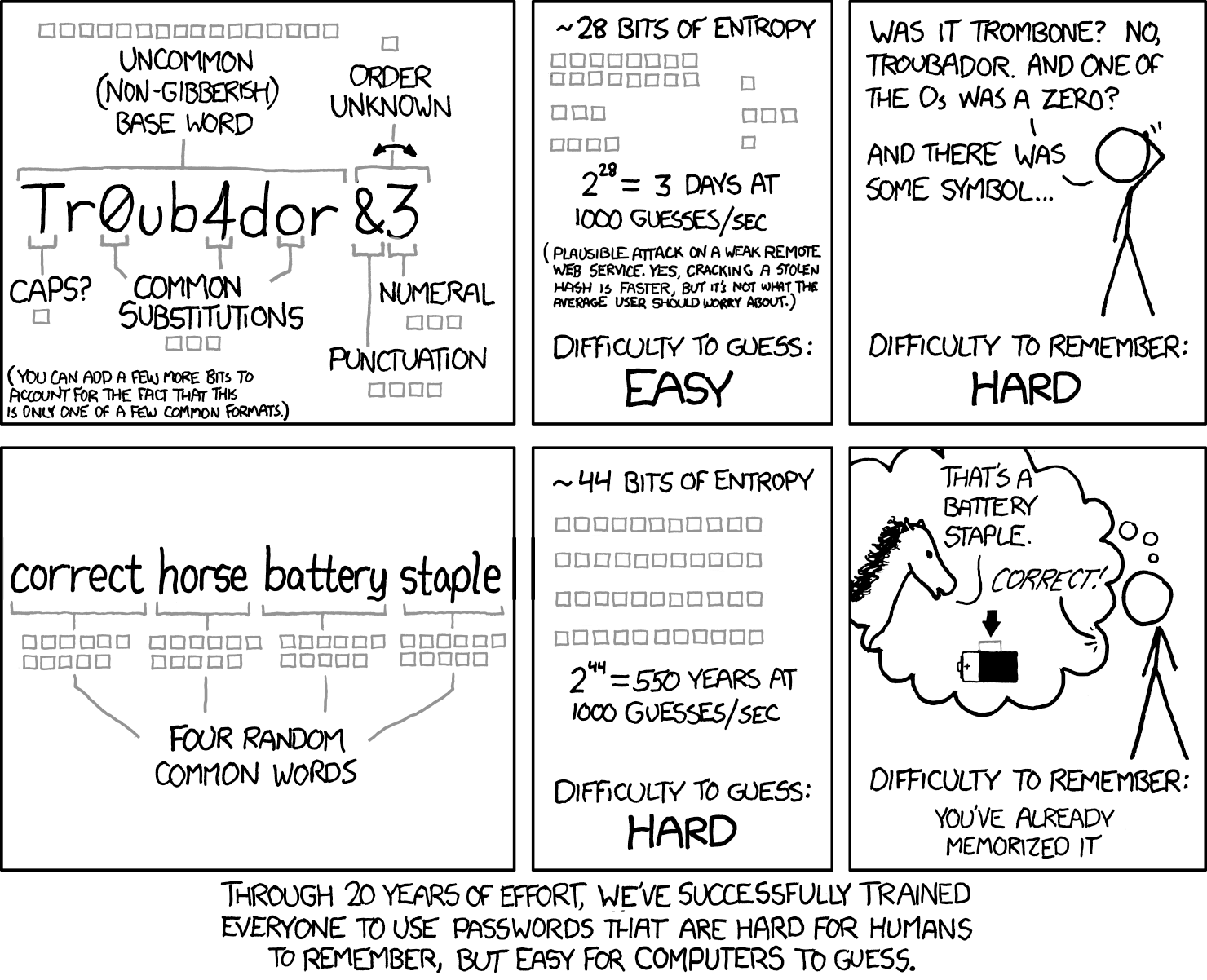
I've posted this many times before, but it's the best summary I've ever seen.

password_strength_2x.png


Pick three things. Could be shops on your commute to work.. Tesco, Betfred, Greggs. You'll want some numbers so maybe add the road number. You'll also want special characters. @ and ! are quite common so I avoid them.

Your password could then be Tesco&Betfred&GreggsA1307 - easy enough to remember but according to the link I posted would take 100 octillion years to crack....

Alternatively song lyrics that include numbers are pretty good too. 99RedBaloonsFloatingInTheSummerSky - you already remember it but look how long it is!

Anyway, you get the gist.

I could (and have!) talk about passwords for hours....
 
Just checked it and it would take 6 tredecillion years to crack :D

However, just adding one 'special character' increases that to 8 hundred quattuordecillion years

Special characters make a big difference!
Wow.

There is a lot of stuff in there to digest.

Thanks for the prompts.

I looked in Chrome Password Manager. Oh, a bit of a mess. Old passwords that will take 10 minutes to crack, 2FA passwords that will take 2 billion years to crack, passwords to websites that I don't even recognise or websites recognised but not used for eons.

I will delete a lot of these.

I will have to set aside some time in my schedule to go through this.
 
I looked in Chrome Password Manager. Oh, a bit of a mess. Old passwords that will take 10 minutes to crack, 2FA passwords that will take 2 billion years to crack, passwords to websites that I don't even recognise or websites recognised but not used for eons.

I will delete a lot of these.
Probably a good idea to export the existing password list and save it somewhere safe before swinging the axe and maybe deleting something that later on you find you shouldn't have !
 
And avoid “Booking.com”….✔️

Seems their website is linked and operated by hackers 👍
 
For those of us who sell software to protect against this sort of stuff, AI has been a real boon :D

For years people have thought I was being 'tin foil hat' about this stuff and now they're starting to realise just how big the problem is (and they haven't yet realised how big it's about to be...)

I should put it in my signature to avoid typing it so often, but AI is going to continue to increase both the frequency and sophistication of attacks at an exponential rate.

The time to protect yourself against it was three to five years ago but if you haven't then you should do right now.

Ditching Windows wouldn't be a bad place to start...
What would you use instead of Windows
 
There is a lot of stuff in there to digest.

Yeah. Sorry!

There is quite a bit to it, but it's actually pretty easy once you've got it all set up and have a 'routine'

I will have to set aside some time in my schedule to go through this.
This is the hardest part, and the part that puts people off or makes them procrastinate and never quite get round to it.

Keeper lets you import passwords (and save a backup of them so you can refer back if needed as @MrC99 pointed out) which took seconds to do.

However, going back through all those websites, updating the passwords, setting up 2FA, deleting unused accounts etc took me a couple of days and there were a few strays that I'd forgotten even after all that so it was probably a couple of weeks before I'd got it all sorted.

Updating the passwords is much easier now, but it still takes an hour or two - but I'm only doing it once a year so it's not a big deal.

I tend to do a check for compromised passwords somewhere around June and a complete change in Dec/Jan.
 
What would you use instead of Windows
Well, ditching Windows is perhaps a bit extreme, but I don't like the direction they seem to be heading down.

I only have Windows in virtual machines on my 'homelab' and only use them for testing purposes.

Otherwise I've used Macs at home for years but I also have some old Windows Laptops that I've put Linux on.

Linux really isn't difficult or scary to use these days. It's not all about typing code into terminals (although you can still do that!)

I'd probably go with Linux Mint if you're starting out.
 
Well, ditching Windows is perhaps a bit extreme, but I don't like the direction they seem to be heading down.

I only have Windows in virtual machines on my 'homelab' and only use them for testing purposes.

Otherwise I've used Macs at home for years but I also have some old Windows Laptops that I've put Linux on.

Linux really isn't difficult or scary to use these days. It's not all about typing code into terminals (although you can still do that!)

I'd probably go with Linux Mint if you're starting out.
Thanks

I was thinking more of commercial packages that use Windows as a platform

I have setup a virtual machine on my Mac - using Parallels -but is that just the same as Windows


Back
Top Bottom