Quest detailed map problem HELP!

OWDGEESER

Registered user
Joined
Jun 12, 2003
Messages
149
Reaction score
0
Location
Sheffield
AAAgh

Help please. Off on holiday tomorrow, tried downloading a rout but did not de select the MAP button first. Clicked abort and tried again.

Now I have lost my street level detail.

Tried to reload UK selection of maps and speed camera overlay from both my main PC SWMBO’s laptop.
I have searched this forum but can’t find an answer
Running a Quest (1) with recent V8
I’m tired its late can anyone help please. :nenau
 
What's problem are you having?
You started a map upload and cancelled it, right? So you've lost your maps on the Quest, and now only have the basemaps. Can you not upload a new set of maps and the overlay? What error message are you getting?
 
With my limited knoweldge on gps having a Quest 1 myself, I would reselect the route you want to upload to the quest and see how you go.

Whenever you upload new mapping you will loose previously stored maps.

Are you going abroad?

Jon :nenau
 
DodgyGeeSer said:
What's problem are you having?
You started a map upload and cancelled it, right? So you've lost your maps on the Quest, and now only have the basemaps. Can you not upload a new set of maps and the overlay? What error message are you getting?

There is no error message. but the maps shown are just very basic, ie main roads only. I guess this is the base map then.

I selected the uk and the safety camera overlay and uploaded them three times (using two differen PCs) but the same problem occurs. Each time it took several minutes and gave me the sucsessfuly completed message.

I will have one last try when I get back from work

thanks for the responses guys
 
Just tried it one more time before setting off to work.

Same problem

Could it be some setting I can't find on the Quest unit
I have checked the MAP INFO and both the City Navigator v8 and Euro poc are ticked. However I cant see any camera sites and when I de-select them there is no change :nenau
 
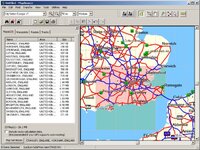
I think you have to use the map tool (irregular shaped icon in the tool bar) to individually select each map segment - selected ones turn pink. The other option may be to highlight the applicable route in the map pane (LHS), right click on it and click on "Select Maps Around Route"
 
Select the maps you want - they will highlight in pink and appear in the list.

Then download to the GPS unit.

Any maps in the GPS will be deleted and you will only have your new selection.

If you have no maps selected, then this will leave you the very basic base map - no detail.

If you do not want to select/download/replace maps, then only download waypoints and routes.
 

Attachments

  • maps.jpg
    maps.jpg
    115.9 KB · Views: 107
Cheers guys I have tried all these, with the exception of this


[The other option may be to highlight the applicable route in the map pane (LHS), right click on it and click on "Select Maps Around Route" ]

which I will try as soon as I get home (this is work time)

Thanks again for your contributions


Back
Top Bottom