still cannot put pics on any sites error coming up saying file too big tried to resize my pics still wont allow me to do so any body help (before the computer gets it)


You are using an out of date browser. It may not display this or other websites correctly.
You should upgrade or use an alternative browser.
You should upgrade or use an alternative browser.
re photos
- Thread starter cutmorej
- Start date

MasterDabber
Registered user
OK... let's try again and see if we can sort this out.
What software are you using to edit the photo?
Have a look at one of the photos you want to post...
how big is the file size? How many kb?
and what are its physical dimensions..
eg. fff pixels by kkk.
Once we know that we can then progress.
What software are you using to edit the photo?
Have a look at one of the photos you want to post...
how big is the file size? How many kb?
and what are its physical dimensions..
eg. fff pixels by kkk.
Once we know that we can then progress.
photo
what i have a the bottom of photo is 1280x960x24 bpp also 305kb 3.52mb i have tried to alter sizes but it always refers back to original size i have access to irfanview,logitech,photo -impression 4,adobe -photo 4.i can use any of these programmes
what i have a the bottom of photo is 1280x960x24 bpp also 305kb 3.52mb i have tried to alter sizes but it always refers back to original size i have access to irfanview,logitech,photo -impression 4,adobe -photo 4.i can use any of these programmes

Try this;
Open it in Irfanview
Click on "image" then "resize/resample"
Set it to 640x480 pixels on right hand side of the window that appears
Click "file"
Click "save as"
Give it a new name
Try attaching the new pic.
HTH

Jon
Open it in Irfanview
Click on "image" then "resize/resample"
Set it to 640x480 pixels on right hand side of the window that appears
Click "file"
Click "save as"
Give it a new name
Try attaching the new pic.
HTH
Jon
MasterDabber
Registered user
Just an additional comment to what Jon has suggested...
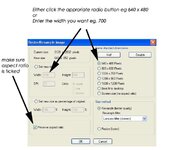
In the "Resize/Resample" box, make sure that you have ticked the "Preserve aspect ration" box.
You may find the 800 x 600 just a little large for these forums... probably Ok but you may want them a little smaller.
If you do...
In the "Resize/Resample" box simply go to set new size....
and then set the width to what you want... 700 perhaps.
With the "preserve aspect ratio" ticked, the height will automatically reset in proportion.
Hope that makes sense.
If the image is still too large then you can "save as"... as Jon suggests but before you then "Save" you can go to the "Options" and select the level of quality you require...
lower quality, smaller file size.
I guess that's as clear as mud
In the "Resize/Resample" box, make sure that you have ticked the "Preserve aspect ration" box.
You may find the 800 x 600 just a little large for these forums... probably Ok but you may want them a little smaller.
If you do...
In the "Resize/Resample" box simply go to set new size....
and then set the width to what you want... 700 perhaps.
With the "preserve aspect ratio" ticked, the height will automatically reset in proportion.
Hope that makes sense.
If the image is still too large then you can "save as"... as Jon suggests but before you then "Save" you can go to the "Options" and select the level of quality you require...
lower quality, smaller file size.
I guess that's as clear as mud

re photos again
i thank you all for your replies and ideas i did manage to put a picture on but it was tiny everytime i resize an error message comes up with 125000 my file size is too big, then resizing the picture only size i can get to place on a site is 175 x 200 how do you chaps get decent size pictures on here ive seen some at 800x529,480 x 360
i thank you all for your replies and ideas i did manage to put a picture on but it was tiny everytime i resize an error message comes up with 125000 my file size is too big, then resizing the picture only size i can get to place on a site is 175 x 200 how do you chaps get decent size pictures on here ive seen some at 800x529,480 x 360
Iain Hogg
Guest
You are saving the picture as a .jpg? Aren't you?
Iain

Iain
MasterDabber
Registered user
I go back to what I said originally...
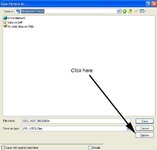
Go to "Save as".
Then click on options...
see below.
If the image is still too large then you can "save as"... as Jon suggests but before you then "Save" you can go to the "Options" and select the level of quality you require...
Go to "Save as".
Then click on options...
see below.
Attachments
MasterDabber
Registered user
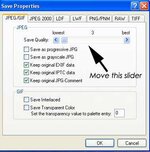
The go to the slider I have marked with the arrow...
see below.
Sliding this to the left will reduce the file size but also the quality.
So you probably need to do a test on what is a reasonable quality versus the overall file size.
So go through the stuff Whatton posted.... select 800 x 600.
Then go go to "save As".
Then go to "Options...
then play with the slider....
If that doesn't work I'm probably out of ideas.
HTH
see below.
Sliding this to the left will reduce the file size but also the quality.
So you probably need to do a test on what is a reasonable quality versus the overall file size.
So go through the stuff Whatton posted.... select 800 x 600.
Then go go to "save As".
Then go to "Options...
then play with the slider....
If that doesn't work I'm probably out of ideas.
HTH
Attachments

Fanum
Toubab
Well done chaps.......I'll copy this to a new thread tommorrow, strip out some bits and make it sticky as Roger suggested........top of the test forum maybe???
there was also that link to the online size adjuster prog that was posted a while back if anyone saved it...I tried to find it again the other day but failed miserably.....
Cheers
Bill
there was also that link to the online size adjuster prog that was posted a while back if anyone saved it...I tried to find it again the other day but failed miserably.....
Cheers
Bill
MasterDabber
Registered user

Iain Hogg said:You are saving the picture as a .jpg?
This is a good point, should be highlighted in the sticky
MasterDabber
Registered user
Re: tester
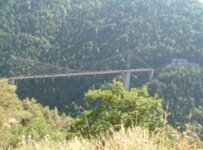
Now you can play around with the slider for quality... this picture is only 29k so you can probably afford to move the slider to the right a bit and improve the quality.
A case of suck it see
cutmorej said:at last i have a picture not the best i must admit i must thank everyone for their input as you all said it would be a good idea for somebody to collect all the data and formar asa file for future users. ps anybody know where this place is ???
Now you can play around with the slider for quality... this picture is only 29k so you can probably afford to move the slider to the right a bit and improve the quality.
A case of suck it see
Re: tester
It's at the top of the thread list in the Technical Forum, in the Computer Help section
cutmorej said:anybody know where this place is ???
It's at the top of the thread list in the Technical Forum, in the Computer Help section

Similar threads


- Replies
- 6
- Views
- 781


- Replies
- 3
- Views
- 542
