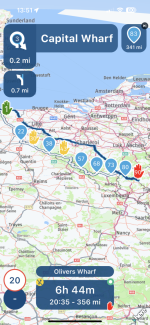
On a recent trip to France I have discovered a way to skip waypoints much faster (on iPhone), compared to tapping on ‘Skip Waypoint’ button, then having to confirm it by tapping on ‘Yes’.
Please note: The above method is obviously ideal if you have tapped ‘Skip Waypoint’ by accident, but if you are absolutely certain that you are in the mood to skip that mountain pass or two and just want to trundle along as fast as possible to that hotel and a cold one, then do the following.
Tap and hold the ‘Skip Waypoint’ button for a mere second. That’s it. No double tapping about or having to confirm anything.
I am not sure how many of the folk already knew this trick, but I am sure it’ll help those who haven’t known of this feature in MRA app.
Please note: The above method is obviously ideal if you have tapped ‘Skip Waypoint’ by accident, but if you are absolutely certain that you are in the mood to skip that mountain pass or two and just want to trundle along as fast as possible to that hotel and a cold one, then do the following.
Tap and hold the ‘Skip Waypoint’ button for a mere second. That’s it. No double tapping about or having to confirm anything.
I am not sure how many of the folk already knew this trick, but I am sure it’ll help those who haven’t known of this feature in MRA app.