Spambots

JoeBiff

Well-known member
UKGSer Subscriber
Joined
Dec 21, 2012
Messages
5,210
Reaction score
3,211
Location
With a hooker
Is there a way to defeat these pesky things?
I’ve noticed one persistent bot as having a “rolling” from-address, which slightly differs over each day.

I’m 99.99% certain I know who has created it.
 
A few more details will help.

When you say it's a spam-bot, I'm guessing you're referring to unwanted emails?

If so, then what email system do you use?

And what email client do you use to read them with?
 
I use gmail to filter my emails, even for the one remaining legacy account from Tiscali. I just set up Gmail to pull in the emails via POP3. Gmail has pretty decent spam removal. My devices are either Windows or Android and Gmail is an effective way to sync email across whatever device I am using as well as filtering.
 

Attachments

  • Screenshot 2024-12-31 101837.jpg
    Screenshot 2024-12-31 101837.jpg
    49.9 KB · Views: 51
I use gmail to filter my emails, even for the one remaining legacy account from Tiscali. I just set up Gmail to pull in the emails via POP3. Gmail has pretty decent spam removal. My devices are either Windows or Android and Gmail is an effective way to sync email across whatever device I am using as well as filtering.
I was tempted to change the mail address, but it's a pain and is the main MS account.
 
I didn’t get that many spam emails prior to sponsoring a contributor on Facebook , via Patreon. As soon as I’d signed up to Patreon my inbox became bombarded with all sorts of scam and spam emails. I’ve got it down now but still get emails from some of the same senders, using very slight differences in the sending address. Usually after I’ve blocked the previous address.
 
Ta :thumb2

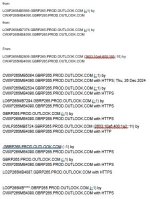
I guess first port of call is to have a look through this

It would be interesting to see if these were all coming from a single IP address or (probably) not.

Realistically, you're going to get the best results from a dedicated tool such as Bitdefender or similar.

Have a look also at things like MailWasher (I've never used it but have heard good things)

The real solution is to run your own mail server at home like I do, but that's a different nerd level entirely :D

Microsoft is evil, Google is eviler. These are the two main things you need to know!
 
Ta :thumb2

I guess first port of call is to have a look through this

It would be interesting to see if these were all coming from a single IP address or (probably) not.

Realistically, you're going to get the best results from a dedicated tool such as Bitdefender or similar.

Have a look also at things like MailWasher (I've never used it but have heard good things)

The real solution is to run your own mail server at home like I do, but that's a different nerd level entirely :D

Microsoft is evil, Google is eviler. These are the two main things you need to know!
Thanks Fil.
The IP [from] address appears to vary in each mail. The only fixed IP address is the one where it’s sent from the MS server (I think, as this is not really my area of expertise…). I’d be happy to PM you the full script if you were so inclined?
I’m mindful that if I create a rule to block this one particular MS address, I might block genuine mail??

The other resources you sent are quite helpful/interesting but my guess is that unless the MS algorithms can be ‘trained’ to reject the junk through a series of “rules” these little that can be done with these bu88ers?
 
Have you ben doing the right-click on the email and mark it as junk (block sender)?

You could also look at turning up the level of Junk Email Settings so it blocks more stuff - although that probably means checking your junk folder more often and 'whitelisting' mails that end up in there that you did want to receive.

That's probably the first thing to try :thumb2
 
Have you ben doing the right-click on the email and mark it as junk (block sender)?
Yep, been doing that for few weeks now. And created a series of rules to capture the shit which seems to be 90% successful.
You could also look at turning up the level of Junk Email Settings so it blocks more stuff - although that probably means checking your junk folder more often and 'whitelisting' mails that end up in there that you did want to receive.

That's probably the first thing to try :thumb2
I think there are some wins with this route. Just wondered if I could achieve nearer 100% capture rate. It’s only this solitary sad bastard who seems to be a bit of a culprit. 👍
 
It would be interesting to see if these were all coming from a single IP address or (probably) not..
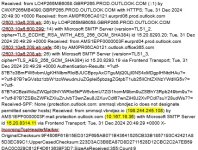
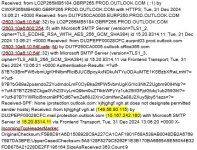
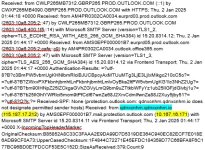
Below are three examples; AFAICS the IP addresses seem to vary.
 

Attachments

  • Screenshot 2025-01-02 172506.jpg
    Screenshot 2025-01-02 172506.jpg
    84.4 KB · Views: 26
  • Screenshot 2025-01-02 172435.jpg
    Screenshot 2025-01-02 172435.jpg
    85.3 KB · Views: 14
  • Screenshot 2025-01-02 172405.jpg
    Screenshot 2025-01-02 172405.jpg
    86.3 KB · Views: 27
Yeah - it's pretty much what I would have expected.

As @wessie alluded to it just needs something that will do some simple filtering for you in the way that Gmail does.

Mailwasher, Bitdefender or Microsoft Defender would probably do the job.

I've been pretty impressed with what I've seen of Bitdefenderand it's really not expensive especially if you buy the 2 year deal. You get a 30 day free trial too which I always like to see - only companies with confidence in their products seem to offer those!

Gives you an awful lot more protection than just taking the spam out of your email

Mailwasher and Defender are supposed to be good, but I've never used either.
 
I use Thunderbird as my default email client for most of my PCs. This is fairly good at eliminating the spam. For two addresses I use Outlook. There are persistently getting spam even though only 4 people know these email addresses. Two of them are govt and the addresses are random enough that you wouldn't guess them easily. It seems that Outlook has sold its' soul.
 
Thunderbird is excellent and very underrated IMO (completely free and it's just a client so you don't have to change your email or do anything complicated and if you don't like it then you can just swap back to Outlook or whatever and you won't lose any email...)

It seems that Outlook has sold its' soul.

Ah! Now, that's where your opinion and mine differ. Outlook is a Microsoft product therefore it didn't have a soul to sell in the first place... :D


(Although Microsoft would probably sell you it anyway even if it didn't exist. I still haven't forgiven them for the hours of my life that were wasted by that stupid paperclip)
 
….. or Microsoft Defender would probably do the job.
AFAIK, Outlook365 has it as standard, and I configure the “rules” through there.
I’m pretty sure it’s part-and-parcel of W11 OS product (though bits can be turned off in ‘Settings’ IIUC).

As I say, I’ve never been troubled with spam for decades on this account, then….. :nenau
I think my next step is to configure the account to accept mail from”trusted senders/known contacts only” ?
 
I don't know that much about Defender but I thought they included a 'lite' version but if you wanted the one that does more protection then it's paid. Not sure. Microsoft licensing is an absolute minefield.

Trusted senders is an option worth trying, but it can be a nuisance.

Given that it's zero cost I'd be tempted to follow Frodi's suggestion of trying Thunderbird. It's part of the Mozilla family which you probably know for the Firefox browser. They've been around for ages and have a pretty good ethos and a decent community.

You just download it and set it up to pick up mail from your existing account. You can keep your Outlook running in parallel while you evaluate it.

Don't know if you use the calendar, but that might be worth looking into if you're going to swap clients. Haven't looked at Thunderbird properly in years so am not up to speed on it's calendaring abilities.
 
I don't know that much about Defender but I thought they included a 'lite' version but if you wanted the one that does more protection then it's paid. Not sure. Microsoft licensing is an absolute minefield.

Yes, you get "Windows Security" with Win10/11. To get the full Defender Suite you have to pay for an MS365 licence. I had 12 months included with this Asus laptop but I did not renew the sub. I use the open source Libre Office suite as it works well. As for security, there is no need to pay a sub for a domestic Windows laptop running Win 11. Ublock stops shit in the Chrome browser including those ads embedded in Youtube videos. Gmail filters spam in email and the free Windows Security blocks Malware and does a periodic scan.
 
Yes, you get "Windows Security" with Win10/11. To get the full Defender Suite you have to pay for an MS365 licence. I had 12 months included with this Asus laptop but I did not renew the sub. I use the open source Libre Office suite as it works well. As for security, there is no need to pay a sub for a domestic Windows laptop running Win 11. Ublock stops shit in the Chrome browser including those ads embedded in Youtube videos. Gmail filters spam in email and the free Windows Security blocks Malware and does a periodic scan.
I have the MS license, so there’s the full cream Defender caper.
Would be interested to see how gmail could cope with the aforementioned spambots, though. They’re deliberately engineered to bypass intelligent algorithms…..
 
I have the MS license, so there’s the full cream Defender caper.
Would be interested to see how gmail could cope with the aforementioned spambots, though. They’re deliberately engineered to bypass intelligent algorithms…..

why not set up a disposable email account with gmail and outlook, sign up to a few email lists with the outlook one and then configure gmail to pull in the outlook emails? Make sure you tick the box to leave all emails on the Outlook server as the default clears the inbox. Then after a few weeks, check the gmail and outlook inboxes to see if you have the spam in one or both inboxes.
I am assuming Outlook email has a web portal you can use to access emails rather than pulling them into your normal email client in MS365.


Back
Top Bottom