Spambots

why not set up a disposable email account with gmail and outlook, sign up to a few email lists with the outlook one and then configure gmail to pull in the outlook emails? Make sure you tick the box to leave all emails on the Outlook server as the default clears the inbox. Then after a few weeks, check the gmail and outlook inboxes to see if you have the spam in one or both inboxes.
I am assuming Outlook email has a web portal you can use to access emails rather than pulling them into your normal email client in MS365.
Ta, but it prolly wouldn’t work with the prat who’s configured the bot?
IOW, he/they wouldn’t know the ‘new’ disposable email addresses?
 
Ta, but it prolly wouldn’t work with the prat who’s configured the bot?
IOW, he/they wouldn’t know the ‘new’ disposable email addresses?

I thought you said you suspected the source of the emails from some dodgy service you subscribed to ... I mean, you can't have signed up to that many porn sites
 
I thought you said you suspected the source of the emails from some dodgy service you subscribed to ... I mean, you can't have signed up to that many porn sites
👍😂😂😂
Post #1 ….. “I’m 99.99% certain I know who has created it.”
Post #11…..”It’s only this solitary sad bastard…”
All in the singular 🎈
 
Don't know if you use the calendar, but that might be worth looking into if you're going to swap clients. Haven't looked at Thunderbird properly in years so am not up to speed on it's calendaring abilities.
I have the calendar activated in most of my PCs but I have never been able to fully integrate Google calendar properly. So much so that I now use google calendar separately in a browser.
 
I seemed to remember the calendar has some quirks, but it was a long time ago and I know the Mozilla team are pretty good at bug fixes and updates.

I don’t want to comment beyond saying it was worth checking so it’s good to have feedback from a current user
 
I think that the problems arose from Google's method of authenticating account and sign ins. I got it working for a while but then after one more change I just gave up chasing fixes.
 
The real solution is to run your own mail server at home like I do, but that's a different nerd level entirely :D
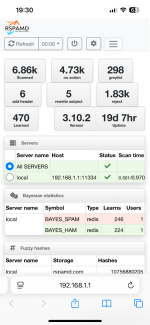
That’s what I do here. Coupled with RSpamD

Only been running RSpam for a couple of months or so & it’s already blocked ~1800 junk emails :yikes
 

Attachments

  • IMG_4891.png
    IMG_4891.png
    246.7 KB · Views: 9
Scary isn't it? :D

Pair that with the amount of adverts etc that we don't think we're subjected to...

Screenshot-2025-01-06-at-21-37-05.png


And, yes, that's in the last 24h

I'd not come across RSpamD before - looks interesting.
 
Your PiHole adlist numbers trump mine a bit :D

Yeah RSpamD is pretty cool, I looked at getting it implemented after I got fed up of many daily emails suggesting that I hook up with Russian Women & goodness knows what else 🙄
I have it running as a plugin on OPNSense but I believe it can be installed on pretty much anything.
You then have it listening on port 25 so any incoming mail gets delivered to it & it then forwards anything that passes its checks on to your actual mail server
 

Attachments

  • IMG_4893.png
    IMG_4893.png
    119.2 KB · Views: 5
My PiHole is doing that thing where it double counts some of the adlist figures so I've probably got about half that.

Mostly Firebog but also have BarbBlock, Swedish Hosts and OISD. Used to have DeveloperDan too but I think that died sadly - oh, and of course the ubiquitous Steven Black, but that goes without saying!

Have to say that my mailserver and the MacMini that has been running it are now creeping up to ten years old so I've been thinking for a while that it's probably time to pre-emptively retire them before they fall over and die...

Is your mailserver also OpenSource?
 
Your PiHole adlist numbers trump mine a bit :D

Yeah RSpamD is pretty cool, I looked at getting it implemented after I got fed up of many daily emails suggesting that I hook up with Russian Women & goodness knows what else 🙄
I have it running as a plugin on OPNSense but I believe it can be installed on pretty much anything.
You then have it listening on port 25 so any incoming mail gets delivered to it & it then forwards anything that passes its checks on to your actual mail server
So (genuine question) what makes the trapping algorithms more effective in those products stopping stuff from ‘Russian women’, that can’t be achieved in Outlook settings?
My PiHole is doing that thing where it double counts some of the adlist figures so I've probably got about half that.

Mostly Firebog but also have BarbBlock, Swedish Hosts and OISD. Used to have DeveloperDan too but I think that died sadly - oh, and of course the ubiquitous Steven Black, but that goes without saying!

Have to say that my mailserver and the MacMini that has been running it are now creeping up to ten years old so I've been thinking for a while that it's probably time to pre-emptively retire them before they fall over and die...

Is your mailserver also OpenSource?
Same question to you Fil, for ten points 🙂
If you don’t mind…..
TIA

Edited to add: I don’t get anywhere like those numbers of spam arriving in my inbox (probably less that a couple per week) until this one persistent cnut developed his code and its generating a dozen a day?
 
Essentially RSpamD is solely built to do one job which is to analyse emails and sift out the spam. It does this through a mixture of rules which apply a 'score' to how likely something is to be spam. The various rules will look at different parts of the email and assign a score to each of those parts and then look at the overall score and see if it's high enough to be marked as spam.

This is combined with an AI element that learns over time - so if it's flagging emails with the word 'Viagra' in them as spam but you happen to be a doctor specialising in erectile dysfunction and therefore keep marking them as 'not spam' manually then it will take a hint and automatically lower the points added to the spam score for that word.

You can also go in to the long list of spam scoring rules and manually tweak them up or down to tailor it to your needs and add blacklists and whitelists - so you can block or allow certain things independently of the spam score.

TLDR? - Outlook is like Paint. It will do a basic job pretty well but you have limited features. RSpamD is like Photoshop. It's a lot more complex and while it will take longer to setup and learn it's also a lot more powerful and capable.


As for my 10 point question - well I'd gone off on a tangent really. The pic I posted is for a thing called PiHole (free software and can be run on a £15 Raspberry Pi). It's got absolutely nothing to do with email. What that does in a nutshell is take a list of websites that deliver adverts to your browser / phone apps / etc and prevents them from sending you stuff you don't want / need. What's nice is that it works at the network level, so you set up one small cheap device and then it will block ads for any device that you connect to your home network without needing to install anything on any other device.

Plenty of tutorials online and very easy to do even without any real networking knowledge. Just follow the instructions and copy/paste the code. Takes about 15 mins to setup from scratch. A little bit longer if you combine it with Unbound to create a recursive DNS server - but that's a bonus 20 point question :D
 
Essentially RSpamD is solely built to do one job which is to analyse emails and sift out the spam. It does this through a mixture of rules which apply a 'score' to how likely something is to be spam. The various rules will look at different parts of the email and assign a score to each of those parts and then look at the overall score and see if it's high enough to be marked as spam.

This is combined with an AI element that learns over time - so if it's flagging emails with the word 'Viagra' in them as spam but you happen to be a doctor specialising in erectile dysfunction and therefore keep marking them as 'not spam' manually then it will take a hint and automatically lower the points added to the spam score for that word.

You can also go in to the long list of spam scoring rules and manually tweak them up or down to tailor it to your needs and add blacklists and whitelists - so you can block or allow certain things independently of the spam score.

TLDR? - Outlook is like Paint. It will do a basic job pretty well but you have limited features. RSpamD is like Photoshop. It's a lot more complex and while it will take longer to setup and learn it's also a lot more powerful and capable.


As for my 10 point question - well I'd gone off on a tangent really. The pic I posted is for a thing called PiHole (free software and can be run on a £15 Raspberry Pi). It's got absolutely nothing to do with email. What that does in a nutshell is take a list of websites that deliver adverts to your browser / phone apps / etc and prevents them from sending you stuff you don't want / need. What's nice is that it works at the network level, so you set up one small cheap device and then it will block ads for any device that you connect to your home network without needing to install anything on any other device.

Plenty of tutorials online and very easy to do even without any real networking knowledge. Just follow the instructions and copy/paste the code. Takes about 15 mins to setup from scratch. A little bit longer if you combine it with Unbound to create a recursive DNS server - but that's a bonus 20 point question :D

Thanks for taking the time/effort to explain.
I assumed (prob wrongly?) that Outlook would have also used recursive learning and possibly even AI to detect spam, given how big the MS organisation is and the billions of mails it must regularly handle through its system. There’s also — to my mind - a lot of settings and predetermined rules which the user can create and set; obviously not enough, tho?
 
Outlook will work on similar principles and will also be using AI etc, but spam removal is not the core function of the software.

This means it doesn't give you the same level of control / customisation / configuration to fine tune it to your needs and it won't be doing it quite as in-depth as a dedicated spam killing piece of software.

You also have to consider the 'dual check' factor. What one misses, the other might pick up because they'll be running on different statistical engines etc.

I was having a look at RSpamD and it has a ton of pre-installed and optional modules so it's possible not only to check standard things like SPF and DKIM but also things like the 'reputation' of the IP address the email originated from and other clever stuff.

It's just a much bigger hammer :D
 
Is your mailserver also OpenSource?
It is, well at least now it is.

I originally started with Exchange Server 2007 that I “found” online somewhere.
I think I went through a couple of generations of that back when I still thought it was cool to mess around with Windows Server.

Then when I saw the light 10 years or so ago & moved over to Linux I migrated my mail server over to Zimbra Collaboration Network Edition & stuck with that for a number of years before the company got bought out & they stopped building the Network Edition of Zimbra. From there I then migrated over to Carbonio CE, which I believe is still based on the Zimbra source code, but the Carbonio team are also putting their own spin on it too.
That’s where I am currently
 
Zimbra were one of my main competitors when I was selling mail servers. Was pretty good, feature rich and stable. The only real downside was that it needed a bit of knowledge to install and configure.

Haven't looked at it in a decade though!

I'll have a look at Carbonio CE - thanks. :thumb2


Back
Top Bottom