TET maps help pls - Mac

Zorro

Well-known member
UKGSer Subscriber
Joined
Dec 10, 2008
Messages
824
Reaction score
57
Location
SE
I am trying to use the TET routes and maps by downloading them from the main website and using Basecamp
https://www.transeurotrail.org/navigation-tips/
I am using a Mac
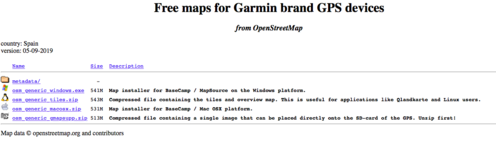
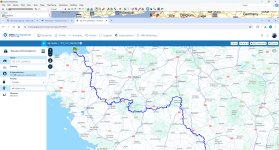
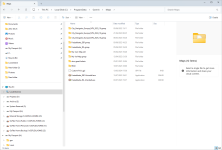
I get to the OpenMaps files but seem unable to do anything with the files dowloaded (screenshot below).
Has anyone managed to use the maps on the TET website? If so, help pls. :thumby:
 

Attachments

  • TET Spain Screen Shot 190909.png
    TET Spain Screen Shot 190909.png
    89.4 KB · Views: 116
thanks, i thought i was following their advice...
re-reading the 'how to' it is embarrassingly simple
looking forward to october to do some of these trails
 
Trying to download the TET maps to iPhone and MRA app .
I can download them from website here then save to files . Then I go on to MRA, Route Lab and click on upload

bb5297680605c9ba3ec0511db884e79d.jpg


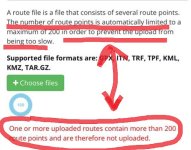
I then get this error when trying to upload file

73b3331fda783df922ee7c48b1da744a.jpg


Adv that’s as far as I get . Can’t see the routes or open anything . Very annoying .

Any ideas ? Ta
 
Different things here-
Maps
and
Tracks
NB there are no routes in the link you provided nor any in BC- ONLY tracks and waypoints- that maybe your first problem when making your selection with mra.

Next:

Maps-
these need be installed in BC in your computer or placed in a folder called 'Garmin' on an SD card- in order to be 'selectable' in BC (and sometimes the Ms version needs be coded to zero for BC to be able to see them.)
but I do not use a Mac so...

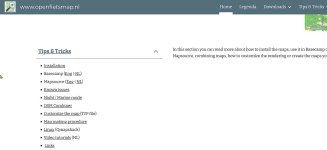
If you were to chose Openfietsmap, ( the only one I looked at), there are 'how to' tutorials as per screen shot below:
fiets.jpg
As to the GPX file upload errors:
Could it be that the answer is in red as per your screen shot? aka "contain more than 200 route points?" :nenaubut then there are no routes in the GPX download option- another problem - selecting 'tracks' may overcome the mra issue

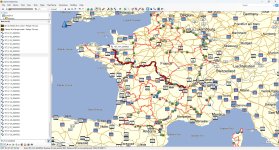
One suggestion - (my not being an mra user so feel free to disregard!) would be to open the downloaded file in BC; the gpx contains 29 tracks and 208 waypoints.
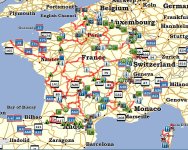
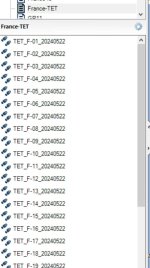
To get past the warning you are getting, I would create individual .gpx files for each of the tracks keeping the same sequence but renaming them like Fr-TET1, Fr-TET2 so that you can match them with the originals (pic below) and start from there.
You could also convert the tracks to routes but for trails I see no point as this will cause errors since recalculations use the mapping chosen to do so and a ridden laid-down trail is accurate whereas mapping...much less so.

Size matters :DLimits.jpgFR-TET.jpg TET-tracks.jpg

Time to get busy!!


p.s
:redlightDon't forget to read their caveat:
"Please note that some sections will be removed from the download over the summer months either completely or by displaying them as single straight lines. We ask you not to ride these sections during these times as there are issues with fire risk or the potential for conflict with co-users who crowd to these areas as tourists."

 
Last edited:
Two different things here-
Maps
and
Tracks

Maps- these need be installed in BC in your computer or placed in a folder called 'Garmin' on an SD card- in order to be 'selectable' in BC (and sometimes the Ms version needs be coded to zero for BC to be able to see them.)
but I do not use a Mac so...

As to the GPX file upload errors:
Could it be that the answer is in red as per your screen shot? aka "contain more than 200 route points?" :nenau

One suggestion - (my not being an mra user so feel free to disregard!) would be to open the downloaded file in BC; the gpx contains 29 tracks and 208 waypoints.

To get past the warning you are getting, I would create individual .gpx files for each of the tracks keeping the same sequence but renaming them like Fr-TET1, Fr-TET2 so that you can match them with the originals (pic below) and start from there.
You can also convert the tracks to routes but for trails I see no point as this will cause errors since recalculations use the mapping chosen to do so and a ridden laid-down trail is accurate whereas mapping...much less so.

Size matters :DView attachment 334414View attachment 334411 View attachment 334412


p.s
Don't forget to read their caveat:
"Please note that some sections will be removed from the download over the summer months either completely or by displaying them as single straight lines. We ask you not to ride these sections during these times as there are issues with fire risk or the potential for conflict with co-users who crowd to these areas as tourists."

Ta for the info.
It wouldn’t open on my iPhone 15 but MRA opens on my ipad and shows the tracks.

658a1b39da51c1db36d346d993e7877e.png


I’ve just been copying some near my place in Brittany . I selected off-road in MRA and can then add tracks, but you need to add lots of waypoints otherwise it just straight lines it . Also doesn’t show distance for some reason .

9e02f7ccf5afdf6116630903c0f67abc.png


32a6118a076cb2d805eca228f79f0621.png
 
@ Bonnie Tyler "you need to add a lot of waypoints" :nenau :nenau
Here you lose me!! but my not using mra, it's no wonder.:D
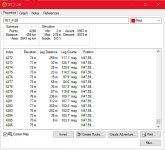
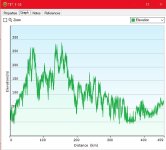
Using track #28 as an example:

ScreenShot475.jpgelevation.jpg
FWIW, you can get rid of legs but IMHO, the more one 'fiddles' with data, the more likely one is to goof somewhere. I do not use mra hence I am of no use to you but every track displays fabulously in my BC and on my Garmin 700 with my topography maps because that is what I use.
Whatever maps you use, IF you try to create a route from an off road track, the re-calculation will take into account your map data and other settings you have set and.....usually cock everything up.
On Garmin units, a track overlaid on any map can easily be displayed and followed- no need for routes. I fail to understand why anyone would want to create a route from an off-road trail :nenau -
 
Last edited:
Bonnie Tyler - your posts have disappeared :confused:
Anyways- I hope this helps monsieur Zorro (and others) a bit- who knows?
UnPot.gif
 
Trying to download the TET maps to iPhone and MRA app .
I can download them from website here then save to files . Then I go on to MRA, Route Lab and click on upload

bb5297680605c9ba3ec0511db884e79d.jpg


I then get this error when trying to upload file

73b3331fda783df922ee7c48b1da744a.jpg


Adv that’s as far as I get . Can’t see the routes or open anything . Very annoying .

Any ideas ? Ta
In MRA if you try to download a lot of tracks like that it links them all together. Which is what you are seeing. If you have basecamp and you downloads them you get 29 tracks. Eash of those tracks has to be individually downloaded to MRA and given a name so that you can see them separately
 
TETF.jpg
this is the download. You can see 208 Waypoints and 29 Tracks. One is highlighted.

If I export the highlighted track to file and then upload this to MRA I get this.

TETF1.jpg

Sorry I cut the ass off it but you get the gist. You need to do this for the 29 Tracks in MRA individually.
 
I am trying to use the TET routes and maps by downloading them from the main website and using Basecamp
https://www.transeurotrail.org/navigation-tips/
I am using a Mac
I get to the OpenMaps files but seem unable to do anything with the files dowloaded (screenshot below).
Has anyone managed to use the maps on the TET website? If so, help pls. :thumby:
I'm not particularly familiar with MAC but, the easiest option would be to load the fourth option on the SD card of your GPS device and I assume in the mac version of Basecamp this can then be read if you connect the GPS device? In Windows machines you bung the non Garmin maps in with the Garmin ones and they appear on the maps tab. If they have a *.gmap file extension

1720447841532.png
 
In Windows machines you bung the non Garmin maps in with the Garmin ones and they appear on the maps tab. If they have a *.gmap file extension
Not always Mzokk! hence my "and sometimes the Ms version needs be coded to zero for BC to be able to see them"
It has caught out many (and me!) who are now out of hair :D
 
I made a few custom maps myself using mkgmap and splitter during the winter and had a few splinters under my nails during the process :D
 
Not always Mzokk! hence my "and sometimes the Ms version needs be coded to zero for BC to be able to see them"
It has caught out many (and me!) who are now out of hair :D

Also just saw elsewhere that OSM maps are available on MRA, and a track can be created manually now which is good.

Doesn’t help the OP though.


Sent from my iPhone using Tapatalk
 
Also just saw elsewhere that OSM maps are available on MRA, and a track can be created manually now which is good.

Doesn’t help the OP though.


Sent from my iPhone using Tapatalk

Yup . That’s what I’m doing . Shame that track created doesn’t show distance or time . Guess it can’t calculate it


Back
Top Bottom