Web page piccies

Firegus

Active member
UKGSer Subscriber
Joined
Jul 31, 2004
Messages
231
Reaction score
8
Location
Burns Country
I wonder if anyone can help me with this problem?

I manage a web site for my local bike club. I created the site using Microsoft Word and have no problems except with the Photos in the Gallery.

When I edit the pictures in Microsoft Picture It, I normally use the “save as a web ready picture” feature, which allows the pictures to appear relatively quickly, but are always blurred.

How do I reduce the file size to allow the pictures to appear quickly but still good quality?

The Club members are always complimentary about the site, but comment on the fact that, either the pictures take so long to appear or if they appear quickly they are blurred.

The Ayrshire Touring Motorcycle Club website is at http://myweb.tiscali.co.uk/atmcc

BTW, I have the loan of Adobe Photoshop 5.0 LE but have not tried it yet.

I am sure there will be a simple solution and one of you will have it,

Thanks in anticipation
 
I had a look at your website and looked at the properties of some of the photos you have posted (which do look very blurred... sorry). They are only about 4k or 5k in size and will be blurred by definition.

A lot of the photos on this site are perhaps around the 40k to 50k size and look good quality. At the end of the day you have to trade off file size against quality.. and 4k or 5k pictures will never look particularly good unless they are physically very small photos.

I'm not familiar with Picture It... but in Photoshop when you "save for the web" you can select the amount of compression you want.. in other words how good a quality you want to accept and be able to preview it before you post.

HTH
Derek
 
I had a quick browse round the gallery, and all of the pictures loaded quickly, as far as I could see, but they were indeed blurry.

The reason for this is that the tool you are using is compressing the picture too much, and making the file too small. The way that JPEG (the format your pictures are stored at) works, is that it tries to average out information in the picture, to make the file smaller (this is called "lossy compression", because you end up losing detail).

Most of the pictures on your web site are fairly small (in terms of file size), around 20 KB. I would see if you can change the settings to use less compression and make them larger. 60-70 KB would be a better file size, and this would lose you less detail. I think most people would prefer to wait a little bit longer for an image to load, and have a good clear image.

David
 
Thanks

Microsoft Picture-it doesn`t have variable compression, I have installed Adobe Photoshop and will give it a go tonight.

Thanks for your help

Fergus
 
Firegus,

If you are using XP right click the original photo and use the send to email option. Windows will ask wether you want tomake the picture smaller or not. You answer yes and it goes to a mail. From there you can save it to your folderand useit.

A quality photo uses a lot of information that the screen cannot show. This option does not reduce the "quality" of the image for the screen but it does for the printer. Therefore you cannot see the difference. However a 2MB photo will go to 50KB.

A screen only shows 72DPI so it just removes the dots the screen can't show.

Hope this helps...
 
Look for the "save for web" facility in photoshop, though I can't recall if it was a feature in 5LE. I'd agree with Derek and David and 50k(ish) is a reasonable size to aim for which will give a good size on page picture up to about 500 pixels wide/high. I'd also suggest looking about for a dedicated web page program of some sort which may have an initial steep learning curve but thereafter will pay dividends when editing or adding to the site and would make things like thumbnail links to pictures easy to develop. However the content of the site, the most important bit, is there so a bit of window dressing is all that is needed to make it sparkle.

Andy
 
Photoshop

Tried the "save for the web" thingy and couldn`t find it, the help section tells you to save a a JPEG and it will then give you the chance to compress the image and make it a progressive JPEG [as used in this site] but i`m buggered if I can find it!
 
photoshop

file

--> save for web


this will give you the photoshop image ready program


what version of photshop do u have?


secondly dont use word to design webpages..

its terrrible, it puts lots of shitty code in there and doesnt work properly on some browsers. esp netscape..

use dreamweaver or something like that..

..

regards

pthag


send me a pm if you have any problems with photoshop..
 
Fergus

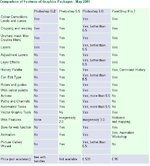
Just found the attached chart... looks like Photoshop 5LE doesn't have the "Save for web" function.
Not quite sure where that leaves you...
But you could use Irfanview.
You can get a free download from here

You can resize the physical dimensions plus when you go into the "save" function you can go to "options" where you can progressively choose the quality of the image you want to save.
The downside is that it doesn't give you a preview window to see what the finished effect will be.
So maybe this doesn't give you much of a benefit over Picture It.
 

Attachments

  • screenshot004.jpg
    screenshot004.jpg
    64.9 KB · Views: 73
yep..

get a newer version of photoshop and yer sorted..

im sure youll find somebody withy a ahem!, copy somewhere :-)


untill then irfanview is great..

pthag
 
You're getting lots of helpful advice but no one has commended you on managing to get any form of web site running that was produced in MS Word on a machine running Doze ME. You have done really well when the odds were heavily against you :thumb
 
Judge

Thanks for your praise and help.
Until I find a easy to use web authoring and or graphics program, cheap, [i.e. coverdisk] I will have to p+ss with the c$ck i`ve got.
Should really invest in a new computer, but, i`m spending too much on this bloody GS to afford it.
 
Masterdabber

Downloaded the IrfanView program, seems to work better, and free! Just the thing us canny Scots appreciate.

Thanks

Fergus


Back
Top Bottom