Wireless connction is crap, what about via the ring main?

ELIMINATOR

Registered user
Joined
Sep 18, 2004
Messages
6,789
Reaction score
46
Location
Hampshire.
Virgin wirelesss connector tends to drop out, I've heard that there is an adaptor to pass the signal via the household ring main.

Any information on this or recommendations would be most welcome.

Virgin is the worst internet provider we've had, both BY and Sky were better, chasing a few pence is not always best.:blast
 
the gadet show on channel five have just been on about the very same thing
 
if you have a look on there web site there is a short video from tonights program
 
@Eliminator - is it the 'wireless' part of the router that drops out or the connection to the internet? I use some adaptors to feed internet from the router into the mains (even works out in the shed!) and the router also provides wireless.
Compared to our last house, much better as I have a loft now and putting the router up there means the whole house is covered by wireless signal.

But step 1 is to figure if it's just the wireless part failing I guess. You could try hard wiring from the router?
I use an Apple airport router - that needs a separate modem but that's by the by...
The connectors to and from the mains are Netgear HD units. They've never missed a beat in 4 years. Cant say that for their modem/router I had! But one unit's up in the loft to put the signal in, one's feeding SWMBO's PC, one spare - the iMac , Apple TV box and phones etc. run off the wireless side.
All the best!
 
Been using the ring main to route my broadband round the house for years. Bl@@dy brilliant! No worrying about getting through walls or extremities of the house. I use these. I've 6 of them! One from the router to the ring main, then one each for 3 PC's around the house, and one for the Humax digibox to get iPlayer on the family TV and another for the TV in my office. Apart from smartphones, this system makes wifi almost redundant!
 
The problem with a lot of these PLT (power line transmission) devices is that the can cause massive interference to Long Wave, Medium Wave, and Short Wave (HF) radio receivers. Not good if you like to listen to short wave radio, are a radio ham and has someone nearby with some of these devices. Ofcom will help track them down and instruct you to change them for a better one. The supplier will be required to replace it as they don't comply with the EEC EMC (Electro-magnet compatibility) legislation.

The newer faster ones can cause interference all the way up to DAB frequencies. They are supposed to notch out certain frequency bands but they all don't.

Simon
 
Look at Netgear kit, I've used it quite a bit at work and it seems to be very reliable. I usually source it from Misco
 
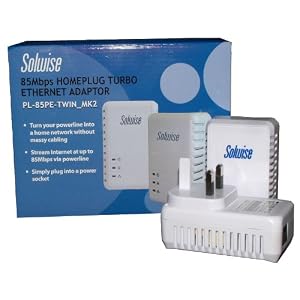
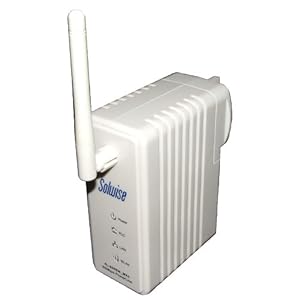
I've got Solwise kit & it's brilliant.

51Ep0eW71TL._AA300_.jpg
416txHg1fFL._SL500_AA300_.jpg


They also do a Wifi plug as well,which I have in a bedroom upstairs. Full wifi signal all over the house (has a plug in the bottom, so you can use it wired like the others too).

Password secured & the signal doesn't get out past the meter, so no-one on your 3 phase getting access either.

As fast as being directly connected to the router & no worrying about long cables or trying to route them anywhere.

Fantastic bit of kit :thumb2
 
It is the router, as the internet works when the PC is hard wired into the router. Also the light that shows the wireless is working is not lit, yes, I know, I should contact Virgin, but, contract is nearly expired. I'll go back to either BT or Sky, and see what happens with wi-fi.
 
Why not just buy a decent router? Those supplied as part of a package by an ISP tend to be the cheapest most basic ones available. I and many mates all use a Cisco router which to date have been reliable and trouble free. :beer:
 
Why not just buy a decent router? Those supplied as part of a package by an ISP tend to be the cheapest most basic ones available. I and many mates all use a Cisco router which to date have been reliable and trouble free. :beer:

Is it possible to swap routers with some providers like Virgin (and not meaning to hijack this thread) Sky? Or are some totally locked in?
 
Is it possible to swap routers with some providers like Virgin (and not meaning to hijack this thread) Sky? Or are some totally locked in?

With Virgin on fibre optic they know what they've supplied you and interrogate it over the connection.

Additionally all their call centres appear to be located in areas where they speak all but unintelligible English. Mostly a long way east and south of the UK.
 
Look at Netgear kit, I've used it quite a bit at work and it seems to be very reliable. I usually source it from Misco
True, but pray you never need their tech support, which used to be the best and is now about the worst.
 
I use Devolo poweline adaptors which I bought from PC World but you can get them on the interweb too like from Amazon.

http://www.amazon.co.uk/Devolo-dLAN...?s=electronics&ie=UTF8&qid=1317155497&sr=1-16

One plugs into the router via a LAN cable and into the mains. I've got another 4 dotted about the house pkugged into PCs and XBox, and another one which is its sets up its own wireless hotspot (different SSID to the Virgin router) which gives me wireless upstairs in my rather solidly walled house.

All extremely easy to setup and theres a nice little utility to check them all from your PC.

Bloody excellent.
 
With Virgin on fibre optic they know what they've supplied you and interrogate it over the connection.

Additionally all their call centres appear to be located in areas where they speak all but unintelligible English. Mostly a long way east and south of the UK.

Not quite true.... We have a very large call centre here in Swansea and Virgin are bringing jobs back to UK from overseas too. Unfortunatley, it will always be pot luck if you get connected to a UK or offshore call centre.

Now, a couple of things to try with your Virgin Netgear hub:

Go into the hub's properties via the IP address 192.168.0.1

Change the wireless network from N or Automatic to G or B/G Wireless N is the latest and greatest wireless standard, it is supposed to be faster with a longer range, but it appeard the N standard does not always deliver.

Bear in mind that where the hub is sited has an effect, the hub should always be stood vertically on it's stand and things like speakers, fishtanks, microwave, can all affect wireless signal.

If you are connecting multiple wireless devices to any wireless network, if you connect a G device and an N device to a N wireless network, then the default speed will always be the slower wireless standard unless you have a dual output router.

The other thing toy can try is if you have a Virgin Netgear SuperHub, then the default wireless speed is 300Mbs, try reducing it to 145Mbs. You will probably never notice the difference.

Just one last thing in Virgins defence, Virgin always owns the equipment whether it is broad band or cable TV so Virgin will always replace equipment FOC unlike Sky for example. Oh yes, and Virgin were the only BB suplier who delivered the speed they promise, I think the figure was 98.5%



Back
Top Bottom