Zumo 660 Version 3.80 as of may 17 2010

Been using mine for three or four weeks now (v3.90 software downloaded) probably 1,000 miles or so, on the 'bike .... behaved impeccably :thumb

Have to say though that I've gone back to standard/normal view :)
:beerjug:

Since then ... been down to the Schwarzwald, 1,700 miles and no probs with v3.90

Still using 'normal view' much less fussy screen...

As an aside, to address an original grumble of mine whereby you couldn't pass on the GPS co-ordinates to someone, cos they weren't to be found...

When I 'save' a new location as a favourite, if I touch the screen at my location I get a screen field containing nearest address, hospitals etc. Once saved this will not have the GPS co-ordinates.

If I want to save my current location as a favourite, if I touch the screen anywhere other than my current location the save field is different! Still shows the map with a 'save' at the bottom of the screen, but when saved contains the co-ordinates.

How subtle a difference is that :eek:

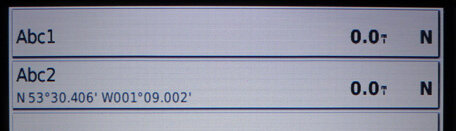
Here's the same location 'saved' by touching the current location, in my case an arrow and not another fancy icon, and touching the screen away from where I am ...

Get mi drift ;)
:beerjug:
 

Attachments

  • Save-4.jpg
    Save-4.jpg
    49.1 KB · Views: 94
f I want to save my current location as a favourite, if I touch the screen anywhere other than my current location

They are not the same location. When you touch away from the current location you save the location that you touched NOT where you are.

It's nothing new in the software. I have had min for a year or so and it has always done it.
 
They are not the same location. When you touch away from the current location you save the location that you touched NOT where you are.

It's nothing new in the software. I have had min for a year or so and it has always done it.

Please read my post again.....

I'm tellinya dat's how it is. Touch the point where I am and the save screen is different from touching away from where I am :rob

Done that, note the difference between ABC1 and ABC2

One contains the co-ordinates :comfort
:beerjug:
 
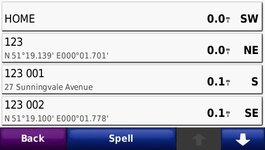
Here is a screen shot from mine held by the window.

Home 0.0 miles no co-ordinates
123 (touching my location) 0.0 miles with co-ordinates
123 001 (touch down the road a bit). Shows address.
123 002 touch away from home but NOT on known road. As it does not know an address it shows co-ordinates.

Mine has always done it.
 

Attachments

  • 521.jpg
    521.jpg
    33.5 KB · Views: 83
Mines only just started doing it since I updated to v3.90

As said ... if I touch my current location on the screen I get a different save screen field than if I touch anywhere away from my current location.

If I touch away from my current location it saves it with co-ordinates. This is all without dragging the screen ... if I drag the screen then it will save to the location I've dragged to.

Mine's a BMW Nav IV ... would there be a difference between it and the Zumo 660?

:beerjug:
 
I wonder if you are mixing two screens.

When I click on the bike icon on the navigation map screen (i.e. the 3D screen that most seem to use) it shows a My Location info screen with police hospitals etc. plus co-ordinates. Saving that position as a favourite does not show co-ordinates although you can easily read them from the info screen.

Touching anywhere else on this 3D screen moves you to the map screen.

On the map screen pressing save before touching anywhere else saves your current location WITH co-ordinates. Touch anywhere else on the map screen and then press save and it saves the location with either the street name or, if there is no street, the co-ordinates.

I wonder if this is what you have been doing but did not note in your post that you were changing screens. Incidentally, Garmin has recently replaced my 660 and the new one has 4.00 software. This does not seem to be available for download yet though.

I have found the location read out really useful when I have used the Zumo for backpacking with Garmin Topo maps loaded. With the position format changed to British National Grid its a lot easier to read off current position and relate to an OS map than it is with lat and long. I normally do this just from the My Location info screen but on occasions it has been useful to save it for later reference.
 
Touching anywhere else on this 3D screen moves you to the map screen.

On the map screen pressing save before touching anywhere else saves your current location WITH co-ordinates. Touch anywhere else on the map screen and then press save and it saves the location with either the street name or, if there is no street, the co-ordinates.

Thanks, that's very useful information. :beerjug:
 
I wonder if you are mixing two screens.

When I click on the bike icon on the navigation map screen (i.e. the 3D screen that most seem to use) it shows a My Location info screen with police hospitals etc. plus co-ordinates. Saving that position as a favourite does not show co-ordinates although you can easily read them from the info screen.


On the map screen pressing save before touching anywhere else saves your current location WITH co-ordinates. Touch anywhere else on the map screen and then press save and it saves the location with either the street name or, if there is no street, the co-ordinates.

I use the 2D North Up screen. What you say in the first paragraph is just how mine is :thumb

When I'm on the normal screen I don't get an option to save until I touch the screen somewhere. Touching away from my current location, anywhere else on the screen, saves my location with the co-ordinates shown on the favourites bar.

:beerjug:
 
3.9 power offs still

Hi Micky

Glad to hear your BMW version 660 is behaving. Unfortunately, my 660 is still powering off.:( Had 6 offs down to Devon (270 miles) needing the battery out to restart it in the car. Reverted to standard view - seemed ok on the bike. Down to Devon in the car again - had 2 offs (needing the battery out again) before Harleyquin decided his 550 was more reliable. Done another master reset - I'll see how it does again on the bike otherwise I might be asking Garmin for a 550 instead. Pity, cos it's good when it's on! Are you using a micro SD card in yours?
Ta
 
Hi Micky

Are you using a micro SD card in yours?
Ta

Hi Avril ... yes there's a micro SD card in it but there's nothing on it as far as I know. I don't have any music on the Nav IV

It seems from previous posts that the card can cause some of the problems?
:beerjug:
 
On two weeks away in the Dolomites.

Version 3.9 (running the latest mapsets) has a very annoying twist.

If I import a route that was created in an earlier mapset, the device asks if I want to recalculate it.

If I say, "No" then I get a series of straight lines, joining up each via point. This feature was meant to have been sorted out in the last update.

If I say "Yes", then the device carries out the recalculation, but reverts the 660's operating system back to the factory default settings. In effect, it carries out a complete hard re-set. This removes all the previously stored Favourites, leaving you buggered if you wanted or needed to use them.

I hit on a 'work around' to the problem, but it requires me taking a small laptop on holiday, each time I want to use an 'old' route.
 
I see that from 1st September the Zumo 660's are available with Firmware Version 4 and the latest 2011 maps.

Bought a new unit from Handtec 2 weeks ago (not delivered yet - waiting for me to get over there) - so I sent them a message querying the "version" software and new firmware....... it's still the older version 3.9 apparently :blast and now they tell me there's a stock shortage........... but there's no way I can risk bringing that unit to SA - I'll NEVER get support from GARMIN here...:(

So 2 options.... wait for stock of new version................ or refund and it seems it's going to be the latter!

Would be interesting to see whether one could backup the new version Firmware (if it's not available yet) and then flash an older unit.... wonder if it will sort the problems?

Anyone using the new unit...?
 
It seems from previous posts that the card can cause some of the problems?
:beerjug:

Can but not will, I suspect, Mick. I'm just back from 5 days and 1200 miles in the California mountains with the whole of City Navigator North America NT, ie 2 GB + on the Micro SD card in my Navigator IV and it performed faultlessly for the whole trip and continued to work fine in the rental car for another 4 days.
 
Hi Micky

Glad to hear your BMW version 660 is behaving. Unfortunately, my 660 is still powering off.:( Had 6 offs down to Devon (270 miles) needing the battery out to restart it in the car. Reverted to standard view - seemed ok on the bike. Down to Devon in the car again - had 2 offs (needing the battery out again) before Harleyquin decided his 550 was more reliable. Done another master reset - I'll see how it does again on the bike otherwise I might be asking Garmin for a 550 instead. Pity, cos it's good when it's on! Are you using a micro SD card in yours?
Ta

My 660 didn't like staying on for more than an hour, after removing the pocketworldgps camera warnings it stays on for over 3 hours :confused:
 
My 660 didn't like staying on for more than an hour, after removing the pocketworldgps camera warnings it stays on for over 3 hours :confused:

Don't have the camera sites ticked on mine John ... I wuz fed up of it flashing and bleeping at me all the time :eek:
:beerjug:
 
Hi everyone,

I used to be a member a while ago, but I've not been active in the forum for a long time...

Anyway, I wanted to say thanks for the info in this thread, it really helped me to debug my Zumo 660.

I just wanted to let you know that although reverting to 3.50 did solve the problem, I think I found the reason why it kept switching off (at least on my unit) wth 3.90.

It had been working fine with 3.90 for many weeks, but recently I swapped the 8GB Sandisk SDHC for a 16Gb Sandisk SDHC, and that's when the problems started.

I tried reformatting the card (FAT32 of course), but as soon as I'd put it in, the unit would switch off (with 3.90). after 1mn or so.

In the end, I decided to mirror the folder structure of the internal RAM on the SDHC, as in the past, at least on my 8GB, I could put my MP3 anywhere (which I did).

So instead of putting them in /MP3, I put all my MP3 in /Garmin/MP3... And miracle, it now works fine with 3.90! No switching off after 1mn.

So those of you who still have switching off issues with an SD card in, especially if it's a 16GB SDHC and if you arent' using the /Garmin/MP3 folder to put your tunes, it's worth checking....

Thanks again for the help!:beerjug:

Manni


Back
Top Bottom