Mapsource funny when routing

wheeledwidewebb

Registered user
Joined
Sep 6, 2008
Messages
660
Reaction score
0
Location
Location: Location: Broadstairs
I have a feeling that this may have been covered already, but here goes.

Create 2 waypoints using the latest version of Mapsource. Then highlight them and choose the create route option.

Drag the route at a couple of places to change it and, therefore, create via points.

Save the route as a gpx file.

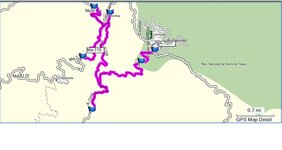
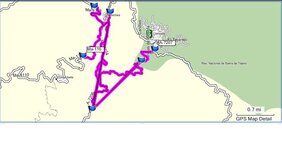
Quit Mapsource, reload the gpx file and I find that the route has gone slightly mad, it seems to have straight lines added to it for no reason.

This also happens if I just transfer it to the Zumo rather than save it as a gpx.

Doesn't happen if you just create a route and then transfer it without messing with it at all.

Anyone else find this?
 
Yep.

Using MapSource 6.15.3 behaves exactly as you describe - pants. If you recalculate the route the straight lines disappear and the route looks as expected. Save it again, close MapSource then restart MapSource and open the GPX and it is still fine; until you add more points and repeat the process ...:(
 

Attachments

  • piccie2.JPG
    piccie2.JPG
    32.3 KB · Views: 212
  • piccie1.JPG
    piccie1.JPG
    33.1 KB · Views: 214
It doesn't if you save it as a (.gbd) or (*.gbd) file - Whatever that is. :nenau

Seems to behave normally then.

What's a (.gpx) file?

Is there any advantage saving it in anything but (.gbd) or (*.gbd) if it is going straight to a Garmin device?

Forgive me if these are very stupid questions.
 
Wapping, the issue exists when saving straight to the device as well for me. I don't know if the other contributors also experience this.

If I create a route, as described, lets say its 125 miles, then transfer it straight out to my Zumo, it will end up at anything from 450 miles long to 4500 miles long (I am not kidding).

If I save it as a gdb file then it is fine (as you say), until I transfer it to the Zumo.

It is most odd. I have to confess I am thinking of MS Autoroute !
 
Wapping, the issue exists when saving straight to the device as well for me. I don't know if the other contributors also experience this.

If I create a route, as described, lets say its 125 miles, then transfer it straight out to my Zumo, it will end up at anything from 450 miles long to 4500 miles long (I am not kidding).

If I save it as a gdb file then it is fine (as you say), until I transfer it to the Zumo.

It is most odd. I have to confess I am thinking of MS Autoroute !

OK I hadn't noticed any problems sending (.gbd) files to the Zumo, but thanks for the heads up.

Have you raised the problem with Garmin by email?
 
I have to admit that I have not raised the issue with Garmin, lazyness to be honest. One always assumes that someone else would of already done it.

I will do it now. [edit] - Have done it now.

I am now using Autoroute, much nicer routing system IMHO.
 
I have to admit that I have not raised the issue with Garmin, lazyness to be honest. One always assumes that someone else would of already done it.

I will do it now. [edit] - Have done it now.

I am now using Autoroute, much nicer routing system IMHO.

Excellent.

Always best to talk to people who can / should fix it. :thumb2


Back
Top Bottom