► GPS mounts/connections and Autocomm (consolidated)

Autocom

I utilised the little gap where the battery is and used the powered canbus output cable under there.
11 months trouble free use with it.
 
Thanks guys, got the autocom kit now just waiting for the can bus plug to come back into stock at my local dealer and then i will have a go.

Cheers
 
I wired mine to the Aux Socket too. :thumb2
Piece of cake! And I am a DIY Numpty!:blast
Sits under the seat no worries and 12 months down the line it still works...

If I can do it, anyone can! lol
 
Made the aux power cable, from the thread on here. Ended up putting the box it the tail because of the electrical noise. After i put it in the tail wondered if i could have shielded it in some way. Put fake tank cover back on and managed to lose on to the torx screws into the bike, tried to get it out with a grabber and it just dropped deeper, lots of shaking, the bike, not me, still has not reappeared. So on to the Bluetooth, looks like a faulty cable, will give Autocom a call and see what they think. Hope i find that bolt.
 
Hey Tony,
I have just taken delivery of a Zumo 660 for my F800GS and saw your posts, not being great with regards to wiring DIY could you point me in the right direction to get the sat nav plumbed in properly???
Cheers
Luke
 
Hey Tony,
I have just taken delivery of a Zumo 660 for my F800GS and saw your posts, not being great with regards to wiring DIY could you point me in the right direction to get the sat nav plumbed in properly???
Cheers
Luke

It will be exactly as above. Get the short lead from BMW, connect it to the lead that came with your Zumo, and you're away.
 
Excellent, sorted the RAM mount supplied with the 660 (as per separate posts on the subject) and the cable arrived in the post the other day and is now wired to the Garmin power cable. The only question I have now is whether or not there is a traffic receiver located on the 800 which plugs into the Mini-USB connector on the garmin cabling? I think the 1200GS has one located under the beak? Or is this an additional part that you purchase and then wire in??? Nearly there................:beerjug:
 
Nope traffic receiver is a Garmin part. The socket under the beak on the 1200 is the same as the under tank 800 one, just a can bus power feed.
 
wiring autocom to 650 gs

just got a autocom, want to wire it to the bike instead of battery powered,

does anyone know how to do it, help is appreciated
i have a 2010 f650 gs (with the 800 engine)
 
I wired mine to the spare can bus socket under the fake tank on my 800, The part number has changed since some one put a nice thread on making up the cable.

http://www.ukgser.com/forums/showthread.php?t=117400
it's for a gps but you can use it to connect up the autocom

here is another thread with pics of 800 (i am assuming the 650 is the same)
http://f800gsrider.blogspot.com/2009/02/electrical-connections.html

I was going to put mine in the space by the battery but got too much interference, so it ended up under the seat right at the back.
 
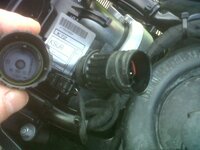
found these wires

i found this under my seat and dont know what it is any ideas, and can it be used to wire the autocom to, there is also another connector i found near rear of seat , seperate reply to this thread
 

Attachments

  • bmw 1.jpg
    bmw 1.jpg
    64 KB · Views: 316
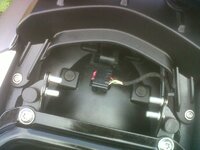
second wires

these where found near the rear of the seat , where connected to a black cover , so werent being used for anything i think
 

Attachments

  • bmw2.jpg
    bmw2.jpg
    64.1 KB · Views: 301
I wired mine to the spare can bus socket under the fake tank on my 800, The part number has changed since some one put a nice thread on making up the cable.

http://www.ukgser.com/forums/showthread.php?t=117400
it's for a gps but you can use it to connect up the autocom

here is another thread with pics of 800 (i am assuming the 650 is the same)
http://f800gsrider.blogspot.com/2009/02/electrical-connections.html

I was going to put mine in the space by the battery but got too much interference, so it ended up under the seat right at the back.

RTFI!


Back
Top Bottom