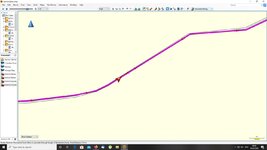
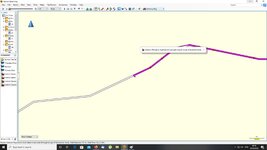
A route is running backwards for a stretch.... HELP!

looking at where the route goes wrong what i dont get is why there would be an extra shaping point between the two others, i can see someone getting the last or first wrong but not the one in the middle, maybe beaver holds the key let us know beaver.
 
looking at where the route goes wrong what i dont get is why there would be an extra shaping point between the two others, i can see someone getting the last or first wrong but not the one in the middle, maybe beaver holds the key let us know beaver.

I wondered about that too, Lee.

I guess that Beaver might have noticed the route going wrong when he created the shaping point ‘Scotforth Road’ on the goat track. I assume that, instead of clicking undo or dragging the erroneous shaping point away from the goat track, he then put in the second shaping point, ‘Road1’ - the ‘one in the middle’ - to turn / force the route around (hence the U-turn) and then made a third shaping point (Road2) - perilously close to the entrance to the goat track - in order to continue the route on the more major road, onwards to the A65 and home. If so, the ‘one in the middle’ was unnecessary, as the third one would have turned it around anyway. But you learn all that only through experience, I guess.

It almost looks as if he thought to himself, “I would like to leave the road I am on, to take this little road.... oh no.... I have changed my mind.... get me out of here! Phew, back on track”.

Bar this one glitch, he’s done well for someone who was daunted by BaseCamp, I think you’ll agree? It is though a good job that the modern devices, like the Nav V, can run circular routes..... or there would be a problem :D


PS In a way it’s good that Beaver has had (and spotted) the error. As he’ll have learned the perils of clicking on the wrong road, the need to check routes carefully, the uses of bringing up the list of shaping and waypoints and, when he’s finished, how to correct glitches, which we all make..... and don’t always spot, even now.
 
Yes that sounds like a likely answer, and agree i think he is doing great with just a little help now and again, seems to have got the jist of things and sensible enough to look at the route for any mistakes, on the whole having looked at all the routes created great job.
As you say the undo option would have been the way to go.
 
Out of courtesy to Beaver, I have deleted the links to the routes in Dropbox, simply as they have what I take to be the location to his house in exact GPS detail.

Richard
 
What :yelrotflm .. you lost me... when I created the route, I went from home to Wrynose using Waypoints. I then clicked on the end waypoint and with the shaping point thing, added on where I wanted to go next... and I just clicked forward as I went until I hit the A65 ...
The route you have now with the turn off is not my original route? you've gone another way which results in the turn off becoming evident... but this now isn't my intended way to go??.... I did follow roads on the map so it should let me go this way?... at no time did I deviate off road?...
 
Now you are losing me, too. :D

Is this, or is it not, the anomaly in the route between Lancaster and the A65 that you asked us to look for and maybe explain why it has shaping points up it and the route arrow cursor goes one way and then the other?


6e194292e61ecd4fc797cdbfb643c90b.jpg


Of course, if you were riding the route you’d probably ignore the instruction to turn right, ride half a mile (or whatever it is) up the minor road and then make a U-turn, it being fairly obvious you would want to stay on the road you are on until the A65.


If it’s not it, then where is it, as Lee and I can’t see anything else. Coordinates time, please.
 
One question: Is what you have drawn

attachment.php


A. Something you see in BaseCamp, or

B. Something you see on your device’s screen?
 
If the route Lee and I are looking at, looks nothing like your route, then I am not sure how best to help you next.

We know you are in car mode.

Can you tell us please, exactly what your preference settings in car mode are.
 
yes, that is the problem... but.... my initial route came from the LHS of the screen over your 'here' point and into the problem area... where as the route now comes from the top of the screen down and the problem area is up a side road... it was never up a side road, it was just part of the route I was doing...
 
My device keeps sending me back...

OK, thanks, I see what you mean, I think.

I am now going at it a different way.

I have taken the route you sent me and converted it into a track, outside of BaseCamp, by using the Scenic app on my iPad. I then put it into the same file as the one I created in BaseCamp. This means we can compare the two.

https://www.dropbox.com/preview/Beaver's buggeration - Now with track.GPX?role=personal

I took a screen shot as well:

5ff71278da2249591b2f8b3954861657.jpg


As you can hopefully see, the grey track line mirrors the magenta line pretty faithfully..... except where the glitch occurs. Quite why my version of your route differs I have no idea at the moment. Logically, it can only be down to the preference settings. I have tried to change my preference settings and recalculate but I cannot find a way to make my magenta line match yours. This is frustrating as, until I can do so, we'll never find the glitch.

I wonder if you could email the route file you sent me to Lee, as he may have more luck.
 
yes, I can do... but maybe its not much of an issue.. if I ride it and it tries to send me back on myself, i can just ask it to move on... I was just curious as to why it had done it?

I'm assuming my route is not a goat track and is actualy a road as it shows it on the map? in reality, I don't need to go that way, I could go any way, but as you say, we are the masters...... but its not playing ball :)
 
My device keeps sending me back...

It's definitely a road, we can be sure of that. I am curious, too.

Bingo.... I have done it... I have managed to get your route to match the track, at least for the crucial bit. You could certainly ride it, I don’t think you’d notice it out on the road.... very well done for spotting it!!!!!

It is all down to the preference settings. If I switch the mode in BaseCamp on my Mac to 'Mountain Biking' I can get the magenta line (which whilst it goes haywire higher up) to follow the track where it matters. I can also replicate the going backwards phenomenon....

243a76e1b29d7b6e43b437b4347eb058.jpg


.....but I can't work out why it is running backwards over that small stretch!

Slowly but surely we are getting somewhere. I have never seen a route run backwards, unless a shaping point is in the wrong place. It is odd..... Hopefully, we can work out why. If not, it is one to take up with Garmin. It’s possible that there is a small failure in the map’s data just at that point. It happens sometimes when, no matter how hard you try you cannot get a route to follow a road. With millions of miles of roads in Western Europe, eventually something must be wrong.

I am also wondering if there might be a small corruption in the shaping point..... removing it would tell us..... a job for tomorrow. I will also see if just creating a short route, just along that stretch, also creates the same phenomenon.


Thank you for giving us the challenge of working it out..... and well done with your creating routes in BaseCamp..... keep it up :thumb2
 
Richard the picture you have in post 44 is the same as the route i had before recalculation accept i had no issue with the route moving backwards and forwards. now when i recalculated the route it ended up looking like the pic in post 38, and that is what i was led to believe was the issue but it appears not, as i have said above i have run a simulation of the route before recalculation and had no issue with it at all, once recalculated i got the same as yourself with the road having gone down and back as in post 38. strange why i dont get the issue on the original file like yourself and beaver, try and run a simulation to see if it actually runs back and forth at the fault.
 
Hi Lee, the whole thing is very odd. I can understand preference settings overriding and reshaping routes between shaping points, that’s well known. That explains the difference between my version of the route and Beaver’s. I cannot understand though why the route runs backwards for a short stretch.

Try running Beaver’s route in mountain biking mode, please, to see if you can get it to go backwards, too. It’s the only way I could get Beaver’s car mode route to behave ‘properly’ (ie to follow the stretch of road) on my Mac.

It’s the biggest mystery we have seen here for a while. I’ll chop this thread into the BaseCamp section, as it’s all BaseCamp related, rather than being a Nav V problem, per-se.
 
Last edited:
Ok i have now run the route in mountain bike mode and get the (anomally) fault, as the route aproaches the first of the three shaping points all is fine and once it gets to the first shaping point it reverses for about 20/30 yards and then turns and goes back the correct way and carrries on as normal, why this is happening i have no idea it maybe a mapping anomally or a shaping point issue, Cancel the last bit i may have found the problem if i remove the first problem shaping point and then look closley at the route shaping point that follows you will see the issue in the pics below. the first pic shows the fault and shaping point on the road the next shows its placed slightly off road once the first shaping point is removed, not saying catagorically that this is the problem but its the only thing i can see.
And with that waypoint removed all is how it should be.
 

Attachments

  • 3333.jpg
    3333.jpg
    68.9 KB · Views: 72
  • 5555.jpg
    5555.jpg
    83 KB · Views: 95
Well done! You have cracked the last piece of the puzzle, Lee :thumb2

There you go, Beaver, between the pair of us, the mystery of your strange reversing route is solved.

Lessons to be learned are:

1. Use a mode appropriate to the course you are creating. If it’s for a motorbike ride, use the motorbike

2. Check your preference settings. I like to have as few as possible, as it reduces the chances of me forgetting and then wondering why the bloody routing refuses to travel on motorways or refuses to cross the Alps, as I had forgotten that I had ticked ‘Avoid seasonal closures’ and ‘Avoid tolls’. The better you get at creating / amending your own routes (or routes you get from elsewhere) the less you’ll need to rely on preference settings, as you’ll do your own ‘preferencing’ as you create it

3. Make your preference settings the same on your device as they are on your own PC at home

4. Place shaping and waypoints accurately. Try to avoid road junctions and roundabouts, wherever possible

5. Always review any route, no matter how it was created or by whom, before you send it to your device. You did this and spotted the strange anomaly. You didn’t know what it was or how to fix it, so you asked. It took us a while to work it out between the three of us but we got there in the end. It was an odd one, that’s for sure

6. Always check your route is properly installed in your device, that it looks the same, has the same shape and near enough the same mileage and estimated time; some small’ish discrepancy is normal. Do it before you leave the proximity of your PC at home, as fixing a problem at the top of the Stelvio or even in Penzance when you live miles away is not always so easy

7. If you have a problem with a route, it’s easiest to sort out on UKGSer if you can share the route AND a track version of the route. OK, we had an anomaly between what Lee, I and you were looking at (due to a misfit in preferences) but, with the help of screen shots, we all three of us got there in the end.... £12 of subscription well spent

Above all, you have learned to make a successful route in BaseCamp, something you thought impossible or very difficult just a few days ago. Enjoy creating routes for your holiday and using them. You might find glitches (we all do) but they are rarely if ever life threatening. The more routes you create and use, the less glitches you’ll encounter and the better you’ll get at fixing them, in Penzance or on the top of the Stelvio. Remember it’s your dumb servant but sometimes it can be really clever, just like us.

:beerjug:
 
Maybe but it does not explain why we only got it to work (or not work) in mountain bike mode.
But will take it as a win.

I agree it is a mystery. I think it can only be due to something like an oddity in the route itself or in Beaver’s preference settings which you and I could only replicate by switching it into an extreme sort of ‘off-road’ mode, like mountain biking. I was absolutely baffled as to why I couldn’t get the route to match the track at all by changing preference settings. I then tried changing modes to walking, bicycling, lorry and was about to give up when I just tried ‘mountain biking’ and BINGO! Not perfect but, by sheer happy luck, it followed Beaver’s route for the important section.

It was only when I opened up Beaver’s route in Scenic and used that to create a track (ie all outside of Garmin’s BaseCamp) and then plonked the track into BaseCamp, that I could see where Beaver’s route was meant to go and could see the anomaly if I zoomed right in but only once the route was recalculated in mountain bike mode. Having the anomaly’s position marked too, helped.

I think it’s the strangest thing we have seen on these pages but we can - all three of us - take it as a win, indeed!

Richard
 
well done!.. not sure I understand much of what you did and no point trying to explain more.. let's move on.

I will ride that section at some point and report on what it does....

But for now I'm planning my trip over the North York moors... I will take on your point about naming the routes.. its the same we do at work with item descriptions on the computer Left hand justified we call it so 'Bolt, M6, Stainless'.. so you can search easy for things... But guess the best thing is to practice on creating these routes so I can become a Grand Master in time like you two :D

Will be sure to let you know if I find anything else odd and as said before.. many thanks for your knowledge and time spent sorting this one out.... :beerjug:


Back
Top Bottom