An Excel problem. How do I "grey out" text?

Taff

Well-known member
UKGSer Subscriber
Joined
Feb 21, 2004
Messages
7,351
Reaction score
6
Location
South West Wales
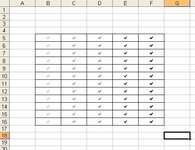
There must be a way of doing this! I have a spreadsheet of questions and I want to add "greyed out" ticks for the answers previously given, so that I can compare it with their answers now. I don't mind that they can see their previous answer, but I would like it feint. Any suggestions? :nenau
 
Like below?........
 

Attachments

  • ScreenShot029.jpg
    ScreenShot029.jpg
    46.3 KB · Views: 1,011
I take it that the ticks are all in a column
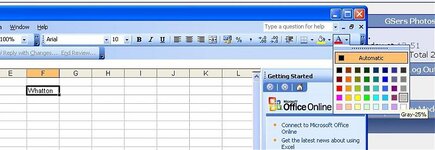
select the column by clicking on the letter(s) at the head of the column and then just change the colour of the font to white if you do not want them to see it or lilac if you want it feint.
The font change button is in the tool bar a large A with and arrow pointing down next to it. Click on the arrow and a box opens giving all the colours available to you. Just muck around you cannot go wrong.
:blast

Ok just look at the post above
 
Last edited:
Thanks boys - I was obviously over-complicating matters. :o

The ticks are indeed in 5 different columns, but how do you type in ticks then? The closest I can find is going to "Insert" then "Symbol" and clicking on th emost appropriate, but even that one isn't a perfect tick.

Strange how there are loads of Arabic symbols but nothing for a simple tick. :nenau
 
If you want a decent tick, change the cell font to Marlett and type a lower case "a".

GJ
 

Attachments

  • TicksInExcel.jpg
    TicksInExcel.jpg
    37.5 KB · Views: 861
Last edited:


Back
Top Bottom