


So, 2023 model Mac Mini running Ventura 13.5.
I've been using the sound via a games monitor with no speakers but connecting this to my Hifi using its headphone jack - HDMI connection which was fine.
All fine until the other day it suddenly stopped! Now the connection is there but when I selct it there's no sound and the volume bar, is greyed out.
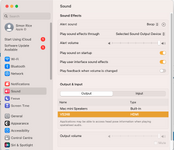
I'be checked Mac user forums and seen similar issues but with no sounds working or the HDMI nit working form the get go so not really the answer for me.
Any clues guys?
Regs
Simon
I've been using the sound via a games monitor with no speakers but connecting this to my Hifi using its headphone jack - HDMI connection which was fine.
All fine until the other day it suddenly stopped! Now the connection is there but when I selct it there's no sound and the volume bar, is greyed out.
I'be checked Mac user forums and seen similar issues but with no sounds working or the HDMI nit working form the get go so not really the answer for me.
Any clues guys?
Regs
Simon


