Another new Mac issue - Excel in mirror image!

Simon_100

Well-known member
UKGSer Subscriber
Joined
Nov 24, 2014
Messages
5,602
Reaction score
5,387
Location
Catalonia
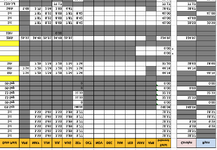
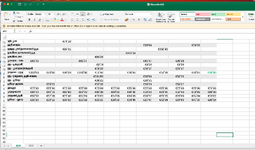
So I've transferred my files over using an external hard drive and all but one of the files are opening in mirror image!

If that's not mysterious enough the fact that one of OK is even more obscure!

Any ideas, help, etc. gratefully received ...
Screenshot 2025-04-21 at 01.02.08.png
 
set fire to the Mac and buy a proper computer
 
I have this on Excel on a Mac and oddly if I scroll down a page or so (so the screen has just blank cells) then scroll back they were then the right way up. I tend to use numbers now instead or google sheets and I just checked and it still does it.

Try paging past and back again and see if it works.

*edit - a bit of research says that running Microsoft Autoupdate will fix this, but I'm not going to bother as dont really use it now. https://answers.microsoft.com/en-us...eadsheet/725ec4c1-c2b9-4939-923d-9f971cda40be

Screenshot 2025-04-21 at 12.45.17.png
 
Last edited:
I have this on Excel on a Mac and oddly if I scroll down a page or so (so the screen has just blank cells) then scroll back they were then the right way up. I tend to use numbers now instead or google sheets and I just checked and it still does it.

Try paging past and back again and see if it works.
Well that sounds like an Orange support call answer but works perfectly! As I only have a few spreadsheets on the go that's the path I'll go down :)
 
As I only have a few spreadsheets on the go that's the path I'll go down
I'd strongly suggest you do update Excel (the update is free).
There might be other "less visible" bugs or Excel could be unstable (crashing). Why risk it?

This inverted content issue was widely documented, easy fix by just updating.


Back
Top Bottom