
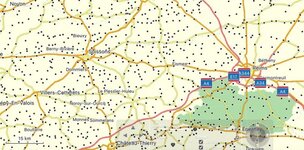
Any way to stop display of all the extra black dots on the screen.

mvrandery

Registered user
Joined
Jun 28, 2008
Messages
648
Reaction score
16
Location
London
Basecamp 4.6.3 on a Mac

Completely useless black dots without town names next to them.

Can't find a way to disable the display of these. The extra dots only appear when the zoom level is between 20km and 3km. But these are the most useful scales.

If I disable the viewing of cities under Preferences - > Display -> Hide Map Features all the towns disappear, not just the unlabelled ones.

Right now, under Map Features, I have everything except Cities unchecked.

Help please.
 

Attachments

  • ScrCap-28-35-2016_11.35.01.jpg
    ScrCap-28-35-2016_11.35.01.jpg
    69 KB · Views: 297
AFAIK tther will be no way to disable selectively

Those dots are towns/villages that become named and detailed as you zoom in ( you already knew that )
 
You can of course set your map detail to its lowest setting but you then lose a few more things until you start to zoom in, my suggestion would be to set detail level to its lowest and if that does not suit go up a step at a time until it works for you.
 
As the replies above confirm, there is no way that I know if to get rid of the black dots beyond zooming in and out and adjusting the detail to suit. I find I do it quite a lot.

Sometimes I want lots of detail on a small scale usually when trying to make sure the software hasn't taken a silly shortcut down an alley in a village, instead of staying on the main road. Other times I only want a large scale with little detail, when I just want to go from A to B, prior to pulling the route about with shaping points. Sometimes something in between. The software allows a broad spread of choices, the black dots are something I can live with in exchange.
 
Churchill used to suffer with what he called his 'Black dot' ....


That would drive me barking mad ..... :thumb2


Back
Top Bottom
