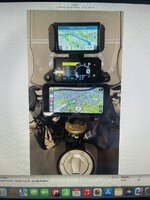
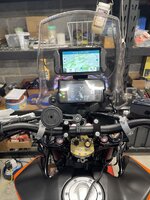
Aoocci C9 Pro

Bigcats

Well-known member
UKGSer Subscriber
Joined
Nov 19, 2022
Messages
11,414
Reaction score
11,222
Location
Portsmouth, England
Recently got this unit in the never ending deals

Very easy to install and and prior to installing I checked it all worked (ie cameras connected etc)

Installation was a doddle and very easy to tap into the live on ignition wire from the 7.5 amp fuse under the seat (A Bike Thing has a very clear video of where and which cable to splice into)

Android Auto works absolutely fine after pairing via bluetooth

Now the issues I am having (I have emailed them but do not respect a response but we shall see)

When I turn the bike off, everything powers down as it should and then when I turn it all back on the rear camera doesn't connect. However if I do a factory reset it all works again until the next time I restart.
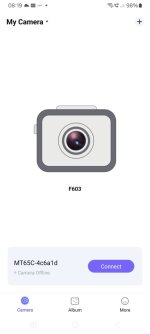
I cannot get the app from the QR code (both on the device and in the manual) to see the camera, even after the phone connects via the WiFi as per the instructions.

How the hell can you update the firmware as I have a feeling this may fix the first issue?? (I know its going to be via the app I cannot get to see the device isn't it)

Other than that, actually seems to be a good little bit of solid kit

If they do not get back to me I shall just Section 75 via my credit card so not to bothered
 
Whats funny is the names (more than one) on the box....

A142A
C9Pro
D8Pro-Hei

in all the settings and firmware it is the D8 Pro, (D8 Pro does not exist on their website).
 
Aoocci got back to me quite quickly actually and it looks like a camera issue rather than a unit issue as the problem follows the camera (they can't be plugged in the wrong way despite the cameras and extension cable having writing on them)

Shall see how they respond to sending out a new one
 
I'm having similar problems with the KYCAM2 app. I have a C5 Pro and managed to download and install the app but it cannot find the dashcam. The WiFi is connected but the app just doesn't seem to see it. I've emailed both KYCAM and Aoocci for a solution but no reply yet.
Apart from that all seems OK.
Paid for mine on CC as well - just in case.
 
I'm having similar problems with the KYCAM2 app. I have a C5 Pro and managed to download and install the app but it cannot find the dashcam. The WiFi is connected but the app just doesn't seem to see it. I've emailed both KYCAM and Aoocci for a solution but no reply yet.
Apart from that all seems OK.
Paid for mine on CC as well - just in case.
Yeah same here and I didn't actually get an answer back to that question so will hassle them once they reply and will update
 
I think I have found the cause - but not the cure!

When I check the WiFi connection it shows 'Connected through Android Auto' and the camera cannot be found. If I then go into Android Auto settings and select 'Exit' AA closes down and the app finds the dashcam.

Almost immediately it drops the connection as AA automatically restarts!

Kycam seems to need the WiFi to itself and cannot share with AA.

Problem is I can't work out how to disable Android Auto! I've been into the settings for Android auto and there are are 3 settings for 'Automatically Launch Android auto' and I've selected ' Set by the car'. I didn't have time to go any further last night.

I've had a response from Aoocci asking me to send a video???

I've also found what seems to be another version of Kycam on Playstore called Viidure. It found the camera before closing down when AA restarted.

1733386877960.jpeg
 
I think I have found the cause - but not the cure!

When I check the WiFi connection it shows 'Connected through Android Auto' and the camera cannot be found. If I then go into Android Auto settings and select 'Exit' AA closes down and the app finds the dashcam.

Almost immediately it drops the connection as AA automatically restarts!

Kycam seems to need the WiFi to itself and cannot share with AA.

Problem is I can't work out how to disable Android Auto! I've been into the settings for Android auto and there are are 3 settings for 'Automatically Launch Android auto' and I've selected ' Set by the car'. I didn't have time to go any further last night.

I've had a response from Aoocci asking me to send a video???

I've also found what seems to be another version of Kycam on Playstore called Viidure. It found the camera before closing down when AA restarted.

View attachment 368629
That's the app I have, Viidure, it came from a QR code on the device but as of yet I've been unsuccessful but will try what you have done.


They are sending out a replacement camera for me today.

I have to say their response has been fantastic
 
I now have it working and it was much simpler than I thought.
Start up the system
I just disable blue tooth on my 'phone, which disables AA. You should see the Wifi symbol at the top of the screen then start up Kycam2 which then looks for a Wifi connection.
If your phone is connected to the Aoocci on it's WiFi and it says 'via Android Auto' just select the system's Wifi from the list below that.
It should then reconnect the WiFi and after a short time report ' Connected to MCXXXXXX (whatever the WiFi name) no internet'.
Press the 'Go back' arrow at top left of screen and you should be connected. You may have to '+Add New Camera'.
I tried this with Viidure and it wanted me to take out a subscription before it would play the videos or download so I've binned it and gone back to Kycam2, which although limited does all I want at present.
Hope this helps.
A decent User Manual would have been nice!
 
New camera arrived today (from China) and fitted and now all working as it should!! Hats off to support as they have done everything they said they would and the only delay is the new camera coming from China which hasn't bothered me as not using the bike at the mo.
 
I now have it working and it was much simpler than I thought.
Start up the system
I just disable blue tooth on my 'phone, which disables AA. You should see the Wifi symbol at the top of the screen then start up Kycam2 which then looks for a Wifi connection.
If your phone is connected to the Aoocci on it's WiFi and it says 'via Android Auto' just select the system's Wifi from the list below that.
It should then reconnect the WiFi and after a short time report ' Connected to MCXXXXXX (whatever the WiFi name) no internet'.
Press the 'Go back' arrow at top left of screen and you should be connected. You may have to '+Add New Camera'.
I tried this with Viidure and it wanted me to take out a subscription before it would play the videos or download so I've binned it and gone back to Kycam2, which although limited does all I want at present.
Hope this helps.
A decent User Manual would have been nice!
I finally got round to doing this and yep soon as I did what you suggested it worked! SO many thanks
 
Hi, I've got a C3 and been pleased with it, so pleased I also set it up in my car and been switching the device between the two. I was thinking of getting another C3 but now considering a C9 pro for the bike instead.

The feature I like is the tyre pressure monitoring. Has anyone tried that? I assume you fit a special dust cap to each wheel to transmit to the C9?

Sent from my SM-G991B using Tapatalk
 
I bought a C3 for one my bikes and a C6 Pro for another. On my KTM 890 I ended up with the Garmin XT above the dash and the C6 Pro on the handle bars using the 3D printed Quadlock adaptor that I bought from Simon on here. My iPhone 12 Pro is also attached to the handlebars using a vibration damped, wireless charging mount from SP Connect (15W charging is desirable if using the phone for navigation).

All worked great ......... it just looked too "busy" and distracting.

FD55FA6B-3757-4880-88E9-AC63A31F6EF3.jpeg


So I've gone back to this ........


7C35BB6D-1E3F-4807-B321-2694C77EDECD_1_105_c.jpeg
 
Thanks for the comments and photos and I can see what you mean about that setup looking distracting. I have a Nav 6 to the left and the C3 mounts on a screen support above the dash. Also, the dash on my CRF 250 is monochrome, so it's pretty unobtrusive. I didn't have a Quad Lock adapter, but one is now on the way, so I made an ally plate for the rear of the C3 and used a stick on adapter, which seems pretty secure so far.

I've now viewed the review on this thread, so considering a C6, or maybe a C9 to get the tyre pressure monitoring Good to see the discount code is still active.

Sent from my SM-G991B using Tapatalk


Back
Top Bottom