Basecamp - How can I break up a HUGE route into practical daily mileages?

What a mess! And all because of a poxy 20 route maximum in the Zumo 660. How stupid and short sighted of Garmin.

Has anyone else experienced this problem? If so, how did you get around it? Would be grateful for any help!

Cheers
Peter :thumb2

I don't have the 660 but I've used a 220 for several years which will only hold 10 routes in the internal memory. The solution on the 220 is to save all route files in .gpx format on the SD card, in a folder <root>/garmin/gpx. Then, all you need to do is to import routes as needed by going to 'My Data', 'Import route from file' which will (after some time...) list all the routes in the files on your SD card. You can then select which ones to import for use. Because the listing process is slow, I tend to delete old route files off the SD card so that I only have relevant routes there for import. I'm fairly sure this will work on the 660 although the steps to import the routes might be a little different to the 220.
 
I don't have the 660 but I've used a 220 for several years which will only hold 10 routes in the internal memory. The solution on the 220 is to save all route files in .gpx format on the SD card, in a folder <root>/garmin/gpx. Then, all you need to do is to import routes as needed by going to 'My Data', 'Import route from file' which will (after some time...) list all the routes in the files on your SD card. You can then select which ones to import for use. Because the listing process is slow, I tend to delete old route files off the SD card so that I only have relevant routes there for import. I'm fairly sure this will work on the 660 although the steps to import the routes might be a little different to the 220.

Thanks Tomcat and that's pretty much what I've done, though I've 'imported' the maximum 20 routes that I can to the device and left the remainder on the SD card. My worry was that when selecting 'My Data' and then 'Import from file', it wasn't showing all the routes to import that I knew were on the SD card! I'm hoping that as I continue my journey and start to delete routes from the Zumo's memory, the remaining (currently invisible) routes will appear within 'My Data' and allow me to import them! I'm not planning on taking a laptop with me on my travels, so my fallback is that I've exported all my routes onto a USB so will (hopefully) be able t find a computer to transfer them across if needed.

Garmin's maximum of 20 routes just isn't enough for a big trip!
 
Before you embark on Peter's suggestion, check what the message said.

You tell us that the maps on your computer and device are the same. So, perhaps the question is:

Were the routes created in an earlier / different map version? If they were, they'll require some sort of recalculation if they are to display properly on your device. Similarly, if they were created with some different preferences, those preferences might (I am not sure) be carried through, too.

Good point Richard. It never occurred to me that the routes may have been created on an earlier map set. Let's hope it is as simple as that! :thumb2
 
Hi Peter
Thanks for your help. I updated to 2016.1, redrew the maps, imported as your suggestion and hey presto I miss Madrid!!
I also have checked that basecamp and the Nav4 have the same preferences.
many thanks for all the suggestions here, they have all been very polite.
Cheers
Paul
 
Excellent, Hoff's problem resolved.

Back to Peter's post #15

(A) 20 active routes displayed on the screen should be enough for most bods' purposes. Have in mind that 20 routes represents probably 20 days' of travel and that each route might be up to 350 miles (or longer) in length; that's 7,000 miles (or futher). You are certainly not going to ride them all in one day, so why have more than 20 displayed as available?

(B) The device needs to recalculate on import for perhaps two or more reasons:

(1) It was - perhaps - created on a different mapset or is now being used on a device with different preference setttings. This is not true in your case as your settings and maps are identical.

(2) More importantly, the device can only display certain file types. Garmin exports a .gpx file extension or summat like that. The device may not be able to read the file extension, so it will need to convert. The conversion may be called 'recalculation', perhaps? If you share a route on the latest Nav V via Bluetooth from one device to another, the importation is all but instant, 'conversion' / 'recalculation' having been largely undertaken by the donor device already.

(C) If you want to load reserve routes onto a spare card - as suggested by Garmin - it's easy. If you want their associated maps, it's easy too. Simply export the routes, along with their map tiles. You are going to Spain, so you'll not need maps of downtown Helsinki or the darker alleys of Sorento, too.... unless you are very lost!! :D

(D) You can check if your device / card brings up the 'invisible' routes as you delete others. Create say 35 routes, where they go matters not. Your device sould display 20 and hold 10 more on the card, rendering 5 perhaps invisible. Delete say 10 of the displayed rooutes and import 5 fresh ones from the card. Do the 5 'invisible'ones now appear? In fact, thinking about it.... Why bother creating 35 trial routes at all? Your 20 plus routes for Spain are all on the device / card.... or they should be. Delete routes (making sure you have backed up the device first) and see what happens. At least you'll know before you hit the plains of Spain at 42 C :eek:

One last tip. For a very long trip I would be very tempted to buy a secondhand device as a back-up. You can always sell it afterwards, maybe even making a couple of quid on the way through. You are away a long time; break / lose your device or have it go belly-up would not be great fun, especially as you've spent hours creating routes.


:beerjug:
 
Excellent, Hoff's problem resolved.

Back to Peter's post #15

(A) 20 active routes displayed on the screen should be enough for most bods' purposes. Have in mind that 20 routes represents probably 20 days' of travel and that each route might be up to 350 miles (or longer) in length; that's 7,000 miles (or futher). You are certainly not going to ride them all in one day, so why have more than 20 displayed as available?

(B) The device needs to recalculate on import for perhaps two or more reasons:

(1) It was - perhaps - created on a different mapset or is now being used on a device with different preference setttings. This is not true in your case as your settings and maps are identical.

(2) More importantly, the device can only display certain file types. Garmin exports a .gpx file extension or summat like that. The device may not be able to read the file extension, so it will need to convert. The conversion may be called 'recalculation', perhaps? If you share a route on the latest Nav V via Bluetooth from one device to another, the importation is all but instant, 'conversion' / 'recalculation' having been largely undertaken by the donor device already.

(C) If you want to load reserve routes onto a spare card - as suggested by Garmin - it's easy. If you want their associated maps, it's easy too. Simply export the routes, along with their map tiles. You are going to Spain, so you'll not need maps of downtown Helsinki or the darker alleys of Sorento, too.... unless you are very lost!! :D

(D) You can check if your device / card brings up the 'invisible' routes as you delete others. Create say 35 routes, where they go matters not. Your device sould display 20 and hold 10 more on the card, rendering 5 perhaps invisible. Delete say 10 of the displayed rooutes and import 5 fresh ones from the card. Do the 5 'invisible'ones now appear? In fact, thinking about it.... Why bother creating 35 trial routes at all? Your 20 plus routes for Spain are all on the device / card.... or they should be. Delete routes (making sure you have backed up the device first) and see what happens. At least you'll know before you hit the plains of Spain at 42 C :eek:

One last tip. For a very long trip I would be very tempted to buy a secondhand device as a back-up. You can always sell it afterwards, maybe even making a couple of quid on the way through. You are away a long time; break / lose your device or have it go belly-up would not be great fun, especially as you've spent hours creating routes.

:beerjug:

Thanks Richard. All very good points :thumb2

In (C) above, you say "Simply export the routes, along with their map tiles." I'm familiar with exporting routes, but how do you export the appropriate map tiles?

on (D), I did as you suggested and 'hey presto' the other previously invisible routes appeared. Sorted!

Now I just need to find another Zumo 660 for sale .....

:beerjug:
 
Hi Peter,

Going from memory...

In BaseCamp you can highlight (left click) a route, then right click and a box pops up, something like 'Send to device'.

You then get a pop-up box with choices of what to send: Routes, Tracks, Favourites or summat like that

Tick the route box

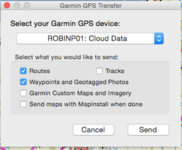
Lower down there is something like: Send maps associated with routes. Tick that box.

I vaguely recall it sends only the map tiles for the route and none others. Try it, you can't break it. You might check that if you repeat the process with a second route it undoes / deletes the earlier route's maps. If so, experiment by send more than one route, I guess.

The other alternative is to just highlight all the map tiles for Spain and load those into the device, as you won't be needing Hungary or Poland. You could also have a play around with Open Street maps, too. You can always undo it all and start again from scratch.

Still think it's a good idea to have a spare device. I had a catastrophic failure of my Nav IV (it lost its ability to secure satellites) leading a Wander.... Having maps and a sheet of paper / pencil saved my bacon... I now take a spare device if I am taking bods away.
 
Thanks Richard.

You said "The other alternative is to just highlight all the map tiles for Spain and load those into the device, as you won't be needing Hungary or Poland." I thought highlighting map tiles for specific areas was only available in Mapsource. Can I also do that in Basecamp?

To be honest, I think I'm gonna bottle it. I've got all my maps, routes, waypoints etc. loaded onto my device and checked they all work. I'm just so very wary about fiddling about with anything else!

I was thinking about buying a 2nd hand device (as you suggested), but it seems like a right phaff. I've got to get it registered in my name with Garmin, download new maps sets (if it doesn't come pre-loaded with City Navigator NT 2016.1) etc. So I'm going to take a chance on it. Touch wood I've never had a problem with it in the past, though I understand that "Past performance is no indication of future performance"!

I've bought a whole set of Michelin maps for Spain and Portugal 1/400 000 - 1cm:4km and if I get a problem, then the maps will have to come out. It may even work out cheaper to contact my missus and fly her out to do the navigating for me like the good ol' days! :D

As an aside, this is the little box that pops up. On this occasion I hadn't connected my device - hence reference to the Cloud. I guess I should opt for "Send maps with Mapinstall when done"? :confused: No idea what Mapinstall is!
 

Attachments

  • Screen Shot 2015-07-18 at 17.45.53.png
    Screen Shot 2015-07-18 at 17.45.53.png
    37.4 KB · Views: 54


Back
Top Bottom