

You are using an out of date browser. It may not display this or other websites correctly.
You should upgrade or use an alternative browser.
You should upgrade or use an alternative browser.
Bluetooth adapter
- Thread starter Doc
- Start date

- Joined
- Jan 9, 2004
- Messages
- 27,160
- Reaction score
- 6,495
well, the obvious question is...
...do you know the manufacturer of your bluetooth dongle?
If not, then let us know where you bought it and maybe post up a pic of it and we'll see if we can figure it out and point you to the right drivers
...do you know the manufacturer of your bluetooth dongle?
If not, then let us know where you bought it and maybe post up a pic of it and we'll see if we can figure it out and point you to the right drivers
- Joined
- Jan 9, 2004
- Messages
- 27,160
- Reaction score
- 6,495
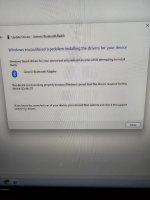
Hmm... reading up on Code 31 errors, it sounds like rebooting the computer might be worth a try. Quick, easy, free.
Worth trying first.
Worth trying first.

Tried that. Its a aplic usb bluetooth nano stick V4.0Hmm... reading up on Code 31 errors, it sounds like rebooting the computer might be worth a try. Quick, easy, free.
Worth trying first.

TP-Link AX3000 works 
Wi-Fi 6 and BT 5.2
Wi-Fi 6 and BT 5.2
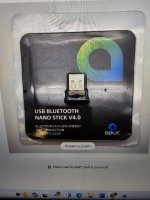
Try:Tried that. Its a aplic usb bluetooth nano stick V4.0
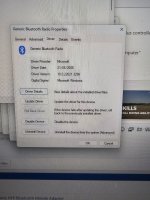
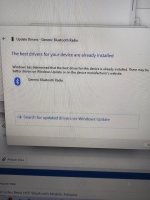
- In the search type" Device manager" and open it.
- Click on the small arrow next to either "Bluetooth" or "Universal Serial Bus controllers"
- Right click on "CSR" and select Update Driver
- Select" Browse my computer for driver update"
- Select on bottom "Let me pick from a list of available drivers on my Computer"
- Select "Generic bluetooth Driver"

If that's BT v4 its a bit old...
not as old as his computer that shipped without integral bluetooth
Dont really use it. So its my computer that is shite or the dongle thing is shite.not as old as his computer that shipped without integral bluetooth

- Joined
- Jan 9, 2004
- Messages
- 27,160
- Reaction score
- 6,495
2006 
That's when Harald Bluetooth was still alive
That's when Harald Bluetooth was still alive
New computer then instead of bike stuff.2006
That's when Harald Bluetooth was still alive

Or take the dongle to the computer shop for them to do it.
Is it on a laptop?Or take the dongle to the computer shop for them to do it.
No home computerIs it on a laptop?
- Joined
- Jan 9, 2004
- Messages
- 27,160
- Reaction score
- 6,495
New computer then instead of bike stuff.
Or take the dongle to the computer shop for them to do it.
Honestly if your computer is that old then spending £2-300 on something now will probably be worth it for so many different reasons.
A lot of USB adapters give trouble. The one I mentioned is a card you put inside.No home computer
TP-Link

Don’t know why you have to use a computer . The dongle I bought just plugged straight in to USB port on bike ( for power supply ) and worked from the off .

I have to agree there pall.Don’t know why you have to use a computer . The dongle I bought just plugged straight in to USB port on bike ( for power supply ) and worked from the off .
@Doc, what are dicking about with a computer for?!
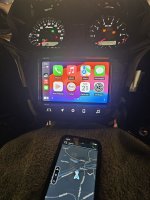
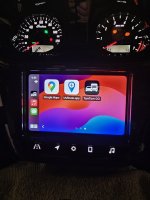
Plug the fecking thing into the USB port on your SOA (bike), let it power up by turning on the ignition. Once on,go on your phone into Bluetooth settings, and select the dongle from available Bluetooth devices nearby. Seeing as you live out in the sticks, there will only be one or two options, the other most probably sumfink else you wish you did not know about. Do the necessary connection stuff. The dongle may ask for a passcode. This by default most of the time being 0000 or 1234. Your bike should now be connected to your phone and Apple CarPlay should work.
It didnt that is why i am asking and was told to put it in computer to set it up.Don’t know why you have to use a computer . The dongle I bought just plugged straight in to USB port on bike ( for power supply ) and worked from the off .
I will try that Ev cheers.I have to agree there pall.
@Doc, what are dicking about with a computer for?!
Plug the fecking thing into the USB port on your SOA (bike), let it power up by turning on the ignition. Once on,go on your phone into Bluetooth settings, and select the dongle from available Bluetooth devices nearby. Seeing as you live out in the sticks, there will only be one or two options, the other most probably sumfink else you wish you did not know about. Do the necessary connection stuff. The dongle may ask for a passcode. This by default most of the time being 0000 or 1234. Your bike should now be connected to your phone and Apple CarPlay should work.


Similar threads

- Replies
- 0
- Views
- 145


- Replies
- 0
- Views
- 170