Can’t turn off seasonal closures in my XT2

Bob Jeffries

It's good to be back ..
UKGSer Subscriber
Joined
Jan 3, 2002
Messages
1,269
Reaction score
140
Location
Griffithstown, South Wales
I have now found that there's no way to switch off seasonal closures when planning a route - I've done a loop from Seez up to the Col de Petit Saint Bernard and the Gran San Bernardo pass but the XT2 insists on going through the Mont Blanc Tunnel!!

=======

I have started you a fresh thread, to save you hijacking your own.

Richard
 
Last edited by a moderator:
I am not at all familiar with the XT2. Does it prefer routes being created in BaseCamp / MyRoute / some Garmin app or other and transferred into it?

It is sounding more and more like a step backwards and / or something aimed at the “Take me from A to B, right now, down the fastest / twistiest routes your algorithms can manage and don’t you dare take me down a closed road!” Old JB will love it, if so.
 
Last edited:
It tries to push you to use the Garmin Tread app but it's easy to transfer routes from MRA directly.

I think your right, it does have some good features for using its inbuilt routing app (explore) such as Michalin green routes and popular moto roads but making it difficult to plan ahead for longer trips is a pita.

I'm trying using a Samsung Tab Active 3 with MRA and if that works OK on my upcoming trip (20th May to 14th June) to the Alps then I think I'll give up with Garmin.
 
Hi Bob, I might be completely off beam here but have you tried switching off smart notifications? I havent got an XT2 but on the XT they are contained within the Garmin Drive app and after playing with them for a while I switched them off. A bridge I use frequently was out for a couple of days during the winter floods and then had a traffic light system for a couple of weeks while they fixed it. With notifications switched on the XT kept changing my route....without asking! Turned off notifications and no more trouble. Is there a similar setting in tread?
 

Bob Jeffries


If you do decide to sell your XT2, you could do a lot worse than buying a secondhand Navigator V or its Garmin equivalent, assuming there is one. They really are very good.

Here’s one for sale at a not too bad price:


Don’t though be tempted to go for a Nav VI, as the two earlier models were beset with problems. It would be only too easy to pick up a duff one, I’m afraid.
 
Last edited:
Any software such as Google or Apple Maps will force you to use routes based on those that are currently open.
Seems that Garmin XT2 has similar preference.
Out of season, (say October through to mid to late May) there is no chance for you to use the mountain passes in the alps that are always closed during the winter season. Let’s face it. Roads up there do get buried under 10+ feet of snow.

I’d plan my routes in MRA. Observing official alpine Mountain Pass opening dates. But only transfer the routes in to XT/XT2 or any other device. When due to travel, preferably within a couple of day max. In MRA you can set precise time and date for each of your routes. Doing this, should also prevent you seeing any potential issues with closed roads etc.
 
Google allows you to change the departure date, to say, July. It will then allow crossings over the higher passes that are closed in say, March. MyRoute allows you to disable seasonal closures. BaseCamp too, from memory.

I think what the OP is trying to do is create routes within his XT2 device itself, which seems to lack many of the usual ‘Set departure time, allow stop-over times, disable road closures’ features from earlier Garmin models.
 
Google allows you to change the departure date, to say, July. It will then allow crossings over the higher passes that are closed in say, March. MyRoute allows you to disable seasonal closures. BaseCamp too, from memory.

I think what the OP is trying to do is create routes within his XT2 device itself, which seems to lack many of the usual ‘Set departure time, allow stop-over times, disable road closures’ features from earlier Garmin models.
I see. In the extreme case, I might use Garmin unit it self to create my route. But I think I'd sooner lick razor blades.
 
After a 30 minute "consultation" with Garmin UK support it seems that all time/date related settings have been dropped from the XT2. They have asked me to send them screenshots of the differences between my XT and XT2 and they will pass them on to technical support as an "issue".

Whilst I was always happy with Basecamp I have been using MRA for the last few years and have now stopped using Basecamp. I find MRA easy to use and pretty comprehensive (does need better POI handling though) and the navigation tool is also very good. I've done the routes for a 26 day trip to the Alps & Italy using MRA and the process to transfer them to the XT2 is simple (I use GPX 1.1 and keep route recalculation on) but all date and time information is lost in the transfer to the XT2 (the XT retains it).

I also use the whole MRA routing/navigation on a Galaxy Tab Active 3 and if that proves reliable on this trip I'll give up with Garmin and sell my XT and XT2.
 
Thank you for making the effort to talk to Garmin; let’s see what happens next.

Enjoy your holiday.
 
After a lot of emails back and forth, and sending screenshots to prove the issue, I had this reply from Garmin:
To start with, per the "Garmin Devices Not Compatible with BaseCamp" article, the Zumo XT2 is not compatible with BaseCamp. It is compatible with the Tread app and the Route Planner on the device, but the Tread app and the Route Planner are not compatible with scheduling. This is not a feature on the current version of the Route Planner. The article Creating, Editing, or Deleting a Route or Trip on an Automotive Device Using Route Planner shows all of the options available in the Route Planner on the zumo XT2 under the editing options section of the edit a route dropdown.

The investigation that has been opened for you has been changed to reported feedback that we'll keep track of if there are more customer reports added to it, so for now this isn't something we can fix. If there are any updates added to the investigation, we'll reach out to you via email.

Let me know if you have any questions!

Kind regards,
Filippa

Garmin Automotive Helpdesk

It seems Garmin are aware of the issue but are not bothered and have no intention of correcting it!

After doing a few more tests it does seem that Basecamp, despite Garmin insisting it's not compatible with the XT2, does indeed pass at least the route Start Date to the XT2, but MRA doesn't.

I did a simple route from just north of Val-d'Isère to a little way south, taking in the Col de l'Iseran. As expected both MRA and Bacecamp routed around Col de l'Iseran with avoid Seasonal Closures enabled and over it with them disabled. I then saved each route twice, I.e. MRA Col de l'Iseran CLOSED, MRA Col de l'Iseran OPEN, Basecamp Col de l'Iseran CLOSED and Basecamp Col de l'Iseran OPEN. I then exported both routes from MRA to my XT2 and transferred both routes from Basecamp to the XT2 (they transferred as Temp 0 and Temp 1 but when imported to Explorer on the XT2 the correct names appeared.

The two routes from MRA both routed around Col de l'Iseran, so the route that was created using the MRA avoid Seasonal Closures option switched off took no notice of the option. Both routes from Basecamp did as planned, one went around Col de l'Iseran and the other went over it.

So it seems it is possible to pass Seasonal Closure info over to the XT2 but the MRA Export "Connector" doesn't do it at the moment.

I'll pass the info onto the MRA team and they can take a look at it.
 
I've just about given up the Tread app and Explore. I have the Explore Library disabled as the constant syncing and recalculation of a route every time it's opened on the XT 2 is a pain.

Weather and traffic information still gets passed from my iPhone to my XT 2.

Does anyone know a way to transmit a MRA route from the iPhone to the XT 2 (as per the Drive app with the XT) ?

I don't want to carry a laptop just to transfer routes to XT 2 by cable.

If not I think I'll return to the XT and swap the cradle back (only swapped as the XT 2 cradle is better).
 
I have never allowed my XT2 to sync with Explore.

The method I use is to plan the route in Basecamp, and get all the waypoints I want, and then e-mail the exported file from Basecamp to myself. I can then open up the e-mail on my phone / tablet and then open the gpx file using Tread. Means I have an unamended copy of the routes that Tread / XT2 has not amended if they mess things up. BTW on my routes I have no shaping points, so that the route from Basecamp to the XT2 via Tread should be as I designed it.
 
My 2pence
Get a 'proper' satnav:duck:
276cX or the new 710
Use BC but not any of the Garmin apps
You'll be glad you did.

And as a gentle reminder, neither can be used with the wonder wheel nor make phone calls etc etc but they do what they do very well.
That is my opinion- Many will disagree / object / promote MRA etc. and frankly... you know the rest!

Bring on the Starbucks buns!:rob
 
I have never allowed my XT2 to sync with Explore.

The method I use is to plan the route in Basecamp, and get all the waypoints I want, and then e-mail the exported file from Basecamp to myself. I can then open up the e-mail on my phone / tablet and then open the gpx file using Tread. Means I have an unamended copy of the routes that Tread / XT2 has not amended if they mess things up. BTW on my routes I have no shaping points, so that the route from Basecamp to the XT2 via Tread should be as I designed it.

Thanks - I'll give that a try.

I didn't realise that the Tread app could be used to transfer a file to the Zumo (without enabling the library and thus Explore) as you can with the XT and Drive.
 
Does anyone know a way to transmit a MRA route from the iPhone to the XT 2 (as per the Drive app with the XT) ?
Is there not a "cloud" to save routes on the MRA browser app? Then you can download/open them on the phone.
That's how I do it with Kurviger.
 
Does anyone know a way to transmit a MRA route from the iPhone to the XT 2 (as per the Drive app with the XT) ?

I plan in MRA on a desktop (I find using a mouse easier for placing waypoints). My routes are sync’d between all devices attached to my MRA account.

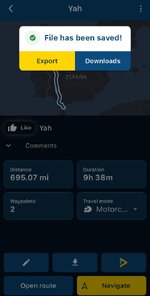
I use the MRA app on iOS - find the route and then use the download button. I then use “export” button on the “File has been saved!” dialog (see screenshot) to open in Garmin Tread app. Save this and it syncs to my XT2.
 

Attachments

  • IMG_3651.jpeg
    IMG_3651.jpeg
    86.9 KB · Views: 5
I plan in MRA on a desktop (I find using a mouse easier for placing waypoints). My routes are sync’d between all devices attached to my MRA account.

I use the MRA app on iOS - find the route and then use the download button. I then use “export” button on the “File has been saved!” dialog (see screenshot) to open in Garmin Tread app. Save this and it syncs to my XT2.

That's exactly the way I've been doing it. (y)

The trouble is with the constant syncing and recalculating with the Tread Library.

I'm thinking it may have something to do with the Seasonal Closures I have on the MRA Desktop - conflicting with the XT 2 routes.

Going to have a look at this later when my head has stopped hurting. :D
 
Is there not a "cloud" to save routes on the MRA browser app? Then you can download/open them on the phone.
That's how I do it with Kurviger.

MRA does the same. The Tread app for getting the route onto the Zumo XT 2 seems to be the culprit (y)
 
I’ve not encountered seasonal closures so I have no experience around it. Best of luck figuring it out!


Back
Top Bottom