Deleted account 250722001
Registered user
- Joined
- Aug 2, 2019
- Messages
- 1,052
- Reaction score
- 416



Yes, I pretty much only use my iPad to create, import &/or edit routes.Ok. Daft question time.
Using an iPad, can I import that route into mra ?
 just sayin'
Had it for years. Never really liked it.Learn Basecamp
No need to surrender. I’m not really interested in all these computer bollocks. I find bc too complicated so I paid for MRA which is slow, won’t do long routes and overall a bit clunky.I give up.

I understand.No need to surrender. I’m not really interested in all these computer bollocks. I find bc too complicated so I paid for MRA which is slow, won’t do long routes and overall a bit clunky.
I’m thinking of going back to Kurviger.
Which makes me question why I bothered to answer your question. Why ask if you just cannot be bothered anyway?No need to surrender. I’m not really interested in all these computer bollocks. I find bc too complicated so I paid for MRA which is slow, won’t do long routes and overall a bit clunky.
I’m thinking of going back to Kurviger.
No. It’s not that I’m not bothered , I just don’t have much success with these things.Which makes me question why I bothered to answer your question. Why ask if you just cannot be bothered anyway?

No. It’s not that I’m not bothered , I just don’t have much success with these things.
Foreinstance, I looked at the help files on the MRA app to find out how to turn off seasonal closures. It told me how, but it doesn’t look anything like my computer
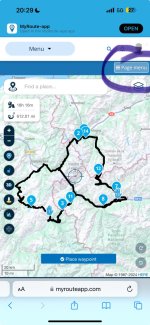
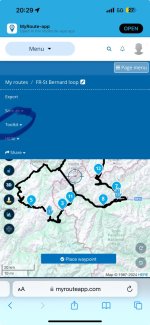
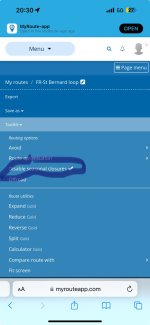
My picture of the route looks just like that, but I don’t have route optimisation or disable seasonal closures. Thanks for looking anyway wrappers.I’m on
From my iPhone on a bus. It might look a bit different on your home computer, but the same bits will still be there.
View attachment 311966View attachment 311967View attachment 311968

I’m already a gold subscriber. I’ll try that though.You get different options available in ‘Toolkit’ depending on what map set you have selected. I believe you only get the Seasonal Closures and Avoid Environmental Zones with Here maps. And you only get Here maps with a paid subscription. The default maps if using the free version of MRA is Open Street Maps



