For reasons I have never been too clear on, MyRoute still does not provide a facility to stitch tracks together. This is not the case with BaseCamp, which of course does.
The workaround is to instruct MyRoute to convert the track into a route, which it does very quickly. Routes you can stitch together in MyRoute, pretty simply.
The conversion from a track to a route does have some advantages. The main one as I see it, is that if you overlay the track onto the route, you can spot any anomalies. This is made easier if you colour the track bright red, simply as it stands out against the black of the route. There shouldn’t be any anomalies but, there are some. Some (and this is not uncommon) are when the creator of the track went wrong, taking a wrong turning and then turning around. When creating the route, you can edit these out.
You can also sometimes see big deviations in the route, versus the underlying track, which it is supposed to follow. In MyRoute, these are often caused by the HERE maps knowing that a road is closed, so it routes you up to the closure, then turns you around again. Here’s an example:
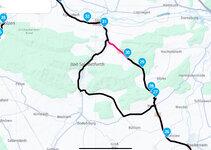
All good up to shaping point 30, then an about turn. I first try forcing the route along, simply by moving the shaping points. This doesn’t always work. Of course it might not be a good idea to do it anyway, as the road might be closed for months. I usually check it by Googling the spot and seeing what Google Map’s Traffic layer reveals, as it’s often pretty good on road closures. If a road is definitely closed when I plan to be there, I’ll edit the route nearer the time.
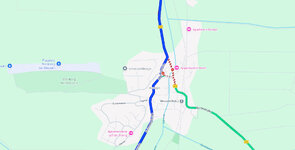
Lo and behold, Google Map’s Traffic layer reveals…. the 243 road is closed, right on the junction. I’d have been turning around, had I gone down there today and ignored the usually very efficient German ‘Umleitung’ signs.
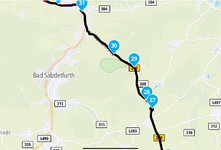
Another very quick way to check in MyRoute, is to switch to the TomTom, which uses different data. This can ‘fix’ the problem, as shown below:
Irrespective of route versus track anomalies, when the day comes, it’s a pretty safe bet that I’ll encounter some road closures in 8,000 miles and, no doubt, a wrong turning or two, too.





