CHANNEL TUNNEL. WHY WONT IT RECOGNISE IT ?

Taff

Well-known member
UKGSer Subscriber
Joined
Feb 21, 2004
Messages
7,351
Reaction score
6
Location
South West Wales
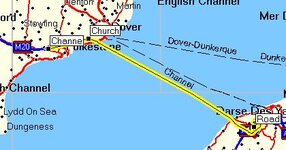
I use an SP3, but when using Mapsource to plot a route to France, for some reason it will not recognise the Channel Tunnel - even when it is blatantly obvious that it is the best route. Even when I've marked the Tunnel entrance and exit, and asked for a route between the two, :rolleyes: Mapsource suggests that I catch the Dover - Calais ferry, then ride down to the tunnel exit.

I thought I was getting the hang of it, so what am I doing wrong. :banghead:
 
It's trying to help?

The attributes for the tunnel are probably a railway track and how often do you take a bike / car / lorry etc along one?
 
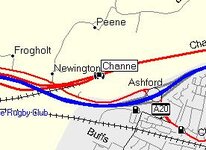
Just tried it and it seems to work ok on my machine. Couple of idea's, did you select the tunnel access point as one of your waypoints and are your settings set to avoid tolls. Probably the second one is irrelevant was just looking for something that might be influencing the route.
 

Attachments

  • screenshot002.jpg
    screenshot002.jpg
    16.3 KB · Views: 240
Channel with routing.
 

Attachments

  • screenshot001.jpg
    screenshot001.jpg
    23 KB · Views: 232
Who cares :p

They rip you off anyway. I'd rather go on a boat anytime.
 
Gazza. Thought you'd sorted it there for a minute, but I've checked the setting & "Avoid Toll Roads" has not been ticked. Yes, I have marked the given symbols ie Entrance & Exits but it still sends me on the ferry. I'll have another look at it tomorrow - when I'm in a better mood.

Animal - I would have automatically chosen the ferry, but the Tunnel prices don't look daft and the crossing will be faster.
 
Here's a thought. Ride to the tunnel entrance, then - and here's the clever bit - ignore the instructions to ride to the ferry.

I'm pretty sure this will work for the return trip as well...

Mike:)
 
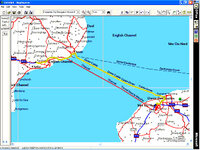
To alter a route, click on the route once with the selection tool (arrow tool) the route turns yellow, click on the route again mid channel, then pull the route and click on the channel tunnel, the route will re draw through the tunnel.
 
It's there right as rain on Euro CN v6:

tunnel.jpg


It's on Euro CN v5 and v4 too!

Greg
 
Mike O said:
Ride to the tunnel entrance, then .... ignore the instructions to ride to the ferry.
:D :D I may not be super intelligent, but I'm not so thick either that I would follow the machine to the letter - especially one which common sense told me was obviously wrong. My problem wasn't that I would be sent on a daft trip, but actual evidence that I couldn't get the GPS to work properly - and the daft route was just confirmation of this - which dents your confidence. I'll attach an image showing the original problem.

The problem is now solved & confidence in GPS has been restored. :P The tunnel shows up all right, and is shown as a road (and not a railway line), but it turns out that the Preferences were set to Faster Time and not Shorter Distance. By changing these settings, it has solved my problem. Just curious now why it thinks that the ferry is faster than the Tunnel. :confused:

Just checked the price at www.eurotunnel.co.uk and a return ticket at the end of April is £90. I'll check the ferry prices later, but I doubt it will be cheaper than that.
 

Attachments

  • untitled-1 copy map.jpg
    untitled-1 copy map.jpg
    58.6 KB · Views: 159


Back
Top Bottom