

You are using an out of date browser. It may not display this or other websites correctly.
You should upgrade or use an alternative browser.
You should upgrade or use an alternative browser.
City Nav 2013.20 Europe mapping is here
- Thread starter Bumpkin
- Start date

Off on my holidays in a weeks time, deciding how brave I feel at the moment!
Any ideas on what options you're given when trying to download to a 660? For example, like the good old days when you downloaded all the maps onto the PC and then decided which ones to install on the GPS.
Any ideas on what options you're given when trying to download to a 660? For example, like the good old days when you downloaded all the maps onto the PC and then decided which ones to install on the GPS.

Any ideas on what options you're given when trying to download to a 660? For example, like the good old days when you downloaded all the maps onto the PC and then decided which ones to install on the GPS.
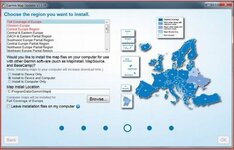
If you look at the 'Options' page on the downloader, you can select which mapping area you want. I'm currently loading Western Europe to my 660 but it will load ALL of the maps to my PC (if you select the GPS and PC option).
Greg

Deleted account Cooperman
Registered user
Bugger - I'm setting off next week and routes are planned.
Should I upgrade
Should I upgrade
mb4807
Registered user
Doh!
Bugger. It's less than 10 days since I bought the .10 version. Do you know if Garmin have a free upgrade for those who bought recently? I would of course have held off and waited if I had known a new version was so imminent. (I've not subscribed to lifetime updates)
Bugger. It's less than 10 days since I bought the .10 version. Do you know if Garmin have a free upgrade for those who bought recently? I would of course have held off and waited if I had known a new version was so imminent. (I've not subscribed to lifetime updates)

Bugger - I'm setting off next week and routes are planned.
Should I upgrade
i wouldn't.


(RIP) Johno23
Registered user
Bugger. It's less than 10 days since I bought the .10 version. Do you know if Garmin have a free upgrade for those who bought recently? I would of course have held off and waited if I had known a new version was so imminent. (I've not subscribed to lifetime updates)
 downloaded mine on Monday................without lifetime upgrades
Bumpkin
Registered user
How much is a one off update these days? Not much less than lifetime via a Garmin gift card from Handtec I'll wager. These are genuine Garmin cards, apart from waiting a couple of days for postal delivery, there's no difference to buying off the Garmin website. I have 2 subscriptions using this method for my Nuvi and my Zumo.
If you plan on keeping your GPS for a few years and intend to upgrade once or twice in that period it makes sense to go for the lifetime option. That way you get 4 updates a year.
Sent from my GT-I9100 using Tapatalk 2
If you plan on keeping your GPS for a few years and intend to upgrade once or twice in that period it makes sense to go for the lifetime option. That way you get 4 updates a year.
Sent from my GT-I9100 using Tapatalk 2
Kevind1
Registered user
Europe 2013.20
Got news via my "Garmin Lifetime Updater" that new maps were available and as I'm heading to Austria from Scotland in a few weeks time I decided best to be fully updated so proceeded to download new maps to my "Mac and Device".
I was greeted with the usual not enough space to download all of Europe to the device but was given the option to either choose restricted mapping (no real use as we may head further east) or to use SD card. I already had an SD card in the Garmin with music on it but decided that best option was delete all the music and load the maps. Several hours later and several attempts I still get the "there has been an error downloading your maps" and although my Garmin now says that it has Europe 2013.20 installed I am not feeling very confident journeying into the unknown (I am going to have to travel through England as we are using the Tunnel rather than ferry ).
).
Hopefully Garmin Support will live up to their good reputation and be able to help me out and put mind at rest.
Sorry this sounds like a bit of a rant but I have done several very successful continental trips using the Garmin and apart from one minor glitch in France it has been a fantastic tool which has got us to our destination impeccably.
I have started using the Basecamp software which(in my opinion) is even better than Mapsource and would recommend it.
Got news via my "Garmin Lifetime Updater" that new maps were available and as I'm heading to Austria from Scotland in a few weeks time I decided best to be fully updated so proceeded to download new maps to my "Mac and Device".
I was greeted with the usual not enough space to download all of Europe to the device but was given the option to either choose restricted mapping (no real use as we may head further east) or to use SD card. I already had an SD card in the Garmin with music on it but decided that best option was delete all the music and load the maps. Several hours later and several attempts I still get the "there has been an error downloading your maps" and although my Garmin now says that it has Europe 2013.20 installed I am not feeling very confident journeying into the unknown (I am going to have to travel through England as we are using the Tunnel rather than ferry
).Hopefully Garmin Support will live up to their good reputation and be able to help me out and put mind at rest.
Sorry this sounds like a bit of a rant but I have done several very successful continental trips using the Garmin and apart from one minor glitch in France it has been a fantastic tool which has got us to our destination impeccably.
I have started using the Basecamp software which(in my opinion) is even better than Mapsource and would recommend it.

Bugger - I'm setting off next week and routes are planned.
Should I upgrade
You are so out of date......

Deleted account Cooperman
Registered user
If you look at the 'Options' page on the downloader, you can select which mapping area you want. I'm currently loading Western Europe to my 660 but it will load ALL of the maps to my PC (if you select the GPS and PC option).
Greg
Bugger - I'm setting off next week and routes are planned.
Should I upgrade
I remembered that last time I did as Greg suggests, it worked then, and it worked this time. Then update the mapinstall and an easy update to the maps has taken place.
So I'd say yes. But if you have any doubts ....
Deleted account Cooperman
Registered user
Against your sound advice I decided to update - another Garmin PITA
I'm on lifetime updates, and to begin with the dashboard suggested I had a software and map upgrade available.
I started with the software but when I got to the map it wouldn't let me get past reinstalling Lifetime Map Updater. Having exhausted other options I reinstalled the updater and set it running to install to PC and device (Mac user).
I left it to it's own devices returning to find it had stopped
Not just that but the whole Garmin site seemed not to be communicating. I shut everything down and started again.
My problem now was the site was suggesting I had already downloaded the update
Lots more checking of options before the solution was again to redownload the Lifetime Map Updater and find a reinstall option. Again I chose PC and device and off it went.
This worked, but only to the device! I had to go through the whole process again selecting download to PC only (albeit this was a lot quicker).
I've checked with the routes and they all seem to work fine
To do this a useful feature in Basecamp is Play Route.

You get this by clicking on your route and going into the options screen in the bottom left hand corner.
This then plays your planned journey with the option to adjust the speed (I chose the fastest on a medium detail map) and you can adjust the zoom at the bottom of the screen.
Just checks you haven't included any loops or dead legs.
I'm on lifetime updates, and to begin with the dashboard suggested I had a software and map upgrade available.
I started with the software but when I got to the map it wouldn't let me get past reinstalling Lifetime Map Updater. Having exhausted other options I reinstalled the updater and set it running to install to PC and device (Mac user).
I left it to it's own devices returning to find it had stopped
Not just that but the whole Garmin site seemed not to be communicating. I shut everything down and started again.
My problem now was the site was suggesting I had already downloaded the update
Lots more checking of options before the solution was again to redownload the Lifetime Map Updater and find a reinstall option. Again I chose PC and device and off it went.
This worked, but only to the device! I had to go through the whole process again selecting download to PC only (albeit this was a lot quicker).
I've checked with the routes and they all seem to work fine
To do this a useful feature in Basecamp is Play Route.
You get this by clicking on your route and going into the options screen in the bottom left hand corner.
This then plays your planned journey with the option to adjust the speed (I chose the fastest on a medium detail map) and you can adjust the zoom at the bottom of the screen.
Just checks you haven't included any loops or dead legs.

Yellow Peril
Registered user
Anyone else had problems updating your PC with this update? No problems to the unit but struggling to get on PC.
araspitfire
Registered user
Having an older GPS, I only update the PC. I had no problem doing this last night... (now.. only selecting just enough maps to not overload the GPS and have to start the GPS update process again = another matter)
Al...
Al...
Bumpkin
Registered user
Having an older GPS, I only update the PC. I had no problem doing this last night... (now.. only selecting just enough maps to not overload the GPS and have to start the GPS update process again = another matter)
Try using Garmin MapInstall, this reports the free space on the sat nav and how much space the selected mapping will occupy. Leave about 100 - 200MB free.
Deleted account Cooperman
Registered user
i wouldn't.
Should have listened
First day on trip and I haven't got the junction preview. I just get a blank screen which is even worse as you can't see feck all for a few seconds.
Must not have selected it for download
Anyone know if you can turn off the junction preview
Yellow Peril
Registered user
Don't know but fixed my problem after 2 days 
Is this a related problem?
I bought the lifetime option the other day, for my 550, but have the following problem when trying to update the maps.
I have the Zumo plugged in to the USB port, it has an additional 2GB card installed, and I have selected a folder on my HDD for the additional data.
It recognises that for the top 3 mapsets - it requires additional space on my HDD, but no matter what folder location I choose - it won't do it.
It won't enable the OK button in bottom-right. (it does enable the button if I choose one of the mapsets in "black")
Sudden thought - does it matter what the HDD is formatted as? (FAT32 etc). I'm running Win 7Pro.
I've e-mailed Garmin, but wondered if anyone here has had the same problem?
Cheers
Al
I bought the lifetime option the other day, for my 550, but have the following problem when trying to update the maps.
I have the Zumo plugged in to the USB port, it has an additional 2GB card installed, and I have selected a folder on my HDD for the additional data.
It recognises that for the top 3 mapsets - it requires additional space on my HDD, but no matter what folder location I choose - it won't do it.
It won't enable the OK button in bottom-right. (it does enable the button if I choose one of the mapsets in "black")
Sudden thought - does it matter what the HDD is formatted as? (FAT32 etc). I'm running Win 7Pro.
I've e-mailed Garmin, but wondered if anyone here has had the same problem?
Cheers
Al
Attachments

Similar threads
- Replies
- 29
- Views
- 5,497
- Replies
- 15
- Views
- 3,472