


You are using an out of date browser. It may not display this or other websites correctly.
You should upgrade or use an alternative browser.
You should upgrade or use an alternative browser.
City Navigator Maps Discontinued
- Thread starter Schtum
- Start date
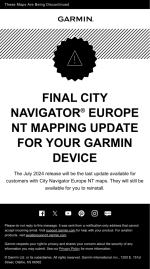
I've just received that email as well - I thought we were supposed to get "Lifetime" updates for the XT etc.? Have I died and not noticed?
Or are these "NT" maps different to the "NTU" maps which are on my XT, in which case don't panic Captain Mainwaring (but why have they sent the email?)
Or are these "NT" maps different to the "NTU" maps which are on my XT, in which case don't panic Captain Mainwaring (but why have they sent the email?)
Last edited:

Yes, I, too, paid for 'lifetime' updates.
WTF?
WTF?


I've spoken with Garmin this morning and they have confirmed to me that units running City Navgator NTU maps are not affected by this, it's only units running the older NT versions that are affected.

Yes, I, too, paid for 'lifetime' updates.
WTF?
I suspect that means the lifetime of the device ie for as long as Garmin support it, which won’t be forever.
Anyway, what’ll you want with a GPS in the old folks’ rest home, other than to navigate to Mrs Goodjob’s bedroom, in the sure knowledge that she’ll have her teeth out.

very old models such as the Zumo 660 as already discussed in here
Yep.
Had the same email, was puzzled, then realised it was for my very old and very broken 550 maps (or the 660, but I sold that one and de-registered).
From Garmin's website -
In accordance with the Lifetime Maps and Maps Terms and Conditions, map updates and/or Downloadable Content (DLC) are no longer available to download or purchase and cannot be activated and/or associated with your device. This is due to these devices not having sufficient memory capacity and other required technical capabilities to utilize current map data.
In accordance with the Lifetime Maps and Maps Terms and Conditions, map updates and/or Downloadable Content (DLC) are no longer available to download or purchase and cannot be activated and/or associated with your device. This is due to these devices not having sufficient memory capacity and other required technical capabilities to utilize current map data.

You can run NTU maps on older devices, well I can on my Montana 600.
The main difference is place names using Unicode characters.
My Montana is not on the list, but I don't have a problem. Maybe if I went somewhere with Latin name it would get upset.
The following Garmin models support the NTU cards:
Dakota 10/20
Dezl 560
Dezl 760
Etrex 20/30
GpsMap 62(s)
Montana 650
Monterra
Nuvi 30
Nuvi 40
Nuvi 42
Nuvi 44
Nuvi 50
Nuvi 52
Nuvi 54
Nuvi 140
Nuvi 150
Nuvi 885
Nuvi 2200
Nuvi 2250
Nuvi 2300
Nuvi 2350
Nuvi 2360
Nuvi 2370
Nuvi 2450
Nuvi 2455
Nuvi 2457
Nuvi 2460
Nuvi 2475
Nuvi 2495
Nuvi 2497
Nuvi 2555
Nuvi 2557
Nuvi 2595
Nuvi 2597
Nuvi 2757
Nuvi 2797
Nuvi 3450
Nuvi 3490
Nuvi 3550
Nuvi 3590
Nuvi 3597
Nuvi 3750
Nuvi 3760
Nuvi 3790
Streetpilot Android
Oregon 550
Oregon 600
Oregon 650
Zumo 350
The main difference is place names using Unicode characters.
My Montana is not on the list, but I don't have a problem. Maybe if I went somewhere with Latin name it would get upset.
The following Garmin models support the NTU cards:
Dakota 10/20
Dezl 560
Dezl 760
Etrex 20/30
GpsMap 62(s)
Montana 650
Monterra
Nuvi 30
Nuvi 40
Nuvi 42
Nuvi 44
Nuvi 50
Nuvi 52
Nuvi 54
Nuvi 140
Nuvi 150
Nuvi 885
Nuvi 2200
Nuvi 2250
Nuvi 2300
Nuvi 2350
Nuvi 2360
Nuvi 2370
Nuvi 2450
Nuvi 2455
Nuvi 2457
Nuvi 2460
Nuvi 2475
Nuvi 2495
Nuvi 2497
Nuvi 2555
Nuvi 2557
Nuvi 2595
Nuvi 2597
Nuvi 2757
Nuvi 2797
Nuvi 3450
Nuvi 3490
Nuvi 3550
Nuvi 3590
Nuvi 3597
Nuvi 3750
Nuvi 3760
Nuvi 3790
Streetpilot Android
Oregon 550
Oregon 600
Oregon 650
Zumo 350
I have an old-ish Nuvi 3958 and a Zumo XT. I just plugged the Nuvi into my PC and Express said that a map update to City Navigator 2026.20 was available, so I told it to update. Thinking that the Zumo could also do with the update, I plugged that in and, sure enough, Express said there was an update....
After a short time Express came up with a red banner saying there was a problem with the update on the Zumo...not that unusual going by past experiences.
However, this time it appears that my City Navigator Europe maps are no longer anywhere to be found on the Zumo - it claims that the only installed maps are the TopoActive PS maps and the Europe DEM - but both Express and the Zumo say that all my maps are "up to date" and do not offer to install anything!
Anyone know how I can get my City Navigator maps back? The Zumo is pretty useless to me without them.
PS - I've just looked at the Zumo Internal Storage in File Explorer and the Map directory is empty
After a short time Express came up with a red banner saying there was a problem with the update on the Zumo...not that unusual going by past experiences.
However, this time it appears that my City Navigator Europe maps are no longer anywhere to be found on the Zumo - it claims that the only installed maps are the TopoActive PS maps and the Europe DEM - but both Express and the Zumo say that all my maps are "up to date" and do not offer to install anything!
Anyone know how I can get my City Navigator maps back? The Zumo is pretty useless to me without them.
PS - I've just looked at the Zumo Internal Storage in File Explorer and the Map directory is empty
Last edited:

Hmmm. I was going to update my Zumo XT’s today but I think I’ll wait!
My suggestions are as follows:
1) Delete Garmin Express. Switch everything off, including PC and Zumo, reinstall Garmin Express, and try again.
2) if that doesn’t work, try a different and preferably the Garmin cable
3) if that doesn’t work, reset by holding the power key for 12s
4) if that doesn’t work, factory reset the XT,
View map>speed button>press Speed circle for 10s>clear all user data, and try again
1) Delete Garmin Express. Switch everything off, including PC and Zumo, reinstall Garmin Express, and try again.
2) if that doesn’t work, try a different and preferably the Garmin cable
3) if that doesn’t work, reset by holding the power key for 12s
4) if that doesn’t work, factory reset the XT,
View map>speed button>press Speed circle for 10s>clear all user data, and try again
I've just re-connected the Zumo using the cable that was on the Nuvi and now Express has decided to show me the City Navigator option ! It's downloading at the moment.
So panic over, I hope.....
Weirdly, I also noticed that the program link to Basecamp seemed to think that it was no longer present either, although the files were still in the Programs folder, so I re-installed that and it's now working too....
So panic over, I hope.....
Weirdly, I also noticed that the program link to Basecamp seemed to think that it was no longer present either, although the files were still in the Programs folder, so I re-installed that and it's now working too....

If you plug in your Zumo XT you can try and update it without resort to your computer/express as long as the XT is connected to WIFI.I have an old-ish Nuvi 3958 and a Zumo XT. I just plugged the Nuvi into my PC and Express said that a map update to City Navigator 2026.20 was available, so I told it to update. Thinking that the Zumo could also do with the update, I plugged that in and, sure enough, Express said there was an update....
After a short time Express came up with a red banner saying there was a problem with the update on the Zumo...not that unusual going by past experiences.
However, this time it appears that my City Navigator Europe maps are no longer anywhere to be found on the Zumo - it claims that the only installed maps are the TopoActive PS maps and the Europe DEM - but both Express and the Zumo say that all my maps are "up to date" and do not offer to install anything!
Anyone know how I can get my City Navigator maps back? The Zumo is pretty useless to me without them.
PS - I've just looked at the Zumo Internal Storage in File Explorer and the Map directory is empty
I tried that but the Zumo insisted it was up to date, so no maps were offered. All sorted now though. As a hifi enthusiast I'm used to seeing extraordinary claims being made about cables, but it's a bit ridiculous when ordinary USB cables mess you around (I had a similar issue with a Garmin dashcam some years ago).

Similar threads


- Replies
- 2
- Views
- 1,124


- Replies
- 9
- Views
- 4,562

