Conditional Formating of Excel Charts

Attleborough

Registered user
Joined
Jan 22, 2006
Messages
470
Reaction score
0
Location
Just off the A11
Hi,

Can anyone help me?

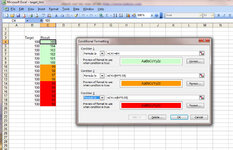
I have an Excel sheet where the calculation result cells have conditional formatting applied to them.

The conditional formating is straightforward enough - Green On Target, Amber less than 5% below target and Red for over 5% below target.

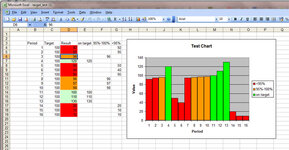
Does anyone know if it's possible to generate a chart from the results where the colums in the graph say, will retain the same colour formating as the result cells?

I'm using Excel 2003 and not very good at VB, so I'm hoping there is a work around I haven't found.

Cheers

A.
 
You can easily change the colour of the columns manually (right click column, format data point) :nenau

You'll need a better expert than me to conditionally format a graph though, sorry :(
 
Thanks Mutley.

I'm trying to avoid manual amendment. The sheet generates a lot of results which generates the graphs liked by the suits.

In all there are 7 graphs representing rolling quarterly information for nine different items so I can well do without manually amending each graph column to the correct colour!

A.
 
D'oh! Never mind me - didn't read the question properly! (It's late)
 
Last edited:
From memory, I think that when you make a chart, you have to define the colours used, but this isn't a hardship anyway.
 
You link the chart formatting to that of the data, usually easier done if on a separate worksheet. It's done via formulae. However if you are merely after a visual result, format the chart data line to reflect what you want, it's easier.
 
Hi,

I'm using Excel 2003 and not very good at VB, so I'm hoping there is a work around I haven't found.

Use Macro recorder to "record" you selecting bits of a chart, then adjusting the formatting for data points. Then look at the generated macro code in the VB editor, this ought to give you a starting point.

You'll then need to expand that code to include the same conditional formatting range checks against the source cell values i.e. to change the data points Green or Amber or Red based on the value in cell XN
 
Thanks Mutley.

I'm trying to avoid manual amendment. The sheet generates a lot of results which generates the graphs liked by the suits.

In all there are 7 graphs representing rolling quarterly information for nine different items so I can well do without manually amending each graph column to the correct colour!

A.

Would it not be easier to just have graphs showing plus or minus to the target then? :nenau
 
Your question got me curious so I had a play.
I made a simple bar chart. Jan - Dec with a value each month.
Then using VBA I created a two dimensional array. I read the monthly values into the first dimension and put the Color Index into the second dimension, depending on the monthly value.
Then, by stepping through each monthly bar in turn, the colour is set according to the Color Index in the array.
It's done with several separate For Next loops for clarity but it could all be squeezed into one.
There may be a smart way to read the values directly from the bars and set the colour on the fly, but I couldn't find it with a cursory look. The code is quick and dirty but it works. It might be a start point for what you want to do. Oh, and there's also a reset routine to set all the bars back to the same colour so the individual colours can be turned on and off. Not at all necessary but it pleased my simple mind.:)
I put notes in the code, Have a play - it might be of some use.
 

Attachments

Make the chart with all the colours you like and stuff you need.

Then go into chart formats and custom charts

Save your chart as a custom chart

You can then use it whenever and wherever you like

jobs done....

I certainly don't feel that you need the macro system for this but hey, it's your time....
 
You lot make hard work of it don't you!!!

See the attachment
 

Attachments

  • target_test.xls
    target_test.xls
    20.5 KB · Views: 41
  • conditional.jpg
    conditional.jpg
    118.3 KB · Views: 43
How about this, you just need three columns with the same logic as the conditional formatting, then use a stacked chart. Seems to work.
 

Attachments

Thanks for all the suggestions - It's tricky isn't it!

Glad it's not just me but its challenged the collective brains here too!

Cheers

:)


Back
Top Bottom