Converting itunes to MP3?

Bryn

Well-known member
Moderator
Moderator
Joined
Sep 20, 2003
Messages
14,048
Reaction score
456
Location
South Leicestershire
Got itunes library on the Mac... and a zumo 660... I need to convert the music to MP3 to get it onto the Zumo.....

Any ideas please? :thumb
 
Or you could highlight the songs or albums in i-tunes and then click 'advanced' from the top bar and then select convert to mp3.

You will then see the selected duplicated on the screen, when finished I delete the still highlighted songs and keep the mp3 version.

do a search in finder and copy the songs to your sd card.
 
Thanks for that Rob/Daffy... but just converted each tune... one by one :eek: then transferred... still no mp3 files found.....

Why can't things be simple :(


Once they're all converted I'm selecting all, then dragging into the Garmin folder which appears when the 660 is plugged in... is this the way to do it???
 
Getting there, sloowly....

Downloaded media monkey and the itunes export thingy, selected all the playlists, and exported them....

Think they've gone to Taiwan or somewhere cos I can't find them now :D

Thats it for tonight, as I'm off to work :mad:

Cheers :beer:
 
Any advice on how to deal with this problem if you have a PC?
 
Two quotes taken from today's Independent - 26 pages apart:


'In February, Shantanu Narayen, CEO of Adobe, accused Mr Jobs [Steve Jobs - Apple CEO] of building a "walled garden" around his products'.


'Yes, they are seductive, these iPhones and iPads. But beware. As Mr Jobs lures you in, he is padlocking the doors behind you
.​

:rolleyes:

Greg
 
Got itunes library on the Mac... and a zumo 660... I need to convert the music to MP3 to get it onto the Zumo.....

Any ideas please? :thumb

Media Monkey is free, and your friend....:thumb

Downloaded media monkey and the itunes export thingy, selected all the playlists, and exported them....

Think they've gone to Taiwan or somewhere cos I can't find them now :D

Thats it for tonight, as I'm off to work :mad:

Cheers :beer:

:confused: :confused: :confused:

From Media Monkey site:

MediaMonkey runs on Windows platforms only. It is supported on Windows 7, Windows Vista, and Windows XP, but is also known to work on Windows 98, Windows ME, Windows 2000, and WINE (Linux). Simply double-click the downloaded file to install it.
 
So now I'm up I've deleted media monkey, still have an icon marked 'itunes export ' in the tool bar , when I look at this it shows all my itunes playlist titles..

so how do I get the stuff in there onto the 660?

Sorry for sounding a thicko ( which I must surely be :augie)
 
missed the 'Mac' bit..... :blast

No problem - Its just that I was wanting to do a similar thing to Bryn and was following the thread but got confused when I went to the Media Monkey site.

still have an icon marked 'itunes export ' in the tool bar , when I look at this it shows all my itunes playlist titles..

so how do I get the stuff in there onto the 660?

I am also trying to do the same thing so today I came across the Tunes Export application and downloaded it from:

http://www.ericdaugherty.com/dev/itunesexport/

Ran the install and placed the iTunesExport.app in my applications folder.

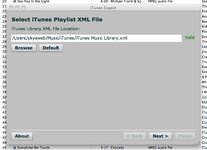
Double clicked on the iTunesExport application and it came up with a screen which located my iTunes Playlist XML File. Clicked NEXT button

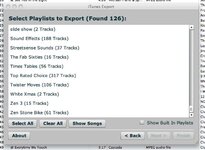
Next screen showed all my playlists. I wanted to my a playlist I had created called "Top Rated Choice" which it showed contained 317 tracks.

Once I selected the "Top Rated Choice (317 Tracks)" I was able to select NEXT and move onto the next screen.

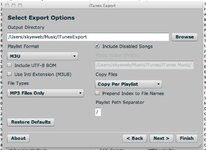
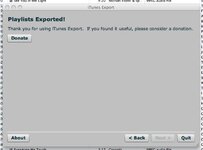
By default this copied a Playlist file to a folder called iTunesExport within my Music Folder. I however wanted my music as well so you must select Copy Files (Copy Per Playlist). I then clicked finish and after a few minutes the final screen came up informing me that my Playlists had been exported.

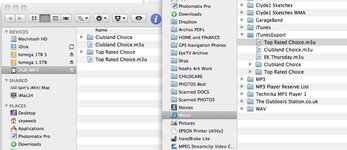
I then put a 2GB Micro SD card in and called it 2GB_MP3 and copied the folders within my iTunesExport directly to my SD Card. I also copied the playlist files. I then put the SD card in my Zumo 660 and after small delay the Media Player found all my MP3 files. I also was able to load the playlist files and they worked fine.

iTunes Export is definitely a useful application for extracting MP3 songs from iTunes for use on other media players such as the Zumo 660.

During the process I also found out how to convert iTunes songs into MP3 files. I know there may be other ways to do it but first of all when I was within a playlist I would ensure that KIND was ticked in the View Options Box within the View Menu. This then shows you the file type for the song. If it is not MP£ you can select the song and convert it to MP3 via the CREATE MP3 Version in the ADVANCED menu. This puts a new version of the song in MP3 format in your itunes Library. You can always find it in the Recently Added playlist. Once your playlist contains all MP3 files you can then run the iTunesExport application (by default it only copies MP3 files, which is what you want anyway). YOu can of course delete the duplicate songs in your playlist which are not in MP3 format. It doesn't delete them for your iTunes Library, just the selected playlist. If your songs are in protected form (purchased from iTunes store) then you can burn them to an audio CD and then import them back to iTunes ensuring that you have selected MP3 as your import format. Bit of a pain but I don't think there is any other way around unprotecting your songs.

There may be easier ways to do this and hopefully I havn't made a mistake in the above instructions. If you still have problems PM me and I can talk you through any problems.

The other great thing I found out from todays messing about with iTunes was that I could install a bit of software called Eyeconnect which means that I can now see all the Media content of my iMac including iTunes on my PS3. I have a TV tuner running EyeTV so even all my TV recordings are also all viewable on my PS3. Its great to view all my Movie and video stuff directly on my TV without having to burn it onto a DVD first. Two major things sorted today :thumb
 

Attachments

  • Export1.jpg
    Export1.jpg
    40.1 KB · Views: 140
  • Export2.jpg
    Export2.jpg
    56.9 KB · Views: 140
  • Export3.jpg
    Export3.jpg
    46.3 KB · Views: 140
  • Export4.jpg
    Export4.jpg
    29 KB · Views: 139
  • Export5.jpg
    Export5.jpg
    53.7 KB · Views: 141
I run an imac and do not have a problem with this, I have no additional software to do this with.

As above, find the album or song(s) you want to convert and select these then select 'advanced' and 'convert to mp3', this will create a mp3 copy in the itunes library. (I usually delete the originally selected sons as this duplicates songs in Itunes.

simply use finder to locate or highlight the copy, right click and then 'show in finder' - then simply copy/paste to an SD card.

Believe me I am no whizz on the computer, if I can do it then anyone can.
 
simply use finder to locate or highlight the copy, right click and then 'show in finder' - then simply copy/paste to an SD card.

That of course works fine, but if you have loads songs in multiple playlists then iTunesExport makes in a breeze to extract the songs and playlist files to folders which can be just dragged onto the Zumo SD Card, as I found out today :thumb
 
That of course works fine, but if you have loads songs in multiple playlists then iTunesExport makes in a breeze to extract the songs and playlist files to folders which can be just dragged onto the Zumo SD Card, as I found out today :thumb


Thanks for the effort you've put in on the reply :thumb

I seem to have got as far as the itunes export thingy, and converted all to MP3

I don't have a card reader on the Mac... Can you transfer the music straight to the garmin with the card installed in the slot?
:confused:
 
Thanks for the effort you've put in on the reply :thumb

I seem to have got as far as the itunes export thingy, and converted all to MP3

I don't have a card reader on the Mac... Can you transfer the music straight to the garmin with the card installed in the slot?
:confused:

That should work fine. On your Mac you should see both the Garmin Unit itself and the Memory Card show up in Finder. Drag the MP3 Files onto the Memory card and hopefully it will work fine when you eject the Garmin and memory card and start the Garmin up properly. When I went into the media player on the Garmin it did take about 10-20 seconds to search for my music files on the card, but now it seems to find them a lot quicker (a few Seconds)
 
That should work fine. On your Mac you should see both the Garmin Unit itself and the Memory Card show up in Finder. Drag the MP3 Files onto the Memory card and hopefully it will work fine when you eject the Garmin and memory card and start the Garmin up properly. When I went into the media player on the Garmin it did take about 10-20 seconds to search for my music files on the card, but now it seems to find them a lot quicker (a few Seconds)


Thanks for that :thumb
 
I run an imac and do not have a problem with this, I have no additional software to do this with.

As above, find the album or song(s) you want to convert and select these then select 'advanced' and 'convert to mp3', this will create a mp3 copy in the itunes library. (I usually delete the originally selected sons as this duplicates songs in Itunes.

simply use finder to locate or highlight the copy, right click and then 'show in finder' - then simply copy/paste to an SD card.

Believe me I am no whizz on the computer, if I can do it then anyone can.

I'm trying to do this with my iMac, with current iTunes version 9.2.1 (4), but there is no option to convert to MP3, only "creat AAC version". Also tried iTunesexport with no luck. :(


Back
Top Bottom