Deleted account 211025001
Registered user
- Joined
- Feb 3, 2005
- Messages
- 8
- Reaction score
- 10
I'm trying to convert a mixed on road / off road 'track' into a 'route' in order to be able to view it on my Quest (my understanding is that routes won't display on the Quest?).
Now I've done this before on pure road routes by drawing over the track with either waypoints of the route drawing tool and then saving as a route.
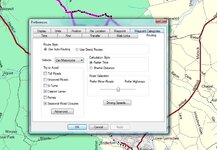
However, when I try to draw over the track on the off road section the route keeps plotting back to the nearest road.
I've tried using the wingdb11 application from the Ensignia site but with no joy.
Am I making it too complicated, how do I use this track I've been given on my quest?
Cheers
Andres
Now I've done this before on pure road routes by drawing over the track with either waypoints of the route drawing tool and then saving as a route.
However, when I try to draw over the track on the off road section the route keeps plotting back to the nearest road.
I've tried using the wingdb11 application from the Ensignia site but with no joy.
Am I making it too complicated, how do I use this track I've been given on my quest?
Cheers
Andres