Curing the XT U-turn (Repeated U-turns / RUTs) weirdness for imported routes - Two separate methods

If you don't have via or way points, then the u-turn madness doesn't occur with imported routes.

That's not something I have tried as if you don't have via or way points you may as well just type the destination in and off you go

 
You have been lucky then!

Either that or you have followed the XT if you have gone off route to get you back on track

Usually its if you go off route and then don't get back on track straight away
I turn off autorecalculate. If I have to go off route I manually get back on route by looking at the map, or drop pins and navigate via via them to get back on route.
 
That's not something I have tried as if you don't have via or way points you may as well just type the destination in and off you go
Not really. I’ve plotted the route in advance so I’m following the route I want to, not just routing a-b.
 
I know, I run a windows VM so I can use basecamp, Javawa and a few others. There’s still not really a replacement for basecamp, even from Garmin, though. As an example, I wanted to save the track from my recent trip. Unless you hit ‘record track’ the XT saves the tracks in segments. It took 5 minutes to import the tracks into Basecamp, join them, then save as a track per day. The track can then be turned back into a route. I don’t think this can be done in MRA.

I do have another question though; if you import GPX 1.2, both track and route, into the XT, why not just navigate the track?

1.1 is the recommended format even though they advertise 1.2 as working for Zumo XT, I find it never brings over the waypoints properly.

I have resorted to following the track a few times which to be fair isn't the end of the world, I don't obsess over the map and instructions, I'd rather take a wrong turn than continually stare at the screen, but I do like being able to glance and see which exit I need to take, but yeah, I have done that before.
 
1.1 is the recommended format even though they advertise 1.2 as working for Zumo XT, I find it never brings over the waypoints properly.

1.2 should always bring across the via points and any waypoints, both shown as orange flags. The shaping points (blue dots) will come across too but may well be invisible on the map screen.
 
1.2 should always bring across the via points and any waypoints, both shown as orange flags. The shaping points (blue dots) will come across too but may well be invisible on the map screen.

Now I feel a little silly 🤦‍♂️

I've seen so many threads about not using 1.2 despite it being allegedly working for the XT (I can't remember where I saw said threads exactly) that I've always used 1.1 instead.

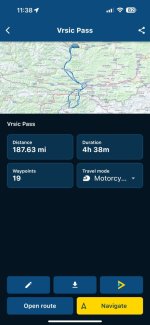
You're right though, with a 1.2 the proper via points show in the list and on the map but the blue shaping points don't unlike with a 1.1 file. But I have just noticed, that comparing a 1.1 and 1.2 against each other, the estimated travel time is exactly the same, but on the 1.2 the mileage is 6miles shorter than the 1.1 file. At first I thought this "proved" my comment about using 1.1 files, but looking on MRA, the original route is 188miles, which matches the 1.2 file imported into the XT, whereas the 1.1 file is 194miles.

It'll be interesting to see if the U-turn behaviour also affects 1.2 files cause if it doesn't then I'm going to feel a bit of a numpty.
 
I have always used 1.2, irrespective of others’ news and views, simply because I find it works with my XT’s.

I do though like to see the little blue dots an a map, if only because it helps me to think that the route I have imported (other than looking right / being near enough the correct distance and time) is as I created it originally.
 
Last edited:
I have always used 1.2, irrespective of others’ news and views, simply because I find it works with my XT’s.

I do though like to see the little blue dots an a map, if only because it helps me to think that the route I have imported (other than looking right / being near enough the correct distance and time) is as I created it originally.

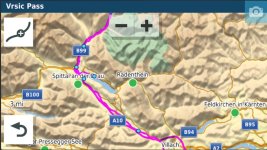
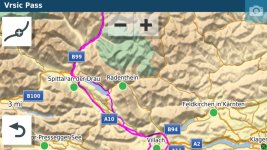
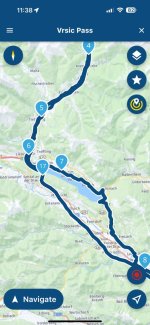
Yeah I do like the blue dots, weirdly I just compared the same route on my XT between the 1.1 and 1.2 to find out why the 1.1 is longer and I spotted that the 1.1 didn't take me around a lake that I specifically put a shaping point in MRA for it, it just bypasses it and goes the quickest route which happens to be longer. On the 1.2 version it adheres to the route and takes me around the lake even though it's only a shaping point I used and not a via point.

Lesson learnt I think.
 
Last edited by a moderator:
MyRoute have always claimed in their blurb, that 1.2 is designed for or around Garmin devices. Interesting that 1.1 offered up a different version of the same route.
 
MyRoute have always claimed in their blurb, that 1.2 is designed for or around Garmin devices. Interesting that 1.1 offered up a different version of the same route.

Yeah, I thought so, but it would certainly explain some (not all) of the weirdness I've been seeing. So in the MRA app it shows the route is 187.63 miles:

6F0B403C-5BB7-4F19-BE34-2784EF0394E2_1_101_o.jpeg

And just to highlight a specific point, the original intent with this route was to take a scenic route there and a faster route back, I never ended up doing this route unfortunately but that was my original intention. And going round this lake was one specific place I wanted to ride along:

12A75E13-B691-405A-A246-38FE0822906E_1_101_o.jpeg

With the 1.1 route imported straight into the XT, the route shows as 194miles which is noticeably longer than the MRA app shows, and quite clearly doesn't go around the lake, it goes partially down it, then U-turns and then takes the fastest route from there to the next point:

SCR-20230922-kqpw-2.jpeg

But if I import the 1.2 version, although I don't see the shaping points, it correctly adheres to the route and is 188miles long:

SCR-20230922-kreb-2.jpeg

Arguably this is my fault for not point enough shaping points or using the Expand feature properly, but it is curious how they differ, but clearly 1.2 is more suited as per their claims. It's also worth noting that the "fixed" version of this trip using the method in this thread doesn't fix the routing issue, but "may" still fix some of the U-turn madness people have seen so I think it's still valid info.
 
Interesting, I’ve always used 1.2 GPX too, with expanded waypoints, and it’s always followed my intended route exactly. Also so far (as above) I haven’t had too many routing problems.

It can’t be that simple, surely!


Sent from my iPad using Tapatalk
 
I turn off autorecalculate. If I have to go off route I manually get back on route by looking at the map, or drop pins and navigate via via them to get back on route.

Then you're not going to get the RUT problem
 
Interesting, I’ve always used 1.2 GPX too, with expanded waypoints, and it’s always followed my intended route exactly. Also so far (as above) I haven’t had too many routing problems.

It can’t be that simple, surely!


Sent from my iPad using Tapatalk

Thats because you have off route recalculation turned off

1.2 doesn't transfer the shaping points where as 1.1 does you will still get the route you plot with 1.2 but if you have recalculation on if you went off route it would just recalculate to the next waypoint or the end point in case of no waypoints

The way I plan routes is with plenty of via points/shaping points and transfer with 1.1 and I ride with recalculation turned on

The thing you have to watch is with recalculation turned on it will recalculate the full route not just to the next point so between each point can change if you don't have enough of them

There's no right or wrong way to plan routes or navigate them its just what works for you
 
Interesting, I’ve always used 1.2 GPX too, with expanded waypoints, and it’s always followed my intended route exactly. Also so far (as above) I haven’t had too many routing problems.

It can’t be that simple, surely!


Sent from my iPad using Tapatalk
One of the advantages of using 1.2 is that when your route is being transferred to your unit it is not recalculated. The XT is forced to use the routing you have specified - if you use 1.1 then the route is invariably recalculated on transfer. This is because when the route is transferred using 1.2, the XT will use the track for the routing whereas, if using 1.1 then the unit uses the Waypoints & shaping points to calculate the route.
 
Last edited:
One of the advantages of using 1.2 is that when your route is being transferred to your unit it is not recalculated. The XT is forced to use the routing you have specified - if you use 1.1 then the route is invariably recalculated on transfer. This is because when the route is transferred using 1.2, the XT will use the track for the routing whereas, if using 1.1 then the unit uses the Waypoints & shaping points to calculate the route.
I've only ever used 1.1 and never experienced my route being changed. Interesting.



Back
Top Bottom