Desktop computer running very slow

Silver Rat

Registered user
Joined
Oct 12, 2006
Messages
220
Reaction score
0
Location
Sunny Aberdeen
My desktop computer has been getting slower over the years. I think it is about 3 years old and as such the kids all use the laptop and I get punted to the old machine!!

I have beentold that I can simply upgrade the RAM and that should help things??

I had it scanned on the 'Crucial' site and according to the results, I only have 512MB but have a spare slot!!

For £28 I can install a 1GB RAM into the second slot and this will make a big difference. It also says that I can install 2x 1GB RAM things and that would make it sooper dooper for £56.

Is this right or wrong? Is it a worthwhile thing to do?
 
My desktop computer has been getting slower over the years. I think it is about 3 years old and as such the kids all use the laptop and I get punted to the old machine!!

I have beentold that I can simply upgrade the RAM and that should help things??

I had it scanned on the 'Crucial' site and according to the results, I only have 512MB but have a spare slot!!

For £28 I can install a 1GB RAM into the second slot and this will make a big difference. It also says that I can install 2x 1GB RAM things and that would make it sooper dooper for £56.

Is this right or wrong? Is it a worthwhile thing to do?

Absoulutely - It will make a big difference.

:thumb2
 
Also worth getting a portable hard drive, transfer the files you want to keep then install the new windows 7. This will get rid of all the unwanted crap which can slow the computer down.. somehow with all the progs which I use re-installed I somehow found an extra 40 gigs of HD space.. Always an option... and from what I can tell so far w7 is a definate upgrade.
 
The additional RAM will give the machine a longer life, but you need to check on the following too:

1) Defrag the HDD (or individual partitions if applicable)
2) Free up space on the HDD (if approaching say - 90% capacity)
3) See what processes are actually running (Run Task Manager and see what is using up memory at present) and chop those you don't need from the Start process.

Not an exhaustive list - all I can think of just now

Al :thumb2
 
First off you don't say what OS your using but with 512 of ram I am going to assume its windows XP. Installing win 7 even with the extra ram wont speed anything up, in fact you might end up with a machine that you really don't want to use. Your hardware is a couple of generations old and really not fast enough for win 7. I doubt the graphics card would be capable of supporting it. If its actually has Vista then its a miracle its running at all with that amount of ram and the 2gig of ram will be a revelation. After 3 years of running it will have all sorts of garbage in the registry and elsewhere so reinstalling will help a lot as well. XP will run quite happy on 1 gig of ram and you probably wont notice much difference going to the 2 gig limit so you can save some coin if you wanted. Vista really needs 2 gig to run properly so if it is that then go for the max.
What anti virus are you running? Some of the well known ones like Norton or Macafee are actually terrible and grind even the best of machines to a halt. Surprisingly I recommend Microsoft security essentials to most people these days outside a corporate network. Its very light weight and scores high marks in security tests just what you need in an older machine.
 
The additional RAM will give the machine a longer life, but you need to check on the following too:

1) Defrag the HDD (or individual partitions if applicable)
2) Free up space on the HDD (if approaching say - 90% capacity)
3) See what processes are actually running (Run Task Manager and see what is using up memory at present) and chop those you don't need from the Start process.

Not an exhaustive list - all I can think of just now

Al :thumb2

Al, if I try this, is there an easy way of finding out which processes I can safely stop, or do I have to just google them individually?

Cheers
 
more RAM (at least 1GB) and reinstall windows.

any 3 year old install of XP will be on it's last legs by now. can't see just adding RAM making much difference.
 
Thanks guys for all the replies.

Blackal - I frequently Defrag and free up disk space but for the life of me, I cannot see where to find the Task Manager! Will keep looking!!

Marki_GSA - The computer is running Windows XP as you have assumed. The computer was made up by a local company and the buggars did not give me the discs so that I could reinstall windows!! I phoned them last week and funnily enough, the suggested that I eturn the computer and they would install windows and update the RAM but it would be at a cost, £90 for labours plus the Parts!!!

As far as anti virus is concerned, I did have Norton for the first year but have been using the free version of AVG for a couple of years on both computers and they seem to be OK.

So, as I don't have the XP discs, is that something I can now obtain from elsewhere or am I tied to the guys who built the computer? I am not so sure about that as it will cost me [say] £150+ and it would make sense to use that money to go towards getting a new one??

Keith
 
The only thing I would add to this is to check to see what is in your start up.

Most companies when you load a program assume that you want their program running all the time and this can result in alot of programs running in the background that are not needed.

I've recently upgraded my memory to 2GB and cleared out my start-up and my PC is now useable again. I admit it still probably needs either XP. or Win 7 reloading, but another day another dollar.
 
Get hold of CCleaner (it's a free download). You can use it to analyse and control what starts up. It will also help tidy up the registry and old temp files, etc.

Recently upgraded my 6 year old computer to 2.5Gb RAM - made a big difference.
 
Are these CCleaner type downloads worth purchasing?

I tried it, it told me that the condition of my computer was bad and would only sort 25 of the 3567 faults unless I subscribed!!
 
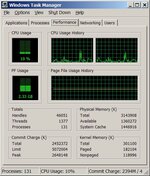
You can access the Taskmanager with "Ctrl+Alt+Del" - and see what processes are using the most memory. Some might be running in the background unneccessarily and can be stopped.

Also- Internet Explorer may be running some memory-eating add-ins.

In Internet Explorer, left click on the Tools button, and select:

<Manage add-ins> <Enable or disable add-ins>

Again - there may be some that you think "hang on - I don't use that at all any more" - just disable them (you can always re-enable them after if something like Java no longer works.

Task manager below:
 

Attachments

  • Task-Man.jpg
    Task-Man.jpg
    58.2 KB · Views: 169
Thanks guys for all the replies.

Blackal - I frequently Defrag and free up disk space but for the life of me, I cannot see where to find the Task Manager! Will keep looking!!

Marki_GSA - The computer is running Windows XP as you have assumed. The computer was made up by a local company and the buggars did not give me the discs so that I could reinstall windows!! I phoned them last week and funnily enough, the suggested that I eturn the computer and they would install windows and update the RAM but it would be at a cost, £90 for labours plus the Parts!!!

As far as anti virus is concerned, I did have Norton for the first year but have been using the free version of AVG for a couple of years on both computers and they seem to be OK.

So, as I don't have the XP discs, is that something I can now obtain from elsewhere or am I tied to the guys who built the computer? I am not so sure about that as it will cost me [say] £150+ and it would make sense to use that money to go towards getting a new one??

Keith

If they didn't give you the discs and sold you the system with the operating system installed, were they providing a legitimate copy of XP anyway? Quite possibly not.

Although Windows 7 will run on a three year old machine, it is probably better to stick to XP unless you have some other compelling reason to change. I'd suggest bending the ear of the supplier company about your entitlement to the XP discs, and ask them to prove that you don't have a pirate copy of XP. When you get the disks (if) use them to install a fresh copy of XP, you will loose all your programmes and need to re-install them, which is a pain but will give you a cleaner setup. Format the disk when installing too.
 
Go back to the shop and tell them they must provide you with windows XP media, if they don't you will report them to Microsoft. Its in the terms that they provide you with it. Is there a license sticker on the case? Either way if they wont give you a disk then report them, Microsoft will have a word and will also provide you with a copy of XP for being an upstanding citizen.

Free AVG has gotten a little heavy in the last couple of years, I would still recommend you change to MS security essentials. Its free and you have nothing to loose through it.
 
Are these CCleaner type downloads worth purchasing?

I tried it, it told me that the condition of my computer was bad and would only sort 25 of the 3567 faults unless I subscribed!!

Have you got the right ccleaner? it shouldn't need any "subscription"
 
Agreed, ccleaner is your first step. (its totally free)
http://www.piriform.com/ccleaner/download
It should clean up your registry and your temp files.
If that doesnt work you really need to reinstall windows.

I would recomend windows 7 (about £70) as it is a great operating system and very easy to use but you will have to increase your available ram.

You may not be able to use the latest (fastest) ram because of the age of the pc, but if possible, try to get a matched pair of 2gig memory (4gig total). Something like this (£74)
http://www.overclockers.co.uk/showproduct.php?prodid=MY-229-CS&groupid=701&catid=8&subcat=

This will make a huge difference from what you are running now. And it will seem like a new pc.

(remember to do a full format on the hard drive (not quick) while installing)
 
I cleared lots of photographs and stuff from the computer and moved them to the back up drive, which cleared about a quarter of the memory.

I then defragmented the hard drive and things were a tad quicker.

This afternoon though, 2 x 1GB RAM thingys arrived in the post and I fitted them just now. Could not believe how easy and quick it was to do and best of all, the computer has a new lease of life! It just works the way it should.

2 x 1GB is the maximuam the old computer can cope with and it cost me £56 posted, so I am a happy chap.

Thanks to you all for the info.

Keith


Back
Top Bottom